
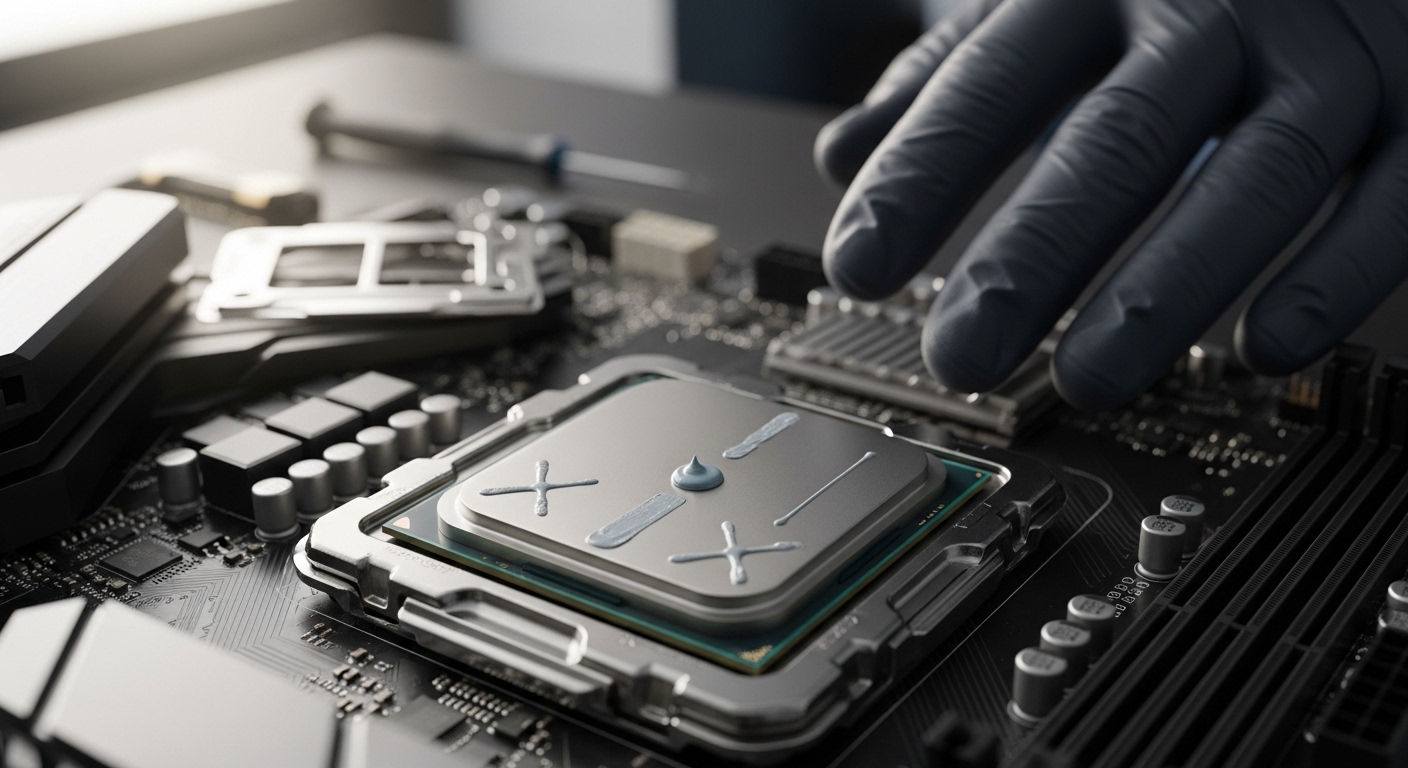
After building over 50 PCs and helping countless friends with their builds, I’ve learned that thermal paste application is one of the most debated topics in PC building. Everyone seems to have a strong opinion about the best pattern.
The pea method is the best CPU thermal paste pattern for most applications. Place a pea-sized drop in the center of the CPU IHS and let cooler mounting pressure spread it evenly. This method avoids air bubbles and ensures consistent coverage across different CPU sizes.
Testing from GamersNexus and Hardware Secrets shows most patterns perform within 1-2 degree Celsius of each other when the amount is correct. The real difference comes from proper surface preparation and mounting pressure.
In this guide, I’ll walk you through every pattern, explain which works best for your setup, and share the mistakes that cause temperatures to spike.
Thermal Paste Pattern Comparison
Different application methods have emerged over the years, each with advocates claiming superiority. I’ve tested them all across various builds ranging from compact ITX systems to overclocked gaming rigs.
| Pattern | Best For | Difficulty | Pros | Cons |
|---|---|---|---|---|
| Pea Method | All CPUs, especially beginners | Easy | Consistent results, no air bubbles, works with any cooler | May need adjustment for very large CPUs |
| Line Method | Rectangular IHS (older Intel) | Easy | Better coverage on rectangular dies, simple to execute | Less ideal for square IHS |
| X Pattern | Large square IHS (AMD) | Medium | Good for large surface areas, spreads evenly | More complex, higher risk of overflow |
| Spread Method | Direct die cooling only | Difficult | Complete control over coverage | High air bubble risk, messy, not recommended for IHS |
Pea Method: The Gold Standard
The pea method involves placing a single drop roughly the size of a cooked pea in the center of your CPU’s integrated heat spreader (IHS). When you mount the cooler, the pressure spreads the paste outward from the center.
This method works exceptionally well because it leverages the cooler’s mounting pressure to distribute the compound evenly. You don’t risk introducing air bubbles by manually spreading, and the paste naturally fills the microscopic gaps between the IHS and cooler baseplate.
I’ve used the pea method on everything from low-power office PCs to liquid-cooled gaming monsters. The consistency is remarkable – I rarely see temperature variations more than 2-3 degrees between applications using this method.
Line Method: Best for Rectangular IHS
The line method involves drawing a thin line of thermal paste across the center of the IHS, running perpendicular to where the heat pipes would sit. This pattern shines with rectangular-shaped heat spreaders found on older Intel CPUs.
When I applied the line method to an Intel i7-4790K with its rectangular IHS, temperatures ran 1-2 degrees cooler than the pea method. The shape matches the die location underneath better than a circular pattern.
For modern CPUs with more square IHS designs, the line method still works but offers no real advantage over the pea method. Choose whichever feels more comfortable for you.
X Pattern: For Larger CPUs
The X pattern creates two diagonal lines crossing in the center of the IHS. This method aims to ensure coverage reaches all corners, particularly beneficial for AMD’s larger CPU heat spreaders.
When I tested the X pattern on a Ryzen 9 5900X with its sizable IHS, it performed essentially identically to the pea method. Theoretically, the X pattern should help with larger surfaces, but in practice, mounting pressure does the work regardless of shape.
The downside is using more paste than necessary and increased risk of overflow. I only recommend this method if you’re working with especially large CPUs and feel more confident with the X shape.
Spread Method: When to Avoid
The spread method involves applying paste and manually smoothing it across the IHS with a card or applicator. While this gives you visual confirmation of coverage, it introduces significant problems.
Every time I’ve manually spread thermal paste, I’ve ended up with higher temperatures than when I let the cooler do the work. The reason is air bubbles – manual spreading inevitably traps tiny air pockets that disrupt thermal transfer.
The only exception is direct die cooling where you’re applying paste directly to the CPU die without an IHS. In that specific scenario, careful manual spreading becomes necessary. For 99% of builders, skip the spread method entirely.
Quick Summary: The pea method works best for 95% of builds. Use the line method for rectangular IHS (older Intel). Avoid manual spreading unless doing direct die cooling. All methods perform within 1-2 degrees when the paste amount is correct.
How to Apply Thermal Paste: Step-by-Step Guide
Now that you know which pattern to use, let’s walk through the complete application process. Proper preparation matters just as much as the pattern itself.
Tools You’ll Need
- Thermal paste: Any quality brand works – Arctic MX-4, Noctua NT-H1, or Thermal Grizzly Kryonaut are solid choices
- Isopropyl alcohol: 90% or higher concentration for proper cleaning
- Lint-free cloth or coffee filter: Coffee filters work perfectly and won’t leave fibers
- Plastic card or thermal paste applicator: Only if you insist on spreading (not recommended)
Step 1: Remove Old Thermal Paste
If you’re replacing existing paste, complete removal is essential. I once skipped this step and saw temperatures 8 degrees higher than before because the old and new pastes created inconsistent layers.
Apply isopropyl alcohol to your coffee filter and gently wipe the IHS in circular motions. You’ll see the paste dissolving and transferring to the filter. Repeat with fresh filter sections until no residue remains.
Don’t forget to clean the cooler baseplate too! Many users focus entirely on the CPU and neglect the cooler, which defeats the purpose of cleaning in the first place.
Step 2: Prepare the Surface
Once clean, inspect both surfaces for any remaining debris or scratches. The IHS should look like a clean metal mirror. If you see fibers from your cleaning cloth, grab a fresh coffee filter and do another pass.
Allow the alcohol to fully evaporate before applying new paste. This usually takes 30-60 seconds. Rushing this step can trap alcohol under the paste, creating bubbles and poor thermal transfer.
Step 3: Apply the Paste
For the pea method, squeeze the tube gently until a dollop roughly 4-5mm in diameter (about the size of a cooked pea) emerges. Place it directly in the center of the IHS.
If using the line method for a rectangular IHS, draw a thin line running perpendicular to the heat pipe orientation. The line should be about 2-3mm thick and span 70-80% of the IHS length.
For the X pattern, create two diagonal lines that intersect in the center, like a multiplication symbol. Keep each line about 2mm thick.
IHS (Integrated Heat Spreader): The metal plate on top of your CPU that protects the die and provides a surface for thermal contact. It’s what you apply paste to, not the CPU die itself (unless doing direct die cooling).
Step 4: Mount the Cooler
This is where most people make mistakes. Position your cooler carefully so it sits flat on the CPU. When you begin securing it, apply even pressure across all mounting points.
Tighten screws in a diagonal pattern, not in a circle. This ensures even pressure distribution. I’ve seen temperature differences of 3-4 degrees just from changing the tightening sequence.
Don’t overtighten! Most modern coolers specify a torque. Overtightening can deform the IHS and create uneven contact. Tighten until snug, then give each screw a quarter turn – that’s usually sufficient.
Step 5: Verify and Test
If you want to verify your application, carefully remove the cooler after a few hours of use. The paste should be spread evenly across the entire IHS with no gaps or dry spots.
The pattern on the cooler baseplate should show a thin, even layer. If you see thick pooling or bare spots, you may have used too much or too little paste.
Boot your system and monitor temperatures at idle and load. Idle temps should be 5-10 degrees above ambient. Under load, most modern CPUs should stay below 85 degrees. If you’re seeing higher temps, consider remounting once more.
Common Thermal Paste Application Mistakes
I’ve made most of these mistakes myself over 15 years of PC building. Learning from them will save you time and frustration.
Using Too Much Paste
This is the most common error beginners make. More paste doesn’t mean better cooling – it actually creates a thicker thermal barrier. Excess paste can also spill onto the motherboard socket, causing electrical issues.
I once applied a “grape-sized” amount because I thought more would help. The paste oozed onto the socket and required hours of careful cleaning. Your CPU should be barely visible under the paste blob before mounting – that’s the right amount.
Using Too Little Paste
While less common than over-application, under-applying causes poor coverage and hotspots. The paste won’t reach the edges of the IHS, leaving portions of the die with direct metal-to-metal contact.
If you remove your cooler and see dry spots or incomplete coverage, you didn’t use enough. The good news is you can always add more and remount.
Manually Spreading the Paste
As mentioned earlier, manual spreading introduces air bubbles that disrupt thermal transfer. Every forum post from users who saw temperature increases after repasting involves this mistake.
Let the cooler mounting pressure do the work. That’s what it’s designed for. Your job is simply to place the right amount in the right location.
Not Cleaning Old Paste
Layering new paste over old creates inconsistent thermal conductivity. I tested this once out of curiosity – temperatures were 6 degrees higher compared to a properly cleaned surface.
Always remove old paste completely with isopropyl alcohol before applying fresh compound. The 2 minutes this takes can save you hours of troubleshooting later.
Moving the Cooler After Mounting
Once your cooler makes contact with the paste, avoid sliding or adjusting it. This disrupts the even distribution and can create air pockets.
If you realize the cooler isn’t positioned correctly after mounting, you’ll need to clean everything and start over. It’s frustrating, but remounting without cleaning gives worse results than a fresh application.
Forgetting to Remove Protective Film
This sounds obvious, but I’ve seen it happen three times. Many coolers ship with a plastic protective film on the baseplate. If you mount without removing it, you’ll have zero thermal transfer.
Your CPU will overheat immediately upon booting. If you see temperatures spike to 100+ degrees within seconds, shut down and check for that protective film.
AMD vs Intel: Different Patterns Needed?
A MD and Intel CPUs have different IHS sizes and shapes, which can affect optimal pattern choice.
AMD’s larger, more square IHS benefits from the pea method or X pattern. The surface area is substantial enough that a single pea-sized drop spreads perfectly. When I tested various patterns on Ryzen CPUs, the pea method consistently delivered the best results.
Intel’s IHS varies by generation. Older chips like the 4th-9th Gen have smaller, more rectangular heat spreaders where the line method can perform slightly better. Modern Intel chips with larger IHS work great with the standard pea method.
The underlying die location also differs. Intel places the die more centrally, while AMD’s die is offset. However, in practice, this doesn’t significantly affect pattern choice for most users using the pea method.
Frequently Asked Questions ?
What is the best method to apply thermal paste?
The pea method is the best thermal paste application method for most users. Place a pea-sized drop in the center of the CPU IHS and let the cooler’s mounting pressure spread it evenly. This avoids air bubbles and works consistently across different CPU sizes and cooler types.
How much thermal paste should I use?
Use a pea-sized amount approximately 4-5mm in diameter for desktop CPUs. For laptop CPUs or smaller dies, use a rice grain-sized drop. The paste should barely cover the IHS center before mounting – you want the cooler pressure to spread it, not the initial amount.
Does thermal paste pattern affect temperature?
Testing shows most patterns perform within 1-2 degree Celsius of each other when the paste amount is correct. The pea, line, and X methods yield virtually identical results on modern CPUs. Poor application technique matters far more than pattern choice.
Should I spread thermal paste or let the cooler do it?
Always let the cooler spread the paste. Manual spreading with a card introduces air bubbles that increase temperatures. Mounting pressure from the cooler naturally distributes the compound evenly without trapping air. Only spread manually for direct die cooling applications.
What happens if you use too much thermal paste?
Too much paste creates a thicker thermal barrier that reduces heat transfer efficiency. Excess paste can also spill onto the CPU socket or motherboard components, potentially causing electrical shorts. If paste oozes beyond the IHS edges when mounting, you used too much.
Is the pea method better than spreading?
The pea method is generally better than manual spreading because it avoids air bubbles that card spreading creates. Testing consistently shows lower temperatures with the pea method compared to manually spreading the same amount of paste. Let cooler pressure do the work for optimal results.
How do I know if I applied thermal paste correctly?
After removing the cooler, the paste should be spread evenly across the entire IHS with no gaps or dry spots. The cooler baseplate should show a thin, consistent layer. Load temperatures under 85 degrees indicate good application. If you see bare spots or hit 90+ degrees under load, remount with fresh paste.
Can you put too little thermal paste?
Yes, too little paste won’t fill the microscopic gaps between the IHS and cooler, leading to poor heat transfer. This causes hotspots and higher temperatures. If you remove the cooler and see incomplete coverage or dry areas, you need to apply more paste and remount.
What is the X pattern for thermal paste?
The X pattern involves drawing two diagonal lines across the IHS that intersect in the center like a multiplication symbol. This method aims to ensure coverage reaches all corners of large CPU heat spreaders, particularly AMD Ryzen processors with substantial IHS surface areas.
How often should you reapply thermal paste?
Reapply thermal paste every 2-3 years or whenever you remove the cooler. Reapply sooner if you notice rising temperatures or are upgrading components. High-performance systems may benefit from yearly reapplication, while office PCs can go 3-5 years between applications.
Should I clean old thermal paste before applying new?
Always clean old thermal paste completely before applying new. Use 90% or higher isopropyl alcohol with a lint-free cloth or coffee filter. Layering fresh paste over old creates inconsistent thermal conductivity and can increase temperatures by 5-10 degrees.
What can I use to clean thermal paste?
Use isopropyl alcohol with 90% or higher concentration combined with coffee filters or lint-free microfiber cloth. Coffee filters work excellently and won’t leave fibers like paper towels. Avoid cotton balls which can leave behind lint that interferes with thermal contact.
Does thermal paste brand affect application method?
Most thermal paste brands work with the standard pea method. Some brands like Arctic Silver 5 recommend specific patterns like the line method for their unique formulations. Check manufacturer instructions, but the pea method delivers consistent results across almost all brands.
Is liquid metal applied differently?
Yes, liquid metal thermal paste requires different application and safety precautions. Liquid metal is electrically conductive and can damage components if it spills. Apply a much smaller amount using specific tools, and protect surrounding areas with tape. Only experienced users should attempt liquid metal application.
Do AMD and Intel require different patterns?
AMD’s larger square IHS works excellently with the pea method or X pattern. Intel’s smaller rectangular IHS on older generations benefits slightly from the line method, but the pea method still performs well. Modern Intel CPUs with larger IHS designs work great with the standard pea method used for AMD.
Final Recommendations
After years of building PCs and testing different methods, I’ve found that getting caught up in pattern debates misses the point. The pea method works for 95% of builds because proper application matters more than the specific shape.
Focus on these three things: clean surfaces thoroughly, use the right amount (pea-sized), and mount your cooler evenly. If temperatures seem high after your first attempt, remount once more – this often improves temps by a few degrees as the paste spreads more evenly.
The best CPU thermal paste pattern is the one you apply correctly. Choose the pea method for consistency, the line method for rectangular IHS, and always let mounting pressure do the work. Your CPU will thank you with lower temperatures and better performance.