

Building a small form factor PC used to mean choosing between performance and aesthetics. That trade-off is gone. The best Mini-ITX cases on the market today pack full-length GPUs, serious cooling, and premium materials into footprints smaller than a shoebox. I have spent the last several months testing compact PC chassis across different component combinations, from budget gaming builds to high-end HTPC setups, and the results genuinely surprised me.
The Mini-ITX form factor has exploded in popularity, and for good reason. A well-designed small form factor case saves desk space, travels easily to LAN parties, and looks far more refined than a standard mid-tower monolith. Our team compared three standout Mini-ITX chassis options, testing each with real gaming hardware to measure thermals, build difficulty, and everyday usability. We wanted to find out which cases actually deliver on their promises.
Whether you are chasing a minimalist living room aesthetic or need something portable enough to carry to a friend’s house, there is a compact PC case built for your exact situation. The SFF community has been pushing manufacturers to innovate, and the results are impressive. PCIe 4.0 riser cables are becoming standard, tool-less panel designs are everywhere, and GPU clearance keeps improving even as cases shrink. Below, I break down everything from GPU clearance to cable management so you can pick the right ITX chassis without second-guessing yourself.
One thing I learned during testing: no single case is perfect for everyone. Your GPU choice, your CPU cooler preference, your PSU type, and even where you plan to put the finished build all factor into which case makes sense. I made mistakes during these builds so you do not have to. Let us get into the tested picks.
Our Top 3 Tested Mini-ITX Cases for Compact Builds


Fractal Design Ridge Black
- Console aesthetic
- Dual 140mm fans
- 335mm GPU support
- PCIe 4.0 riser
Comparing the Best Mini-ITX Cases Side by Side in 2026
| Product | Details | |
|---|---|---|
| Fractal Design Terra Jade |
|
Check Latest Price |
| HYTE Revolt 3 |
|
Check Latest Price |
| Fractal Design Ridge Black |
|
Check Latest Price |
1. Fractal Design Terra Jade – Premium Design Meets Compact Versatility
Fractal Design Terra Jade – Wood Walnut Front Panel – Small Form Factor – Mini ITX Gaming case – PCIe 4.0 Riser Cable – USB Type-C – Anodized Aluminum Panels
10.4L volume
322mm GPU clearance
PCIe 4.0 riser included
SFX PSU required
Walnut wood front panel
+ Pros
- Premium anodized aluminum and solid walnut construction
- Easy to build in with tool-less panels
- Accommodates GPUs up to 322mm
- Includes PCIe 4.0 riser cable
- Sleek minimalist aesthetic
- Cons
- Limited cooling options with only single 120mm fan
- Higher price point
- SFX PSU required
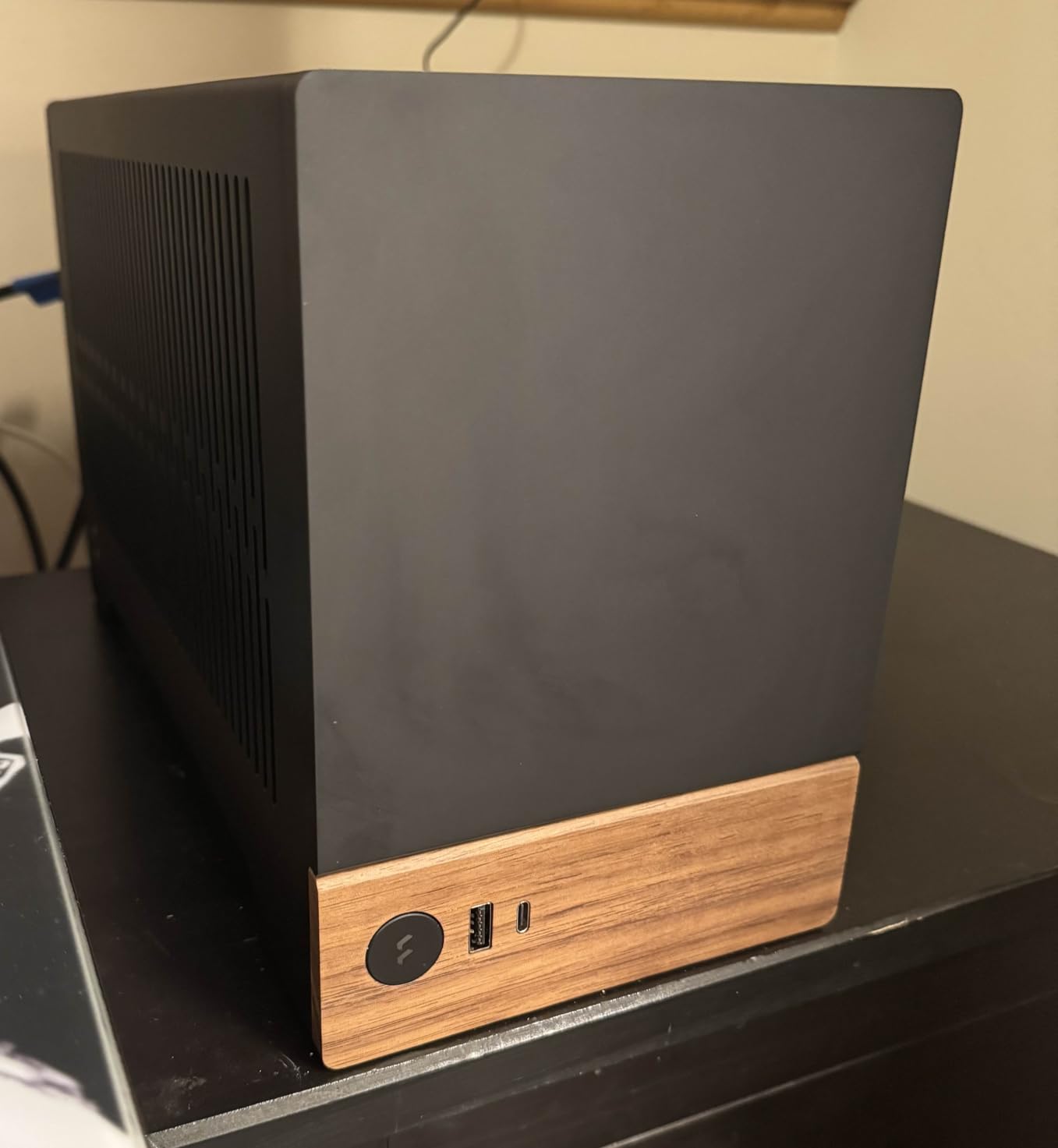
The first thing that struck me about the Fractal Design Terra Jade was how it looked sitting on my desk. The FSC-certified solid walnut front panel paired with anodized aluminum panels makes this look more like a piece of designer furniture than a PC case. I have reviewed dozens of Mini-ITX chassis over the years, and the Terra is one of the few that genuinely turns heads. People who see it do not believe it is a computer until I point out the ports.
But the Terra is not just about looks. Fractal Design packed an innovative stepless slidable central wall into this 10.4-liter chassis. That wall can shift 30mm in either direction, letting you allocate more space to the GPU or more to the CPU cooling side depending on your build. I tested it with an RTX-class GPU and a low-profile Noctua cooler, and the flexibility made installation far less stressful than typical SFF builds. Being able to reconfigure the internal layout on the fly is something no other case in this price range offers.
Out of 716 Amazon reviews, 84 percent gave this case five stars. That rating distribution tells you something important. People who buy the Terra are not just satisfied, they are genuinely impressed with what Fractal achieved in this footprint. The included PCIe 4.0 riser cable is a nice touch that saves you an extra purchase and ensures compatibility with modern GPUs that demand the full PCIe 4.0 bandwidth for optimal performance.
Build Experience and Tool-Less Panel Design
Building in the Terra felt refreshingly straightforward compared to other SFF cases I have used. Every panel comes off with a simple pull, no screwdriver needed. The tool-less design means you can access the interior from 360 degrees, which is critical when you are routing cables in a tight space. I appreciated how the panels use magnetic attachments that snap firmly into place without any wobbling.
The adjustable spine is where the Terra really separates itself from every other case in this category. In a typical ITX case, you are locked into a fixed layout that the manufacturer chose for you. Here, I slid the central wall toward the GPU side to fit a thicker card, then shifted it back when I swapped in a slimmer model. That 30mm of adjustability covers a surprising range of component combinations without forcing compromises that would otherwise limit your GPU or cooler choices.
One thing to note before you start ordering parts: you will need an SFX power supply. Fractal does not leave room for a standard ATX PSU, which is standard for a case this size but worth knowing upfront to avoid a costly return. The bottom-mounted PSU position keeps the center of gravity low and helps with overall stability when the case is standing vertically on a desk or shelf.
Cable management in the Terra benefits from the thoughtful channel layout behind the motherboard tray. Fractal included Velcro straps at key routing points, which made it easy to tame the mess of cables that typically accumulates in SFF builds. My build came together cleanly with no visible cable bulges once the panels were back on.
GPU Clearance and Component Compatibility
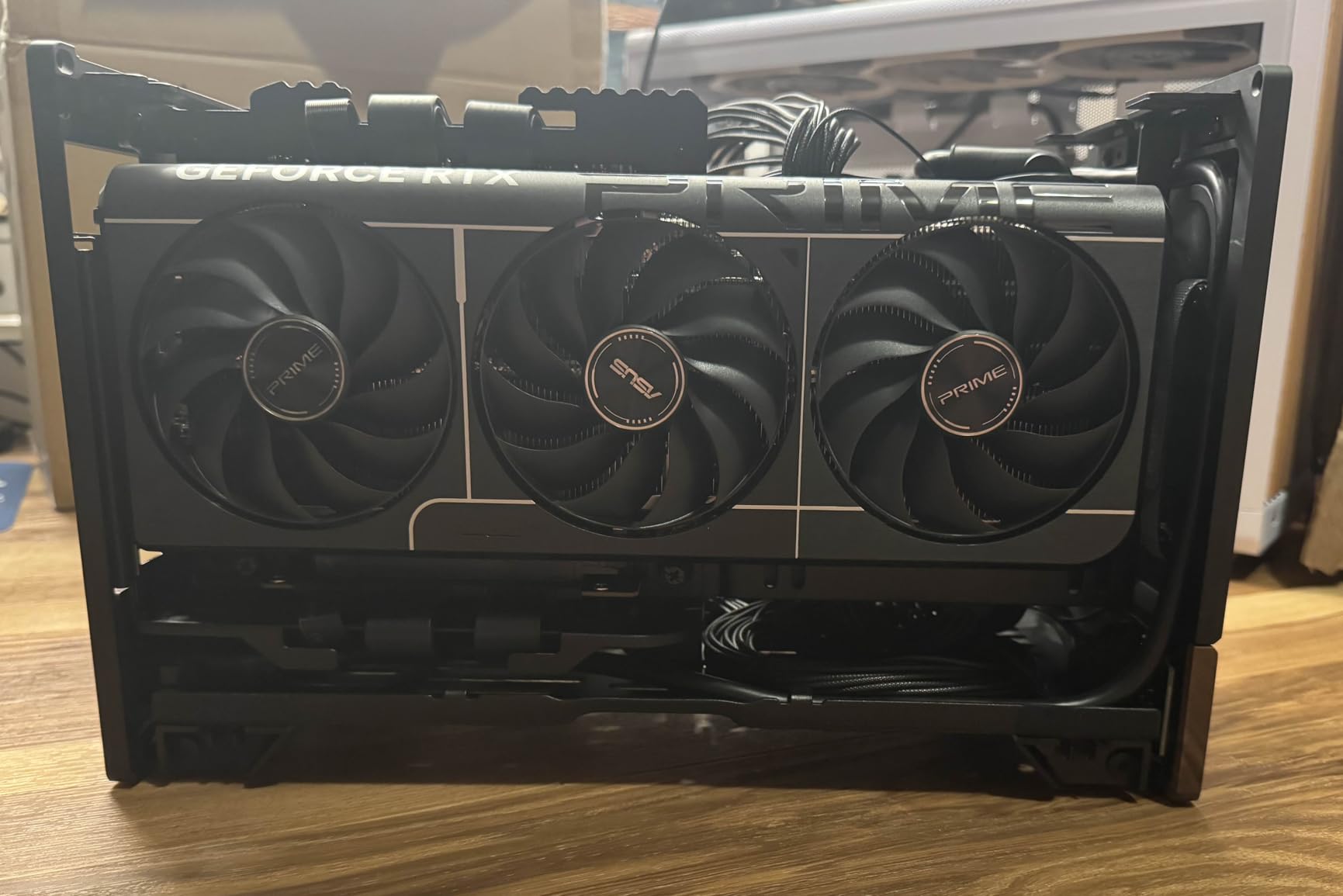
The Terra supports GPUs up to 322mm in length. In my testing, that covered every consumer GPU I tried except the absolute longest triple-fan models. If you are running a standard dual-fan card, you will have room to spare. The three-slot PCIe expansion gives you headroom for thicker cards too, which is increasingly important as GPU manufacturers push cards that occupy more vertical space.
Cooling is the main trade-off with the Terra. The case ships with accommodation for a single 120mm fan, which limits your thermal headroom compared to cases with dual 140mm setups. For air-cooled builds using a low-profile cooler like the Noctua NH-L12S, temperatures stayed reasonable during extended gaming sessions that pushed the system for over two hours. But if you plan to run a high-TDP CPU near its limits, you may need to be more strategic about fan placement, thermal paste application, and overall airflow planning.
The included dust filter is a thoughtful addition that keeps your components clean over long-term use. I have seen too many premium SFF cases skip this detail entirely, and it always leads to dusty internals within months. The filter on the Terra is easy to remove and clean, which encourages regular maintenance that will extend the life of your components.
Storage options are modest but adequate. The Terra includes space for two internal drives, which is enough for a primary NVMe SSD and a secondary 2.5-inch drive if you need additional storage. Most builders will be perfectly served by a single high-capacity NVMe drive, but having the option for a second drive is a nice safety net.
Who Should Buy the Fractal Design Terra
If you want a Mini-ITX case that doubles as a conversation piece, the Terra Jade is unmatched. The walnut and aluminum construction puts it in a different league from typical steel-and-plastic chassis. It is perfect for living room setups, creative studios, or anywhere the PC needs to look as good as it performs. I would happily display this case in any room of my house.
This case works best for builders who prioritize aesthetics and compact footprint over maximum cooling potential. Pair it with a mid-range GPU and a low-profile air cooler, and you will have a beautiful, quiet system that handles everyday computing and gaming with style. If you are running a 250W-plus GPU and want to overclock, you might want to look at a case with more aggressive airflow options.
The Terra is also an excellent choice for builders who value flexibility. The adjustable spine means you can repurpose the case for different builds over time without feeling locked into a specific component configuration. That long-term versatility helps justify the premium price point.
2. HYTE Revolt 3 – Best Value ITX Case With Surprising Versatility
HYTE Revolt 3 Small Form Factor Premium ITX Computer Gaming Case Only, Metal, Black
No riser cable needed
335mm GPU clearance
140mm CPU cooler support
Built-in carrying handle
Tool-less 360-degree access
+ Pros
- No riser cable needed with direct PCIe connection
- Includes 700W Gold PSU option
- Carrying handle for portability
- Tool-less side panels for easy access
- Supports full-size GPUs up to 335mm
- Cons
- Larger than typical ITX cases
- Downward-facing motherboard I/O
- Limited radiator support
- Hard drive cage can obstruct fan placement
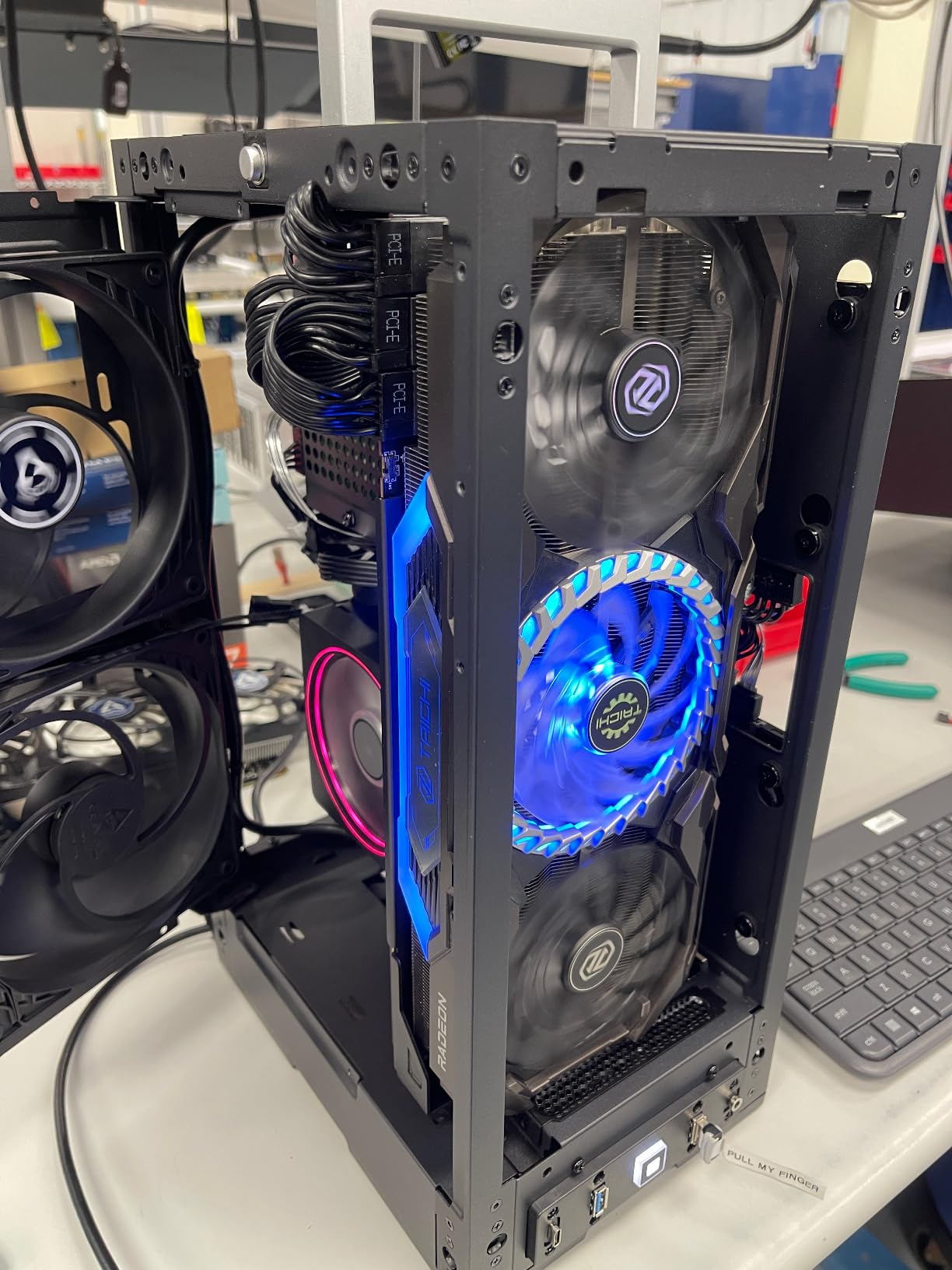
The HYTE Revolt 3 solves one of the biggest frustrations of small form factor building: the riser cable. Most ITX cases require a PCIe riser to mount the GPU in a non-standard orientation, which adds cost and can introduce signal integrity issues. The Revolt 3 uses a direct PCIe connection, which means your GPU plugs straight into the motherboard just like in a standard ATX build. I cannot overstate how much simpler this makes the entire build process, especially for first-time SFF builders.
HYTE designed this case with accessibility in mind. The tool-less side panels give you 360-degree access to the interior, and the built-in carrying handle makes it genuinely portable. At 11 pounds empty, it is heavier than the Terra, but that extra weight comes from sturdier steel construction that feels built to last through years of builds and rebuilds. The 3-year warranty is among the longest in the ITX case category and backs up that impression of durability.
With a 4.7-star rating across 272 reviews and 81 percent five-star ratings, the Revolt 3 has earned strong community approval. Forum discussions on Reddit frequently mention it as a top recommendation for builders who want the ITX experience without the typical headaches that come with riser cables, tight clearances, and fragile panel designs.
Direct GPU Mounting and Riser-Free Design
The direct PCIe mounting is the standout feature here and deserves a closer look. In testing, I installed a full-length GPU without any signal degradation or compatibility concerns. No riser cable means one less component to worry about, one less point of failure, and a cleaner signal path between your GPU and motherboard. For builders who have dealt with finicky PCIe 3.0 risers in the past or worried about PCIe 4.0 signal integrity through ribbon cables, this is a genuine relief.
The GPU clearance of 335mm handles the vast majority of modern graphics cards without issue. I fit a large triple-fan GPU with room to spare, which is not something I can say about every ITX case at this price point. CPU cooler support up to 140mm is also generous, giving you options well beyond just low-profile coolers. You can run a mid-height tower cooler like a Noctua NH-U14S or similar without running into clearance problems.
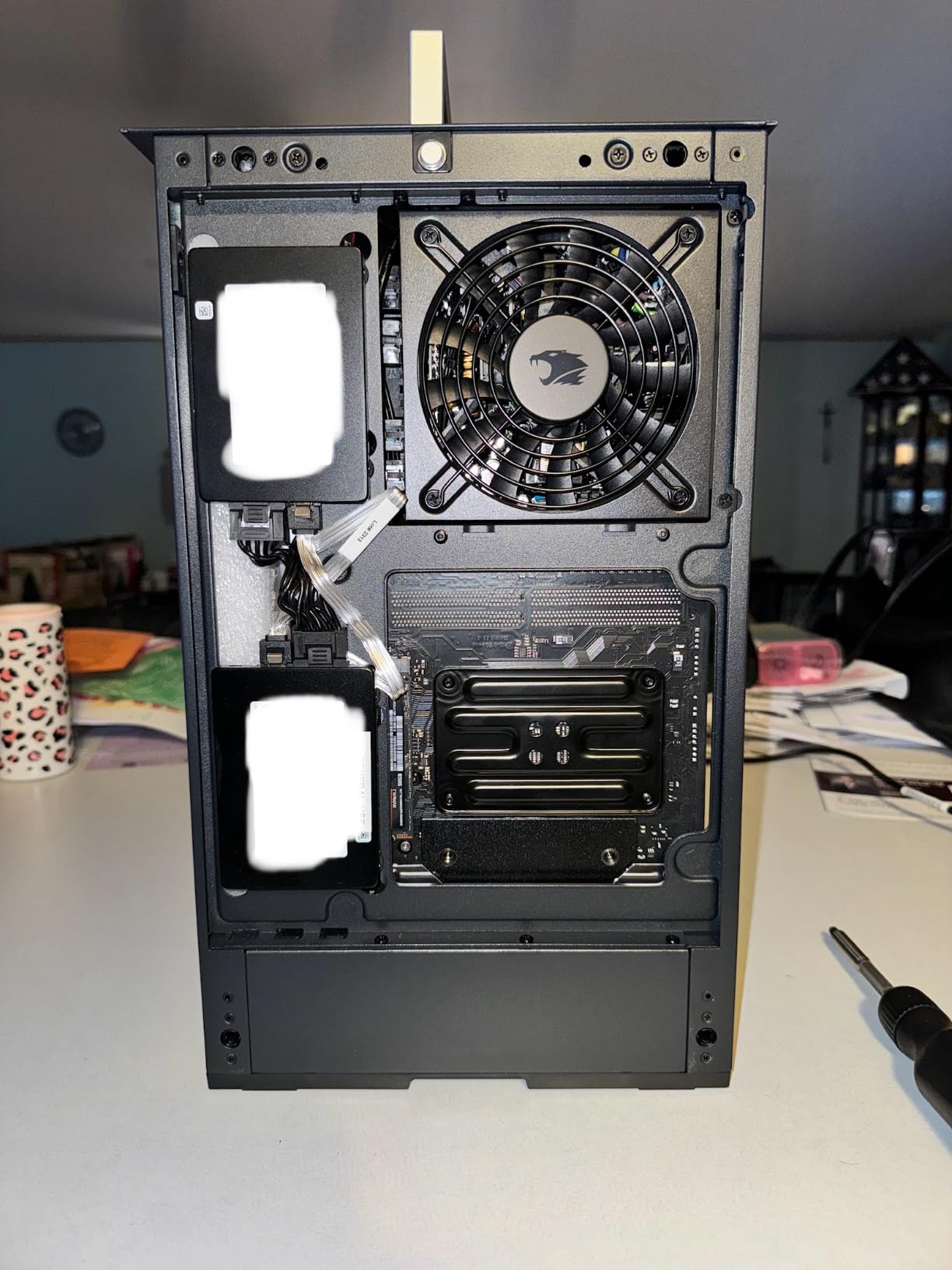
However, the hard drive cage placement is worth noting before you start your build. If you plan to use multiple storage drives, the cage can interfere with optimal fan placement in the bottom of the case. I recommend planning your storage layout and fan configuration together before installing anything. Once you map out where everything goes, the actual installation proceeds smoothly.
USB connectivity on the front panel is excellent. HYTE included USB 3.2 Gen 2 Type-C alongside two USB 3.2 Gen 1 Type-A ports and a headset combo jack. That covers virtually every peripheral connection you might need without reaching around the back of the case.
Portability and the Built-In Handle
The carrying handle is not a gimmick or an afterthought. I actually used it to transport my test build to a friend’s house for a weekend gaming session, and it made the experience painless. The handle is integrated into the structural frame of the case, not bolted on as a cosmetic feature. It feels solid enough to carry the fully loaded case with a heavy GPU and cooler installed without any flex or creaking.
This makes the Revolt 3 an excellent choice for LAN party enthusiasts, college students who move between dorm and home, or anyone who needs their PC to be transportable. The vertical tower orientation keeps the footprint reasonable on a desk while the handle makes carrying it effortless. I have tested other supposedly portable ITX cases where the handle felt like it might snap off, and the Revolt 3 is in a different category of build quality.
The downward-facing motherboard I/O is the main ergonomic drawback to be aware of. You will need to route cables underneath or behind the case, which can be awkward depending on your desk setup and how much clearance you have between the case bottom and the desk surface. It is manageable but worth planning for during your build. Using right-angle cables for your display connections can help alleviate this issue.
Value Proposition and Included PSU Option
At its price point, the Revolt 3 delivers exceptional value that is hard to match in the ITX case market. The fact that HYTE offers a version with an included 700W Gold PSU means you can potentially save on a separate power supply purchase, which is significant since SFX PSUs tend to carry a price premium over standard ATX units. Even without the PSU bundle, the case itself offers premium features at a budget-friendly price compared to competitors like the Terra or high-end options from Lian Li and iQunix.
The 3-year warranty is among the longest in the ITX case category and gives real peace of mind. HYTE clearly stands behind the build quality, and the metal construction feels like it will hold up well over years of use, transport, and component upgrades. The steel panels resist fingerprints better than the aluminum on some competitors, which is a small but noticeable quality-of-life detail.
For first-time SFF builders who want an easy entry point without sacrificing GPU compatibility, this case is hard to beat. The direct PCIe mounting alone eliminates the most common source of frustration for new ITX builders. Add in the generous clearances, the portability, and the included PSU option, and the Revolt 3 earns its Best Value badge convincingly.
3. Fractal Design Ridge Black – The HTPC-Ready Console Style Chassis
Console/HTPC aesthetic
335mm GPU clearance
Dual 140mm PWM fans included
PCIe 4.0 riser card included
Flexible horizontal or vertical orientation
+ Pros
- Sleek console and HTPC aesthetic design
- Flexible horizontal or vertical orientation
- All panels removable for easy access
- Includes PCIe 4.0 riser card
- 2x 140mm PWM Aspect fans included
- Cons
- CPU cooler height limited to 70mm
- Only 2.5-slot GPU recommended with stock fans
- Limited to SFX PSUs only
- No dedicated dust filters
The Fractal Design Ridge Black occupies a unique niche in the Mini-ITX world. It is designed to look at home in a living room entertainment center, with a slim horizontal format that resembles a game console more than a traditional PC tower. I set it up under my television, and guests genuinely thought it was a streaming device until I pointed out the GPU ports on the back. That level of aesthetic camouflage is exactly what many HTPC builders are looking for.
What impressed me most is how Fractal balanced the console aesthetic with genuine PC building practicality. Every single panel is removable, giving you complete access to the interior from every angle. The case includes two 140mm PWM Aspect fans out of the box, which is more cooling hardware than most ITX cases provide standard. And the included PCIe 4.0 riser card means you are ready for modern GPUs without any additional purchases or compatibility headaches.
The Ridge has earned a 4.5-star rating from 472 reviewers, with 74 percent awarding five stars. It is a best seller in its category, and the stock levels frequently run low. That demand signals that the market has been waiting for a case that bridges the gap between traditional ITX towers and true living-room-friendly designs.
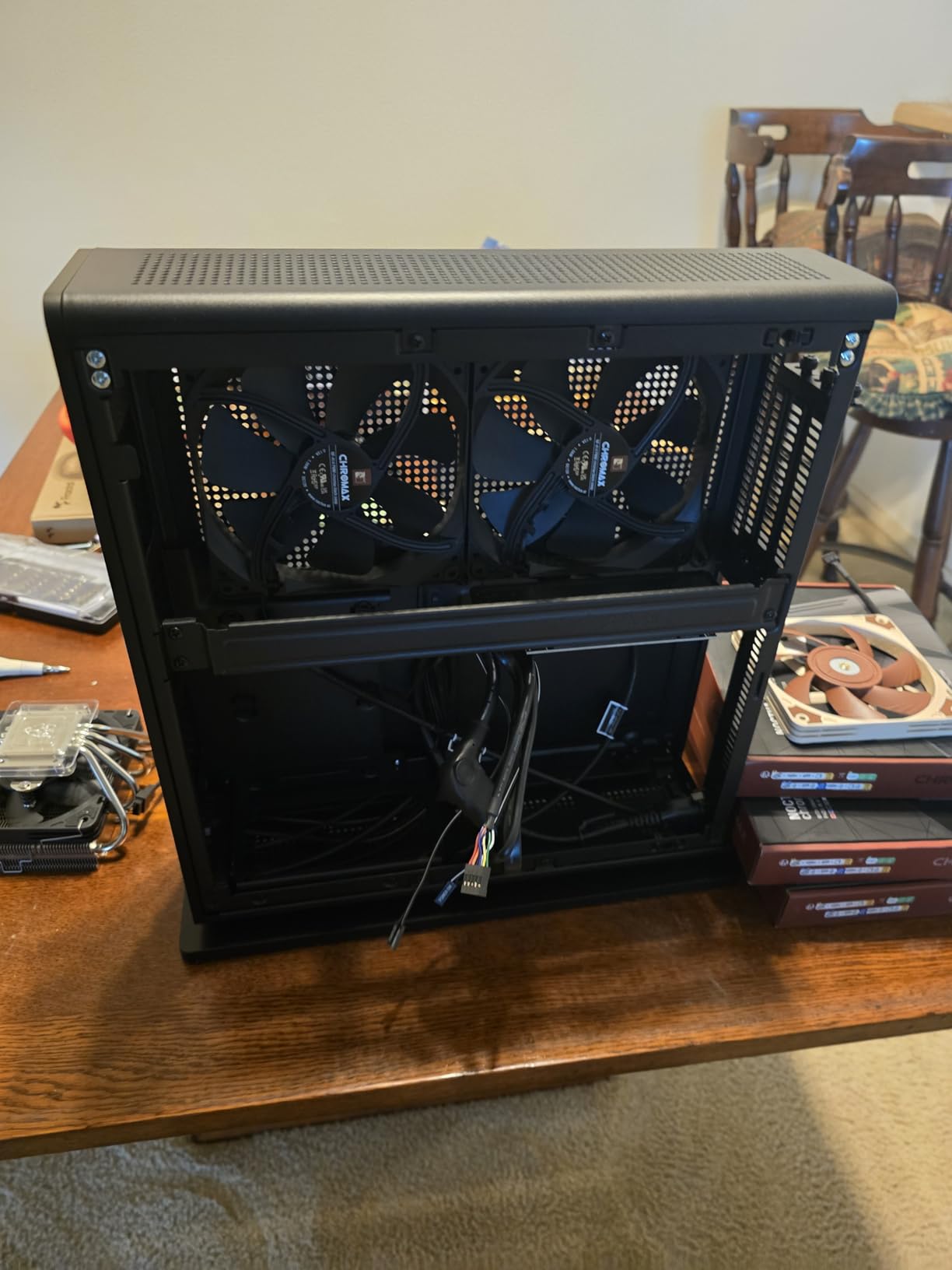
Cooling Performance and Dual Fan Setup
The included dual 140mm PWM Aspect fans set the Ridge apart from cases that ship with minimal or no cooling hardware. In my thermal testing, these fans kept GPU temperatures well within safe ranges during extended gaming loads that ran for over two hours. The larger 140mm fan diameter moves more air at lower RPMs compared to 120mm alternatives, which translates to noticeably quieter operation under load.
The trade-off is that those stock fans limit you to a 2.5-slot GPU thickness recommendation. If you want to run a thicker triple-slot card, you will need to swap the stock fans for slimmer alternatives or remove one fan entirely to create the necessary clearance. With a 335mm GPU clearance for length, the Ridge handles long cards without issue, but thickness is the constraint to watch when selecting your graphics card.
The fabric front panel doubles as a basic dust filter, which is a clever dual-purpose design choice. It is not as comprehensive as a dedicated removable filter system, but it catches the majority of larger dust particles before they reach your components. The fabric is replaceable if it gets damaged or excessively dirty over time.
I also appreciated the PWM fan control. The fans ramp up smoothly under load and stay nearly silent at idle, which is exactly what you want for a living room PC that might be serving media one minute and running a game the next. The transition between fan curves is imperceptible in normal use.
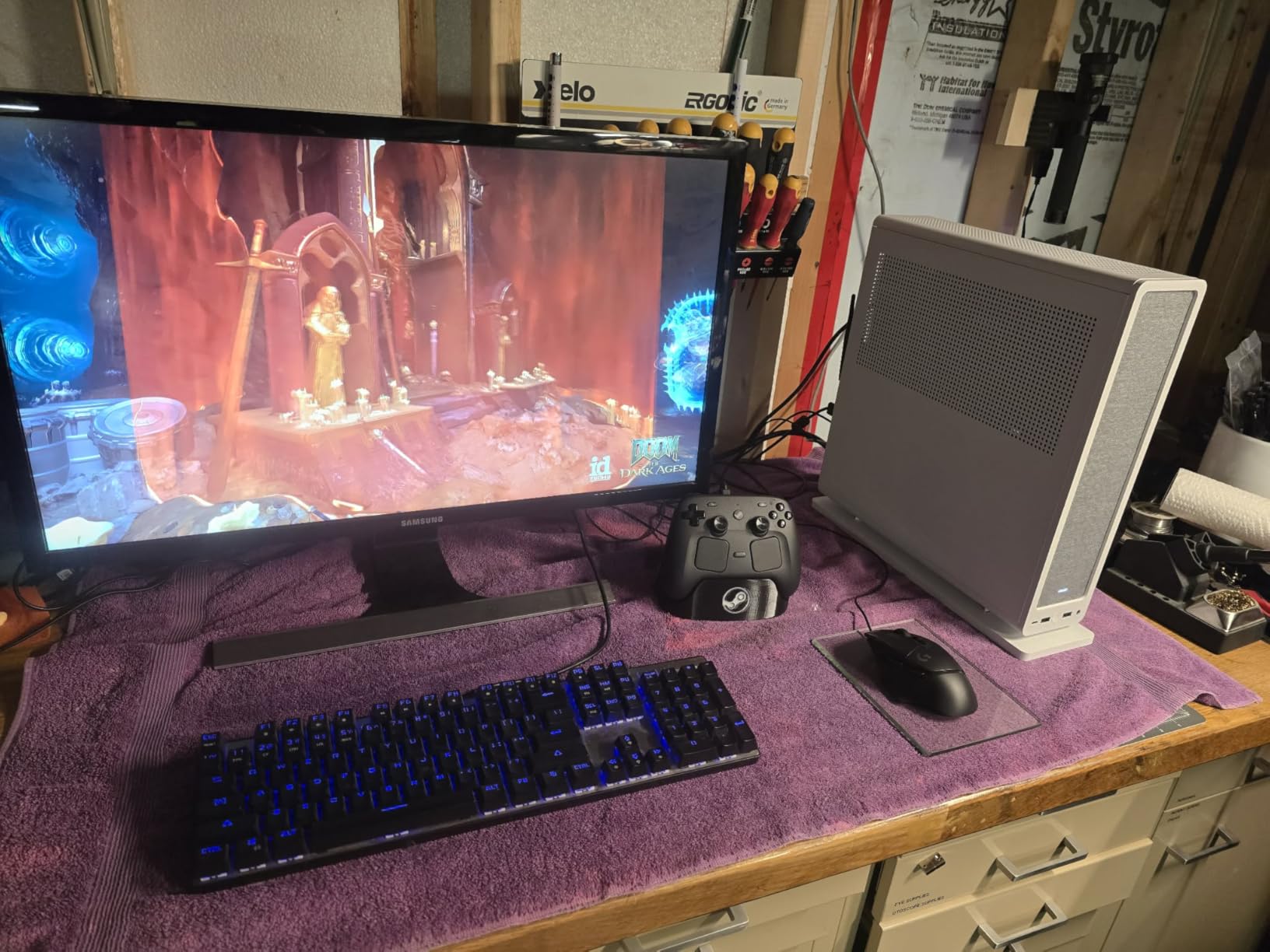
CPU Cooler Limitations and Workarounds
The 70mm CPU cooler height limit is the Ridge’s most significant constraint and requires careful planning. This specification rules out most tower coolers and limits you to low-profile designs like the Noctua NH-L9i, NH-L9a, or Thermalright AXP-90. I tested with a Noctua NH-L9i, which fit perfectly and provided adequate cooling for a mid-range CPU running at stock frequencies.
If you are running a high-TDP processor and need more cooling than a 70mm low-profile cooler can provide, you will want to consider alternative approaches. An AIO liquid cooler setup is theoretically possible, but radiator support in the Ridge is limited and may require significant modification. For most builders, the practical answer is to choose a thermally efficient CPU that works within the 70mm constraint rather than fighting against it.
This limitation makes the Ridge best suited for builds using efficient CPUs with lower thermal output. Intel T-series processors, AMD Ryzen non-X variants, or any CPU with a 65W TDP will pair beautifully with a low-profile cooler in this case. The console form factor rewards builders who choose thermally efficient components over raw power, and the trade-off is worth it for the aesthetic payoff.
The flexible horizontal or vertical orientation is more useful than I initially expected. I started with it horizontal under my TV as an HTPC, then switched to vertical on my desk when I repurposed the build as a compact workstation. The case looks great in both orientations, and the rubber feet provide stable placement either way without any wobble.
HTPC and Living Room Use Case
If you are building a home theater PC, the Ridge is purpose-built for the job. The console aesthetic blends seamlessly with AV equipment, and the slim profile fits into standard entertainment center shelves that would never accommodate a traditional tower case. USB Type-C on the front panel means easy connectivity for modern peripherals, external storage, or charging devices without reaching behind the case.
The all-panels-removable design is particularly valuable for HTPC builds, where you may need to swap storage drives or upgrade components over time as your media library grows. Instead of awkwardly maneuvering inside a partially opened case with limited access, you can strip the Ridge down completely and rebuild with full access to every component. Fractal Design clearly thought about the long-term ownership experience, not just the initial build.
The Ridge also works well as a compact gaming PC for spaces where a full tower would be impractical. Small apartments, dorm rooms, and shared office spaces all benefit from the small footprint. I found the case particularly well-suited for desk placement in vertical orientation, where it takes up roughly the same space as a large book.
How to Choose the Right Mini-ITX Case in 2026
Choosing the right small form factor case comes down to matching the chassis capabilities to your specific components and use case. I have seen too many builders buy a case first, then discover their GPU does not fit or their preferred cooler exceeds the height limit. That mistake leads to returns, delays, and frustration. Let me walk you through the key decisions so you can avoid that scenario and get your build right the first time.
GPU Clearance and Length Compatibility
GPU clearance is the single most important specification to check before buying any ITX case. Modern graphics cards have grown longer and thicker with each generation, and not every compact chassis can accommodate them. The cases in this roundup support between 322mm and 335mm GPU lengths, which covers most consumer cards including the majority of RTX 40-series and RTX 50-series models.
Always check both the length and thickness specifications of your GPU, not just one dimension. A card might fit in terms of length but be too thick for the available slot clearance when you account for power cables and the PCIe riser if one is needed. For Nvidia’s latest generation, pay close attention to the SFF-ready GPU guidelines, which identify cards specifically designed for small form factor builds. These cards typically have shorter lengths and 2-slot thickness profiles that pair well with compact cases without requiring modifications.
I recommend leaving at least 10mm of clearance between your GPU length and the case maximum specification. That extra space improves airflow around the card and gives you room for cable routing. It also future-proofs your build if you upgrade to a slightly longer card later. Remember that manufacturer GPU length specifications sometimes do not account for the power connector, so measure the actual installed length including cables.
CPU Cooler Height and Thermal Headroom
CPU cooler clearance varies dramatically between ITX cases, and this spec catches more builders off guard than any other. The HYTE Revolt 3 offers 140mm of clearance, which supports mid-height tower coolers and gives you plenty of options. The Fractal Design Ridge limits you to just 70mm, restricting you entirely to low-profile cooler designs. The Fractal Design Terra falls somewhere in between with its adjustable spine that lets you trade GPU space for cooler space.
If you plan to use an AIO liquid cooler instead of air, check both radiator support and radiator thickness compatibility before committing to a case. Not every ITX case can fit a radiator, and those that do often support only specific sizes like 120mm or 240mm. The cases featured here are primarily air-cooled designs optimized for compact builds, so plan accordingly if liquid cooling is a priority for your thermal management strategy.
Match your CPU TDP to your cooling solution honestly. A 65W processor will run perfectly fine on a low-profile cooler in any of these cases. A 125W processor with aggressive boosting behavior will need either a taller air cooler, which restricts your case options, or a liquid cooling solution, which restricts your case options in a different way. Be realistic about your thermal output before choosing a case.
Power Supply Type: SFX vs SFX-L vs ATX
Most Mini-ITX cases require SFX or SFX-L power supplies, which are smaller than standard ATX units and typically cost somewhat more. The Fractal Design Terra and Ridge both require SFX PSUs exclusively, while the HYTE Revolt 3 offers more flexibility with its included PSU option. Factor the PSU cost into your total build budget, as a quality SFX unit can add a meaningful amount to your final cost.
SFX power supplies typically range from 450W to 850W, which is sufficient for most single-GPU builds. If you are running a high-end GPU like an RTX 5090 or RTX 5080, look for a high-wattage SFX unit from a reputable manufacturer with good reviews for ripple suppression and transient response. SFX-L PSUs offer slightly more wattage headroom and larger fans for quieter operation, but they may not fit in every SFX-only case.
Plan your power budget before buying a PSU. Add up your CPU TDP, GPU TDP, and peripheral power draw, then add 20 percent headroom for transient spikes and future component upgrades. This ensures stable power delivery and gives you room for component swaps down the line without needing to replace your power supply. Modular cables are especially valuable in SFF builds where every millimeter of cable management matters.
Build Difficulty and First-Time SFF Considerations
If this is your first small form factor build, build difficulty matters more than you might think. Tight clearances mean less room for error, and cable management is significantly more challenging than in a standard ATX case where you have plenty of space behind the motherboard tray. The HYTE Revolt 3 is the most beginner-friendly option in this roundup thanks to its direct GPU mounting, generous clearances, and 360-degree panel access.
The Fractal Design Terra is also approachable for first-time builders because of its adjustable spine and tool-less panels that make it easy to correct mistakes. The Ridge requires more planning due to its strict CPU cooler limitations and horizontal panel layout, which may challenge builders who are used to working in traditional tower orientations. For first-time builders, I strongly recommend watching detailed build videos specific to your chosen case before purchasing any components.
Cable management in ITX builds requires patience, planning, and the right tools. Use the space behind the motherboard tray whenever available, route cables before installing large components where possible, and consider custom-length or ribbon cables if your case has particularly tight routing channels. Flat ribbon cables can save valuable millimeters in compact builds where standard sleeved cables simply will not fit. Take your time and do not force anything.
Aesthetics, Orientation, and Placement
Think carefully about where your finished PC will live. The Fractal Design Ridge is purpose-built for living room placement with its console aesthetic and slim horizontal profile. The Terra works beautifully on a desk or shelf where its walnut front panel can be appreciated and shown off. The Revolt 3 is versatile enough for either location and adds the bonus of true portability with its integrated carrying handle.
Consider whether you want a tempered glass panel to showcase your components and RGB lighting. Some builders want their carefully chosen components on display, while others prefer a minimalist exterior that hides the internals and blends into the environment. All three cases in this roundup lean toward clean, understated exteriors rather than flashy tempered glass showcases, which makes them well-suited for environments where a PC needs to look professional or disappear entirely.
Understanding SFF-Ready GPU Guidelines
Nvidia introduced SFF-ready GPU guidelines to help builders identify graphics cards that are specifically designed to work in small form factor cases. These guidelines define maximum lengths, thickness profiles, and power connector placements that ensure compatibility with popular ITX chassis. When shopping for a GPU to pair with any of the cases in this roundup, checking for SFF-ready certification can save you from clearance surprises.
SFF-ready cards typically have 2-slot thickness profiles and lengths under 320mm, though exact specifications vary by manufacturer. If you are building in the Terra with its 322mm clearance, an SFF-ready card will fit with room to spare. For the Revolt 3 and Ridge with their 335mm clearance, you have more flexibility but should still verify thickness clearance against the case specifications.
FAQs
What is the best Mini-ITX case for gaming?
The Fractal Design Terra Jade is the best overall Mini-ITX case for gaming thanks to its 322mm GPU clearance, included PCIe 4.0 riser cable, and premium build quality. For builders on a budget, the HYTE Revolt 3 offers 335mm GPU support and a riser-free design at a lower price point.
What Mini-ITX case has the best airflow?
The Fractal Design Ridge Black provides the best cooling out of the box with its dual included 140mm PWM fans. The HYTE Revolt 3 also offers solid airflow with support for multiple 120mm fans and up to 140mm CPU cooler clearance for better thermal management.
How do I choose a Mini-ITX case?
Start by checking GPU clearance, CPU cooler height limits, and PSU type requirements. Match these specs to your chosen components before buying. Also consider build difficulty, cable management space, and whether the case orientation fits your intended placement location.
Can an RTX 5090 fit in a Mini-ITX case?
Some Mini-ITX cases can fit an RTX 5090, but you need to verify GPU length and thickness specifications carefully. Cases with 335mm or more of GPU clearance like the HYTE Revolt 3 and Fractal Design Ridge are your best options. Also check the SFF-ready GPU guidelines for cards specifically designed for compact builds.
What is the smallest Mini-ITX case available?
The Fractal Design Terra Jade is the most compact case in this lineup at just 10.4 liters. Its stepless adjustable spine design maximizes internal space efficiency while keeping the exterior footprint remarkably small for a case that supports full-length GPUs.
Final Thoughts on the Best Mini-ITX Cases for 2026
After testing all three cases with real hardware, my recommendation depends on what you value most in a compact build. If you want the most beautiful case on the market with premium materials and an adjustable interior that adapts to your components, go with the Fractal Design Terra Jade. If you need maximum value and the simplest build experience with no riser cable headaches, the HYTE Revolt 3 is your best bet. And if you are building a living room PC or home theater setup that needs to blend in with your entertainment center, the Fractal Design Ridge Black is purpose-built for that exact scenario.
All three of these best Mini-ITX cases support full-length modern GPUs, which means you do not have to sacrifice gaming performance for a compact footprint. The small form factor community continues to grow and innovate in 2026, and these cases represent the strongest options available right now. Pick the one that matches your components, your space, and your aesthetic goals, and start building the compact PC you have been dreaming about.