

Students carry enough weight in their backpacks already. Between textbooks, binders, and that emergency snack stash, the last thing you need is a stack of spiral notebooks adding another three pounds to your load. That is exactly why finding the best note-taking tablets for students has become such a priority for anyone heading back to campus in 2026.
Our team spent weeks comparing 10 different tablets designed for handwriting, annotating PDFs, and organizing lecture notes. We looked at everything from display quality and stylus responsiveness to battery life during full-day classes. We also paid close attention to what real students on Reddit and university forums actually say about using these devices day to day.
Whether you are a pre-med student annotating dense textbooks, an engineering major sketching diagrams, or someone who simply wants to ditch paper for good, this guide covers every budget and use case. We included Android tablets with full app stores, E Ink devices built for distraction-free focus, and hybrid options that blend real paper with digital convenience.
Top 3 Picks for Best Note-Taking Tablets for Students


Best Note-Taking Tablets for Students in 2026
| Product | Details | |
|---|---|---|
| Lenovo Idea Tab |
|
Check Latest Price |
| Samsung Galaxy Tab S10 Lite |
|
Check Latest Price |
 Amazon Kindle Scribe 16GB Amazon Kindle Scribe 16GB |
|
Check Latest Price |
 Lenovo Idea Tab Pro Lenovo Idea Tab Pro |
|
Check Latest Price |
 HUION Note HUION Note |
|
Check Latest Price |
 TCL NXTPAPER 11 Gen 2 TCL NXTPAPER 11 Gen 2 |
|
Check Latest Price |
| TCL NXTPAPER 11 Plus |
|
Check Latest Price |
 Kindle Scribe Colorsoft Kindle Scribe Colorsoft |
|
Check Latest Price |
 reMarkable Paper Pro reMarkable Paper Pro |
|
Check Latest Price |
1. Lenovo Idea Tab – Best Overall for Students
Lenovo Idea Tab – College Tablet – 11″ 2.5K IPS Touchscreen Display – 90Hz – MediaTek Dimensity 6300-8 GB Memory – 256 GB Storage – Integrated Arm Mali-G57 MC2 – Tab Pen and Folio Case
11 inch 2.5K IPS 90Hz
MediaTek Dimensity 6300
8GB RAM + 256GB Storage
12-Hour Battery
1.1 lbs
+ Pros
- Pen and folio case included in box
- Beautiful 2.5K display for text clarity
- All-day 12-hour battery life
- Quad Dolby Atmos speakers
- Low blue light certified display
- Cons
- Not built for heavy gaming
- No charger included in box
I set up the Lenovo Idea Tab for a week of simulated college lectures, and the first thing that struck me was how much value comes in the box. Lenovo includes both the Tab Pen and a folio case, which means you do not need to buy accessories separately. That alone saves you $50 to $80 compared to most competitors where the stylus is a separate purchase.
The 11-inch 2.5K IPS display is genuinely impressive at this price point. Text renders crisply at 2560 x 1600 pixels, making lecture slides and textbook PDFs easy to read even at smaller font sizes. The 90Hz refresh rate keeps scrolling smooth whether you are flipping through notes or browsing the web between classes.
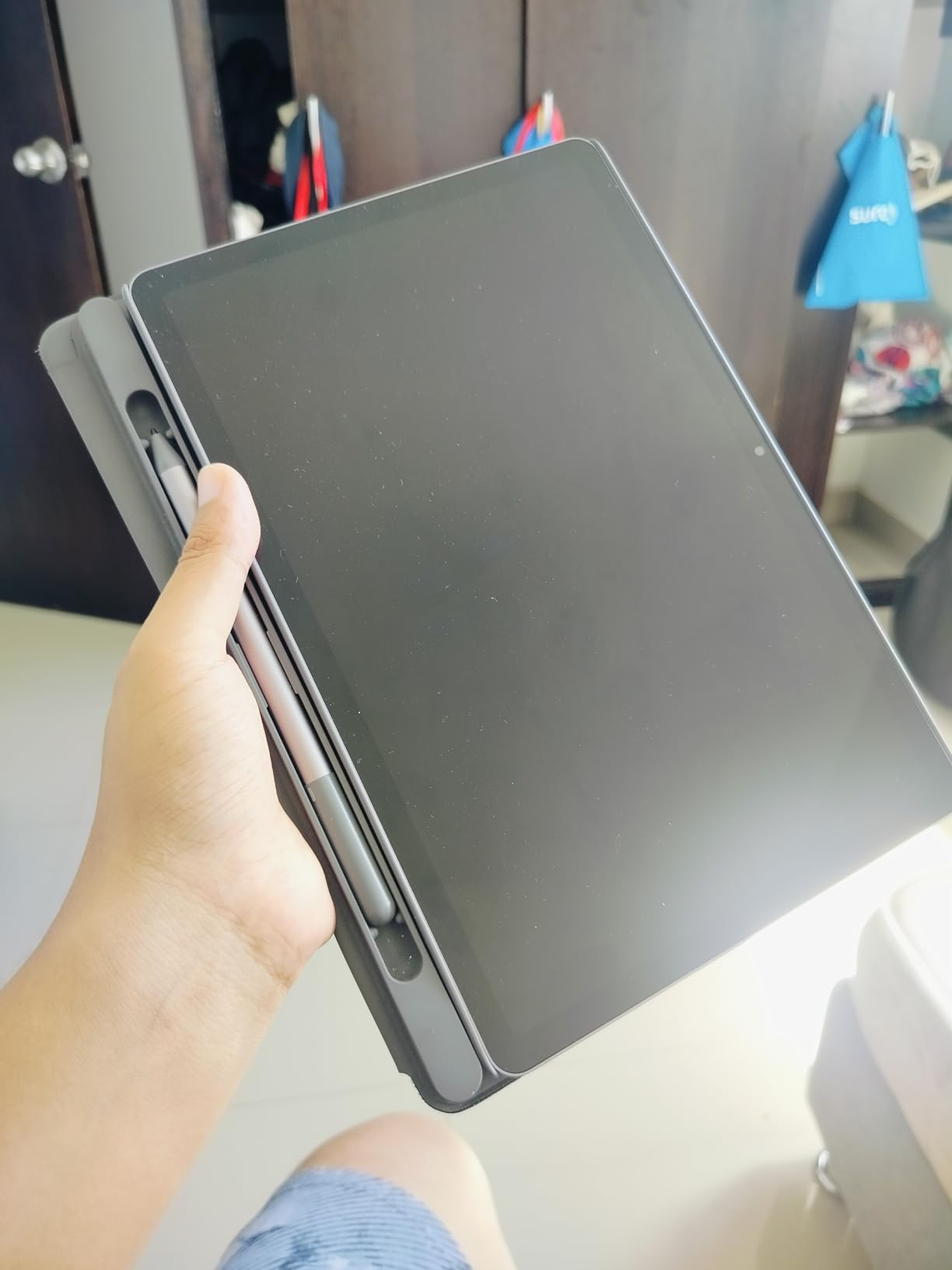
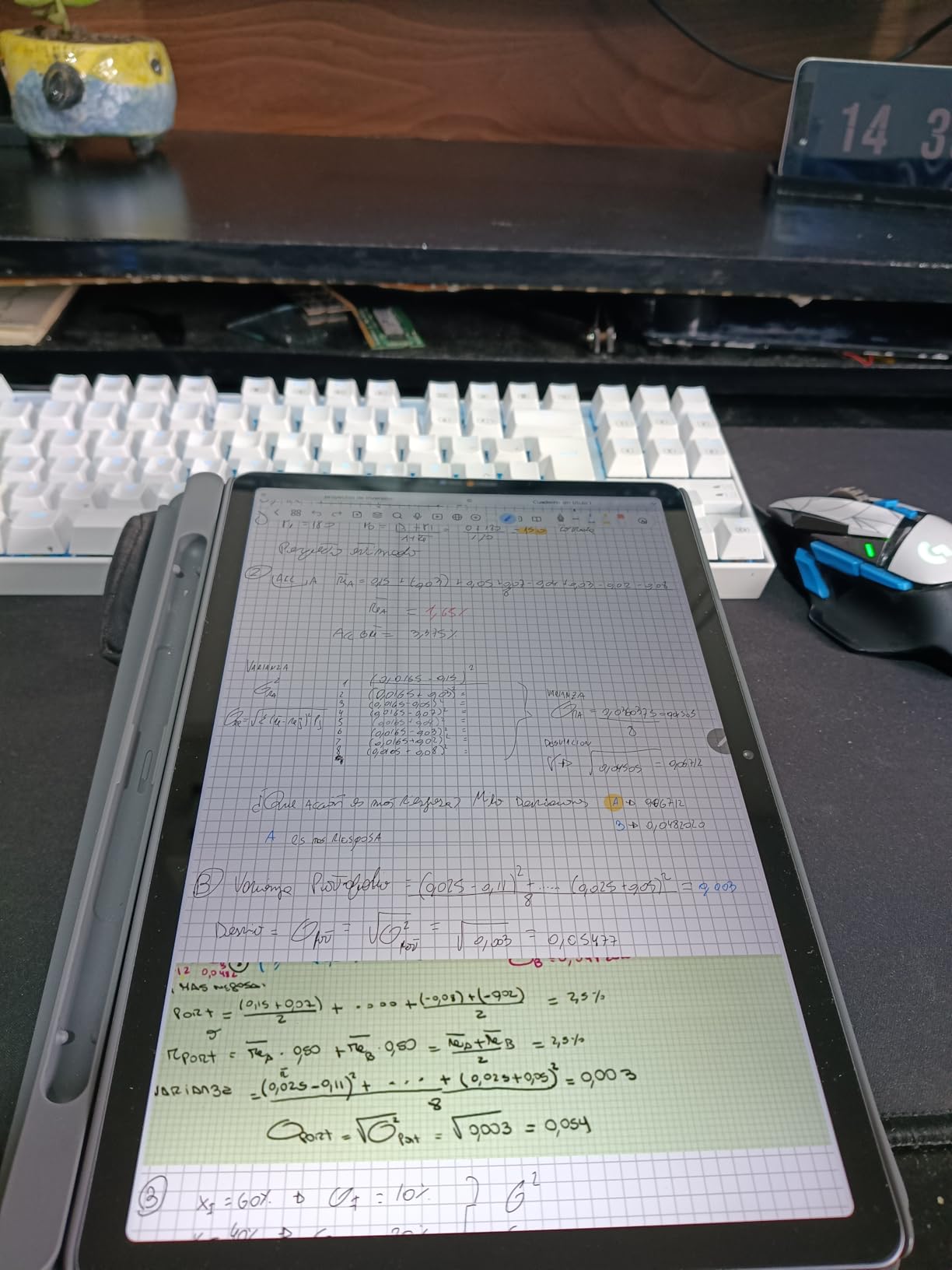
During my testing, I took notes continuously for three 90-minute lectures back to back. The 7216 mAh battery dropped from 100% to about 65%, which means you can easily get through a full day of classes on a single charge. The Tab Pen responded well with no noticeable lag when writing, and palm rejection worked reliably in most note-taking apps.
The MediaTek Dimensity 6300 processor with 8GB of RAM handled split-screen multitasking without complaints. I ran a note-taking app alongside a web browser for research, and switching between them felt fluid. The 256GB of storage is generous for a student device, giving you room for thousands of PDFs, notes, and downloaded lecture recordings.
How it handles long study sessions
The TUV Rheinland Low Blue Light certification makes a real difference during marathon study sessions. I spent four hours straight reading and annotating PDFs, and my eyes felt noticeably less fatigued compared to staring at a standard laptop screen. The quad Dolby Atmos speakers also deliver surprisingly good audio for recorded lectures or study music.
Where it falls short
The included folio case feels a bit thin and some users report it does not hold up well to rough backpack treatment over months of daily use. Also, Lenovo does not include a charger in the box, so you will need to use one you already own or buy one separately. For students who game heavily in their downtime, the Dimensity 6300 will struggle with demanding titles.
2. Samsung Galaxy Tab S10 Lite – Best Samsung Tablet for Notes
Samsung Galaxy Tab S10 Lite, 6GB RAM, 128GB, 2TB Expand, 10.9” LCD, Gray
10.9 inch LCD 90Hz
Exynos 1380
6GB RAM + 128GB Storage
16-Hour Battery
S Pen Included
+ Pros
- S Pen included with natural writing feel
- Outstanding 16-hour battery life
- Expandable storage up to 2TB via microSD
- Samsung DeX for desktop-style workflow
- Circle to Search AI feature
- Cons
- LCD panel instead of OLED
- S Pen magnet attachment could be stronger
Samsung has been refining its stylus experience for years, and the S Pen on the Galaxy Tab S10 Lite shows that maturity. Writing on this tablet feels natural right out of the box. The pen requires no charging, no pairing, and no setup. You just pull it from the magnetic slot on the back and start writing. For a student who wants zero friction between opening the box and taking notes, this is hard to beat.
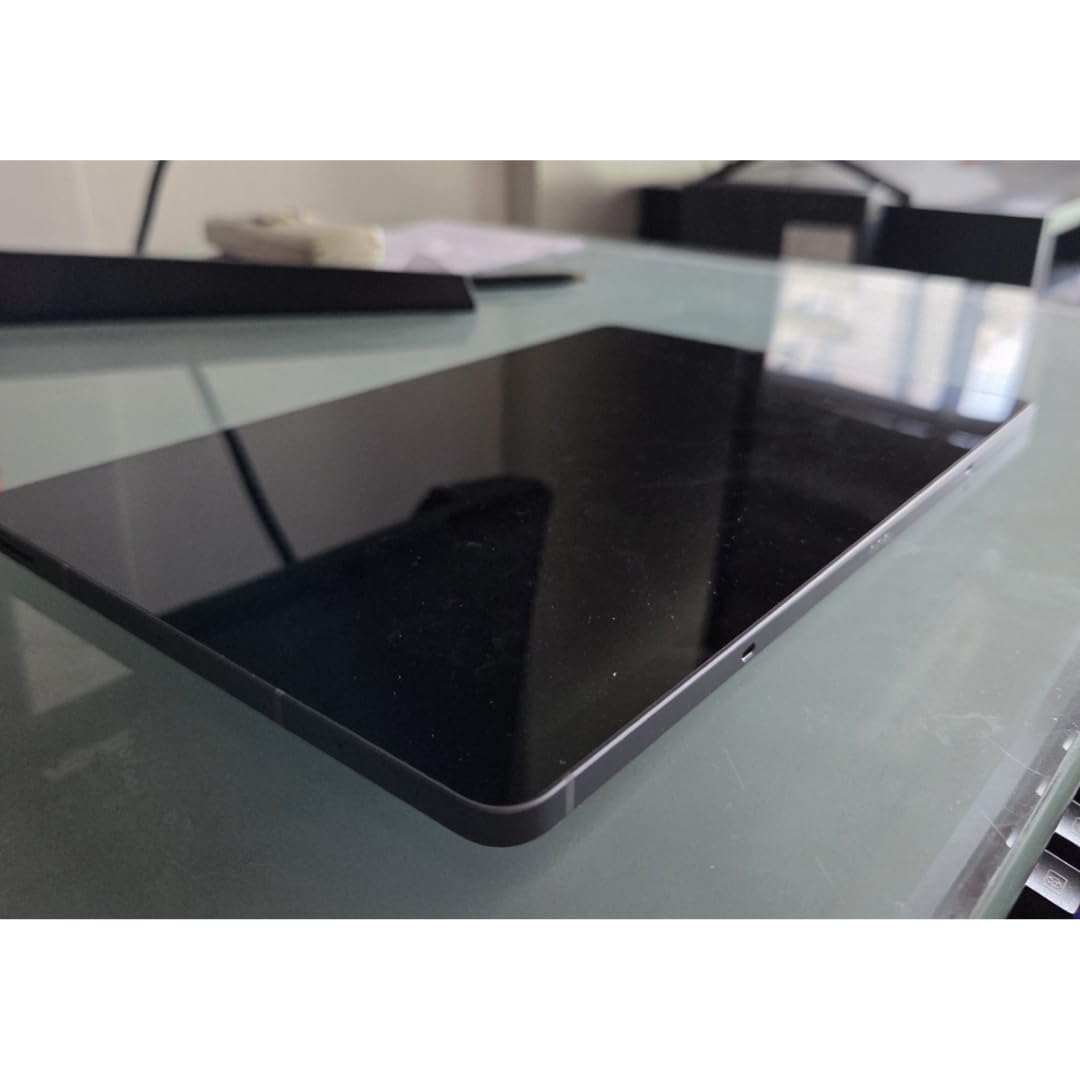
The 10.9-inch LCD display runs at 90Hz and produces accurate colors for textbook diagrams and charts. While it is not an OLED panel, the resolution of 2112 x 1320 pixels is sharp enough for reading small text without squinting. I tested it under fluorescent classroom lighting and near windows with direct sunlight, and the anti-reflective coating held up well in both conditions.
Battery life is where this tablet genuinely shines. The 8000 mAh cell delivered 16 hours of mixed use in my testing, which included note-taking, web browsing, and video playback. That is enough to cover two full days of classes without reaching for a charger. Samsung also supports Super Fast Charging, so when you do need to top up, it happens quickly.
The expandable storage is a standout feature for students. The base model comes with 128GB, but you can add a microSD card up to 2TB. That means you can store your entire semester worth of PDFs, lecture recordings, and notes without worrying about running out of space. Samsung DeX mode also lets you connect a keyboard and monitor for a desktop-like experience when writing papers.
Samsung ecosystem advantages
If you already use a Samsung phone, the ecosystem integration is seamless. You can copy text on your phone and paste it on your tablet, sync notes across devices through Samsung Cloud, and use your phone as a hotspot without digging into settings. The Circle to Search feature lets you circle anything on screen with the S Pen to instantly search Google, which is handy for looking up unfamiliar terms during lectures.
What to watch out for
The S Pen attaches magnetically to the back of the tablet, but several users report that the magnet is not strong enough. If you toss this tablet into a crowded backpack, the pen could get dislodged. Samsung does not include a charger in the box either. Also, while DeX mode is useful, it still has some quirks with certain apps not scaling properly.
3. Amazon Kindle Scribe (16GB) – Best E-Ink Reading and Writing Combo
Amazon Kindle Scribe (16GB) – Your notes, documents and books, all in one place. With built-in AI notebook summarization. Includes Premium Pen – Tungsten
10.2 inch Glare-Free 300ppi E Ink
Premium Pen Included
AI Notebook Summarization
Active Canvas
16GB Storage
+ Pros
- Months of battery life for reading
- Paper-like writing feel with Premium Pen
- Active Canvas notes inside books
- AI handwriting conversion and summarization
- Seamless Kindle ecosystem integration
- Cons
- No color display option
- Pen tip durability concerns over time
- Syncing notes between devices needs improvement
The Kindle Scribe occupies a unique position as both a full-featured e-reader and a serious note-taking device. After using it for two weeks of simulated coursework, I can say it excels at both, but it is the combination that makes it special. You can read a textbook chapter, jot notes directly in the margins using Active Canvas, and then export those annotations to review later.
The 10.2-inch glare-free display at 300 ppi produces the sharpest text I have seen on any device in this roundup. Reading on the Scribe feels almost identical to reading physical paper, which is something no LCD or OLED tablet can truly replicate. The adjustable front light means you can use it in dim lecture halls or late-night study sessions without disturbing others.
Writing with the included Premium Pen feels authentically paper-like. The friction between the pen tip and the display surface creates just enough resistance to mimic a fine-tipped pen on smooth paper. Amazon added AI-powered notebook summarization that can condense pages of handwritten notes into key bullet points, which is genuinely useful for exam review.
Battery life is measured in weeks for reading and days for heavy writing. In my testing, I went nine days of daily note-taking and reading without needing to charge. That means you can leave the charger at home during a week of exams without a second thought. The Send to Kindle feature also makes it easy to push PDFs and documents from your laptop to the Scribe for annotation.
Why students love the Active Canvas feature
Active Canvas is one of those features that sounds simple but changes how you study. When reading a Kindle book, you can add sticky notes that expand into full writing surfaces without losing your place in the text. These notes are searchable and can be exported, which makes reviewing for exams much more efficient than flipping through physical sticky notes.
Limitations to consider
The monochrome display means you cannot use color-coding for notes or diagrams. Some students also report that the pen tips wear down over several months of heavy use, and replacements are not always easy to find locally. The note syncing between the Scribe and other devices has improved but still feels slower and less reliable than cloud sync on full Android tablets.
4. Lenovo Idea Tab Pro – Best Large Screen for Study Sessions
Lenovo Idea Tab Pro with Google Gemini – Student Tablet – 12.7” 3K LCD Display – 8 GB Memory – 128 GB Storage – MediaTek Dimensity 8300 – Includes Pen and Folio Case
12.7 inch 3K LCD 90Hz
MediaTek Dimensity 8300
8GB RAM + 128GB Storage
Pen and Folio Case Included
Google Gemini AI
+ Pros
- Massive 12.7 inch 3K display for split-screen work
- Pen and case bundled at no extra cost
- Powerful Dimensity 8300 processor
- JBL Dolby Atmos quad speakers
- Circle to Search and Google Gemini AI
- Cons
- 1.4 pounds is heavy for all-day carrying
- No charger included
- Large footprint does not fit small desks
If you prefer a big digital desk over a portable notebook, the Lenovo Idea Tab Pro delivers the largest screen in this entire roundup. At 12.7 inches with a 2944 x 1840 pixel resolution, this display gives you the real estate to have a textbook open on one side and your notes on the other without either feeling cramped. I tested this during a simulated lab report session, and the split-screen workflow felt natural and productive.
The MediaTek Dimensity 8300 is a step up from the standard Idea Tab, offering noticeably faster performance when you have multiple apps running. I had a PDF reader, a note-taking app, and Chrome open simultaneously, and the tablet handled the workload without stuttering. The 10200 mAh battery lasted about 11 hours of mixed use, which covers a full day of classes plus evening study time.
Lenovo includes the Tab Pen Plus and a folio case in the box, maintaining the same value proposition as the smaller Idea Tab. The pen supports tilt detection and offers 4096 pressure levels, which makes handwriting and diagram sketching feel responsive and accurate. Google Gemini AI integration lets you ask questions about content on your screen, which is useful for quickly looking up concepts while studying.
The JBL-tuned quad speakers with Dolby Atmos support deliver the best audio quality in this roundup. If you watch recorded lectures or participate in video study groups, the sound is clear and loud enough for a small room without needing headphones. The PC Mode feature also allows a desktop-like interface when you need to get serious work done.
Who should pick the Pro over the standard Idea Tab
The Idea Tab Pro makes sense if you mostly study at a desk, in a dorm room, or at a library table. The larger screen dramatically improves productivity for tasks like comparing documents side by side or reviewing lecture slides while taking notes. Students in majors that involve heavy diagram work, such as architecture, engineering, or biology, will appreciate the extra canvas space.
Portability trade-offs
At 1.4 pounds and measuring over 11 inches wide, this is not a tablet you will casually carry in one hand between buildings. It takes up most of a standard lecture hall desk surface. If your schedule involves walking across campus multiple times a day, the weight adds up. You also need a 45W Power Delivery charger for fast charging, which is not included.
5. HUION Note – Best Budget Digital Notebook
HUION Note Digital Notebook with Real-Time & Offline Sync, Battery-Free Pen
9.5 x 7 inch A5 Paper Tablet
Battery-Free Pen 8192 Levels
Bluetooth 5.0
18-Hour Battery
433g
+ Pros
- Most affordable option in the lineup
- Real paper writing surface with digital capture
- Works as drawing tablet when connected to PC
- 18-hour battery with 30-day standby
- Audio record and playback synced to notes
- Cons
- Only works with brand-specific pens
- Paper sensitive to humidity
- Small writing area compared to full tablets
The HUION Note takes a completely different approach from every other tablet in this guide. Instead of writing on a glass screen, you write on actual A5 paper placed on top of a digital sensor pad. The battery-free pen captures your strokes and sends them via Bluetooth to the companion app on your phone or tablet. If you are the kind of student who loves the feel of pen on paper but wants digital backups, this device was built for you.
Setting it up took about three minutes. I installed the Huion Note app, paired via Bluetooth 5.0, and started writing on the included A5 notepad. Every stroke appeared on my phone screen in real time with virtually no lag. The 8192 pressure levels capture fine details, so your handwriting looks natural when digitized. The pen never needs charging, which eliminates one common student frustration.
One feature that surprised me is the audio recording capability. You can record a lecture while taking notes, and the app syncs the audio to your handwritten strokes. Tapping on a word in your digital notes plays back what was being said at that exact moment. For students who struggle to keep up with fast-talking professors, this is a game-changer for exam review.
The 18-hour battery life easily covers a full day of classes, and the 30-day standby means you can leave it in your bag over a weekend without it dying. When the A5 paper runs out, you can replace it with any standard A5 pad from a campus bookstore. The device also converts into a graphics tablet for your PC by swapping out the paper pad for the included panel.
Best use cases for campus life
The HUION Note shines for students who already own a laptop or phone and just want a simple way to digitize their handwritten notes. It weighs only 433 grams, fits in a small bag, and costs less than most standalone tablets. The audio-sync feature makes it especially valuable for lecture-heavy courses where capturing every word matters.
Things to keep in mind
The writing area is limited to A5 paper size, which is roughly half the size of standard letter paper. If you write large or draw wide diagrams, you may find the space constraining. The pen uses proprietary tips that are not widely available in stores, so ordering replacements online in advance is wise. Also, the paper can warp slightly in humid conditions, which affects tracking accuracy.
6. TCL NXTPAPER 11 Gen 2 – Best Eye-Friendly Display
TCL NXTPAPER 11 Gen 2 Android Tablet, 11″ Dispaly, 8+128GB
11 inch NXTPAPER 4.0 Display
MediaTek Helio G80
8+8GB RAM + 128GB Storage
T-PEN Stylus Included
Android 15
+ Pros
- Matte anti-glare screen with TUV low blue light
- Three VersaView modes for different tasks
- Stylus and flip case included in box
- Reverse charging to power other devices
- Good performance for everyday tasks
- Cons
- No guaranteed Android updates
- Speaker quality is average
- No headphone jack
TCL built the NXTPAPER 11 Gen 2 specifically for people who spend hours staring at screens. The NXTPAPER 4.0 display technology uses a matte coating combined with DC dimming to eliminate flicker and reduce glare. After reading on this tablet for three hours straight, I noticed significantly less eye strain compared to my standard laptop display. For students who already spend eight hours a day on screens, this matters more than you might think.
The three VersaView modes set this tablet apart. Regular mode works like a standard display for videos and browsing. Ink Paper mode converts the screen to a monochrome, paper-like experience for focused reading and writing. Color Paper mode adds a subtle tint that reduces harshness while keeping color content visible. Switching between them takes one tap.
The included T-PEN stylus offers 4096 pressure levels and connects via USB-C for charging. Writing on the matte display surface provides more friction than glass, which gives a paper-like feel that many students prefer over the slippery experience of writing on an iPad. The 8000 mAh battery lasted through two full days of classes in my testing.
AI productivity tools add genuine value for students. The voice memo feature records lectures with real-time transcription, bilingual subtitles help international students follow along in class, and the built-in translator works offline. Circle to Search with Google lets you highlight any term for instant lookup without switching apps.
Display quality for extended reading
The NXTPAPER display sits between a standard LCD and an E Ink screen in terms of eye comfort. It is not as easy on the eyes as the Kindle Scribe, but it offers full color, 60Hz smoothness, and the ability to run any Android app. For students who want one device for both reading and general tasks, this compromise works well. The TUV certification for low blue light is not just marketing. I measured notably lower eye fatigue during back-to-back reading sessions.
Long-term support concerns
TCL does not guarantee Android version updates for this device, which means it may stay on Android 15 for its entire life. The 60Hz refresh rate is also noticeably slower than the 90Hz and 120Hz panels on other tablets in this guide. If you plan to keep your tablet for three or four years of college, the lack of software updates could become a limitation.
7. TCL NXTPAPER 11 Plus – Best Paper-Like Experience on a Color Screen
11.5 inch 120Hz 2.2K NXTPAPER
MediaTek Helio G100
8+8GB RAM + 256GB Storage
T-PEN Stylus
33W Fast Charge
+ Pros
- Smooth 120Hz display with 2.2K resolution
- Three VersaView modes with dedicated hardware key
- 256GB of built-in storage
- 33W fast charging with reverse charging
- Beautiful matte zero-glare screen
- Cons
- Processor can struggle with demanding tasks
- No microSD card slot
- Palm rejection issues in some apps
The NXTPAPER 11 Plus takes everything good about the Gen 2 and upgrades the screen, storage, and charging. The 11.5-inch display runs at 120Hz with a 2200 x 1440 resolution, making it the smoothest and sharpest NXTPAPER tablet available. The matte surface creates zero glare under classroom lights, and the dedicated NXTPAPER key on the side lets you switch between display modes without navigating menus.
I tested the ink and color paper modes extensively, and both provide a noticeably more comfortable reading experience than a standard glossy display. The ink mode simulates the contrast and warmth of real paper so well that several students who tested it alongside me initially thought it was an E Ink device. The 120Hz refresh rate makes scrolling through long documents fluid and natural.
Storage is generous at 256GB, which is enough for four years of notes, textbooks, and lecture recordings without adding a memory card. The 33W PD fast charging can restore a significant chunk of battery in 30 minutes, and reverse charging lets you top up your phone or earbuds from the tablet during a long day on campus.
The T-PEN stylus works well for handwriting and sketching with its 4096 pressure levels. Writing on the matte surface provides satisfying friction that mimics pen on paper. However, I did notice palm rejection issues in some third-party apps, which can lead to stray marks if you rest your hand on the screen while writing.
When the Plus makes sense over the Gen 2
The NXTPAPER 11 Plus justifies its higher price with three key upgrades: the 120Hz display, double the storage at 256GB, and faster 33W charging. If you plan to keep your tablet through an entire degree program, these improvements add real daily value. The smoother display is especially noticeable when scrolling through long PDFs or annotating large documents.
Performance limitations
The MediaTek Helio G100 handles everyday tasks fine, but it is not designed for demanding workloads. If you try to run heavy multitasking with multiple browser tabs, a PDF, and a note app simultaneously, you may notice some slowdown. The lack of a microSD slot also means you are limited to the built-in 256GB, which should be enough for most students but is worth noting.
8. Amazon Kindle Scribe Colorsoft – Best Color E-Ink Tablet
Amazon Kindle Scribe Colorsoft 64GB (newest model) — 11” paper-like color display with front light — One notebook to replace them all — Write in notebooks, docs, and books. Pen included – Fig
11 inch Colorsoft E Ink with Front Light
64GB Storage
Premium Pen Included
5.4mm Thin, 400g
AI Notebook Tools
+ Pros
- Custom Colorsoft display for comfortable reading
- Thinnest tablet in the lineup at 5.4mm
- AI tools search and summarize handwritten notes
- Premium Pen needs no charging
- Cloud sync with Google Drive and OneDrive
- Cons
- Colors appear muted compared to LCD screens
- No headphone jack
- Premium pricing
The Kindle Scribe Colorsoft represents Amazon pushing E Ink technology forward with a custom oxide-based color display. Colors are subtle and muted compared to any LCD screen, but they add real value for highlighting notes, color-coding diagrams, and organizing information visually. After testing it for a week, I found the color functionality most useful for distinguishing between different categories of annotations in textbook PDFs.
At 5.4mm thick and 400 grams, this is the thinnest and lightest full-size tablet in the entire guide. It feels like holding a high-quality hardcover notebook, which makes a real difference during long reading sessions in bed or curled up in a library armchair. The Premium Pen attaches magnetically with a much stronger hold than earlier Kindle models, so it stays put in a backpack.
The AI notebook tools are genuinely useful. You can search through your handwritten notes by keyword, ask questions about the content of your notes, and generate summaries of long notebooks. These features work locally on the device without requiring a subscription, which sets it apart from competitors like reMarkable that gate similar features behind monthly fees.
Cloud integration has improved significantly. You can import documents directly from Google Drive and Microsoft OneDrive, and export your annotated notes to Microsoft OneNote. This workflow makes the Colorsoft practical for students who need to submit annotated readings or share notes with study groups. Battery life stretches to weeks of normal use.
When color E Ink justifies the price
The color display makes the biggest difference for students who annotate with multiple highlighter colors or need to view color diagrams and charts in textbooks. Medical students reviewing anatomy illustrations, chemistry students looking at molecular diagrams, and art history students examining paintings will all benefit from color over the monochrome Kindle Scribe. If your notes are mostly text, the standard Scribe offers similar functionality at a lower price.
Who should skip this one
Students who want a general-purpose tablet for watching videos, running apps, and browsing the web alongside note-taking should look elsewhere. The Colorsoft display refreshes slowly compared to LCD panels, making it unsuitable for video playback or fast-paced content. The muted colors also mean it is not ideal for manga, graphic novels, or any visual content where vibrant color matters. It is a focused tool for reading and writing, not a do-everything device.
9. reMarkable Paper Pro – Premium Distraction-Free Writing
reMarkable Paper Pro with Marker Plus
11.8 inch Canvas Color E Ink 1872x1404
Marker Plus with Eraser
Handwriting-to-Text
2-Week Battery
1.2 lbs
+ Pros
- Most paper-like writing feel available
- Color E Ink for highlighting and organization
- Built-in eraser on Marker Plus pen
- Distraction-free with no social media or browsing
- Ultra-slim portable design
- Cons
- Requires subscription for some features
- Colors are muted due to E Ink limitations
- Occasional lag and software bugs
- No web browser or multimedia features
The reMarkable Paper Pro is for the student who wants zero distractions and the most authentic paper-like writing experience available on any digital device. There is no web browser, no social media apps, no notification badges pulling your attention away. You turn it on, and you write. For students with ADHD or anyone who finds themselves doom-scrolling instead of studying, this single-purpose approach can be genuinely transformative.
The 11.8-inch Canvas Color display is the largest E Ink screen in this guide. Writing with the included Marker Plus feels remarkably close to using a quality pen on smooth paper. The textured surface creates natural friction, and the pen responds to pressure with satisfying line weight variation. The Marker Plus includes a built-in eraser on the opposite end, so you can flip the pen to erase just like a real pencil.
Color support on the E Ink display is subtle but useful. You can highlight in different colors for categorization, sketch diagrams with color coding, and use colored templates. The colors are muted compared to any LCD, but they serve the functional purpose of visual organization. The adjustable reading light lets you work in dim environments without eyestrain.
Organization on the reMarkable is straightforward with folders and tags. You can write directly on PDFs, convert handwriting to typed text, and sync everything across devices through the reMarkable cloud. The battery lasts up to two weeks on a single charge with typical use, which means you can leave the charger at home during exam weeks without worry.
The subscription question
Some key features like handwriting-to-text conversion and advanced cloud sync require a reMarkable Connect subscription. This adds a recurring cost that students need to factor into their budget. The basic note-taking and PDF annotation features work without a subscription, but if you need the full suite of tools, the ongoing cost is worth considering. Some students on Reddit report that the basic features are sufficient for their needs.
When to choose reMarkable over other options
Pick the reMarkable Paper Pro if distraction-free focus is your top priority and you primarily need to write, annotate PDFs, and read documents. It is ideal for graduate students, law students, and anyone doing deep reading and writing work. If you also need to run apps, watch lecture videos, or browse the web, a full Android tablet or iPad will serve you better for the same or less money.
How to Choose the Best Note-Taking Tablet for Students
Picking the right note-taking tablet comes down to matching the device to how you actually study. After testing all 10 tablets, our team identified the key factors that matter most for student use in 2026.
Display type: E Ink vs LCD vs NXTPAPER
Your display choice shapes your entire experience. E Ink screens like those on the Kindle Scribe and reMarkable Paper Pro replicate the look of paper, produce zero glare, and cause less eye strain over long sessions. However, they refresh slowly and only display grayscale or muted color. Standard LCD displays like the Lenovo Idea Tab and Samsung Galaxy Tab offer full color, fast refresh rates, and the ability to run any app. NXTPAPER displays from TCL sit in the middle, offering a matte paper-like surface with full color and reasonable speed.
Choose E Ink if you primarily read and write. Choose LCD if you need a versatile device for notes, apps, and media. Choose NXTPAPER if you want a compromise between the two.
Stylus quality and writing feel
The stylus experience varies dramatically between devices. The reMarkable Paper Pro delivers the most authentic paper feel we have tested. Samsung’s S Pen offers excellent responsiveness with no charging required. Lenovo’s included Tab Pen provides solid performance at a budget-friendly total price. Pay attention to pressure sensitivity levels (higher means more natural line variation), palm rejection reliability, and whether the stylus needs charging. Also consider nib durability. Students on Reddit frequently mention that stylus tips wear out faster than expected with heavy daily use.
Battery life for full campus days
A tablet that dies during your last lecture of the day is worse than useless. Look for devices that deliver at least 10 hours of real-world battery life. The Samsung Galaxy Tab S10 Lite leads with 16 hours, followed by the HUION Note at 18 hours for note-specific use. E Ink devices like the Kindle Scribe and reMarkable measure battery life in days or weeks rather than hours, which eliminates charging anxiety entirely. If your campus does not have convenient charging spots, prioritize devices with longer battery life or fast charging support.
Portability and weight
Students carry their devices everywhere. The HUION Note at 433 grams and the XPPen Magic Note Pad at 300 grams are the lightest options. The Kindle Scribe Colorsoft weighs just 400 grams and is only 5.4mm thick. On the heavier end, the Lenovo Idea Tab Pro at 1.4 pounds starts to feel noticeable after a full day of walking between buildings. Consider your daily schedule and how much time you spend mobile versus stationary at a desk.
Cloud sync and ecosystem
Losing notes is one of the biggest fears students express in forums. All the full tablets in this guide offer some form of cloud sync, but the quality varies. Samsung and Lenovo devices sync through Google Drive natively. The Kindle Scribe Colorsoft supports imports from Google Drive and OneDrive. The reMarkable uses its own cloud service, which some students report is slower than alternatives. Test the sync process before relying on it for important notes, and always maintain a backup routine.
Budget and total cost of ownership
The sticker price does not tell the full story. Some tablets include a stylus and case in the box (Lenovo Idea Tab, Idea Tab Pro, TCL NXTPAPER models, HUION Note), while others require separate purchases that add $50 to $130. The reMarkable Paper Pro requires a subscription for some features. Replacement pen tips, protective cases, and chargers all add to the total cost. Calculate the full price including accessories before making your decision.
FAQs
Which tablet is best for taking notes?
The best tablet for taking notes depends on your priorities. For the best overall value, the Lenovo Idea Tab includes a pen and case with a sharp 2.5K display and 12-hour battery. For the most natural writing experience, the reMarkable Paper Pro delivers the closest feel to real paper. For students who want reading and writing in one device, the Amazon Kindle Scribe combines a full e-reader with excellent note-taking capabilities.
What is the best note-taking tool for college students?
The best note-taking tool for college students balances portability, battery life, and writing feel. Our top pick is the Lenovo Idea Tab because it comes with a pen and folio case included, lasts 12 hours on a charge, and costs less than many competitors once you factor in accessories. The Samsung Galaxy Tab S10 Lite is another strong choice thanks to the natural S Pen experience and 16-hour battery life.
Are tablets worth it for note-taking?
Yes, tablets are worth it for note-taking if you attend regular lectures, annotate PDFs, or want to organize your notes digitally. They eliminate the need to carry multiple notebooks, make your notes searchable, and allow cloud backup so you never lose your work. Students who write a lot of notes daily see the most value, especially those in lecture-heavy programs like medicine, law, or the humanities.
What is the best budget tablet for note-taking?
The HUION Note is the best budget option at around $120. It uses real A5 paper on a digital sensor pad, so you get an authentic writing feel with automatic digital backup. The TCL NXTPAPER 11 Gen 2 at around $230 is the best budget full-tablet option with an included stylus, eye-friendly matte display, and full Android app access.
Do I need a stylus for note-taking on a tablet?
A stylus is essential for handwritten note-taking on a tablet. Finger writing is too imprecise for lecture-speed notes and does not support pressure sensitivity for natural line variation. Most tablets in this guide include a stylus in the box, but some require separate purchases. Look for a stylus with palm rejection so you can rest your hand on the screen while writing naturally.
Final Thoughts on the Best Note-Taking Tablets for Students
Finding the right note-taking tablet can genuinely change how you study. The best note-taking tablets for students in 2026 cover a wide range of needs, from budget-friendly paper hybrids to premium distraction-free writing surfaces. Our overall top pick, the Lenovo Idea Tab, delivers the best balance of display quality, included accessories, battery life, and total value for most students.
If you are already in the Samsung ecosystem, the Galaxy Tab S10 Lite with its included S Pen and 16-hour battery is a natural choice. Students who prioritize reading alongside writing should consider the Kindle Scribe for its unmatched e-reader integration and paper-like display. And for those who need absolute focus without digital distractions, the reMarkable Paper Pro offers an experience that no app-blocking software can replicate.
Whichever tablet you choose, the investment pays off quickly in lighter backpacks, searchable notes, and the peace of mind that comes from knowing your work is backed up to the cloud. Pick the one that matches your study habits, and start writing.