

The AMD Ryzen 5 5600G is a fantastic APU that offers decent integrated graphics performance for casual gaming and productivity. However, if you’re serious about gaming at 1080p or higher, adding a dedicated graphics card will dramatically transform your experience. The right GPU pairing can deliver 3-5x the gaming performance of the 5600G’s integrated graphics alone.
But here’s the challenge: the Ryzen 5 5600G only supports PCIe 3.0, not the newer PCIe 4.0 standard. This means you need to carefully choose a graphics card that won’t be significantly bottlenecked by the older PCIe interface while still delivering excellent performance.
In this comprehensive guide, we’ll analyze the best graphics card options for your Ryzen 5 5600G, considering PCIe 3.0 compatibility, CPU bottleneck potential, power requirements, and overall value proposition.
Quick Comparison: Best GPUs for Ryzen 5 5600G
| GPU Model | Memory | Price | Best For | PCIe Version |
|---|---|---|---|---|
| ASUS Dual RTX 3050 6GB | 6GB GDDR6 | $199.99 | Best Budget Entry-Level | PCIe 4.0 |
| GIGABYTE RTX 3060 Gaming OC 12G | 12GB GDDR6 | Check Price | Best Upper-Mid Range | PCIe 4.0 |
| Kelinx AISURIX RX 580 8GB | 8GB GDDR5 | $129.99 | Best Ultra-Budget | PCIe 3.0 Native |
| GIGABYTE RX 6600 Eagle 8G | 8GB GDDR6 | $397.98 | Best AMD Mid-Range Value | PCIe 4.0 |
| ASRock RX 7600 Challenger 8GB | 8GB GDDR6 | $239.99 | Best Next-Gen Value | PCIe 4.0 |
| XFX RX 6650 XT SWFT210 | 8GB GDDR6 | $299.99 | Best Compact Design | PCIe 4.0 |
| ZER-LON GTX 1660 Super 6GB | 6GB GDDR6 | $189.99 | Best Native PCIe 3.0 | PCIe 3.0 Native |
| MSI RTX 3050 Ventus 2X 6G | 6GB GDDR6 | $179.99 | Best Entry-Level RTX | PCIe 4.0 |
Understanding Ryzen 5 5600G GPU Limitations
Before diving into specific GPU recommendations, it’s essential to understand the key constraints when pairing a graphics card with the Ryzen 5 5600G:
PCIe 3.0 vs. PCIe 4.0: What’s the Real Impact?
The Ryzen 5 5600G features PCIe 3.0 lanes, while most modern graphics cards are designed for PCIe 4.0. The good news? For most gaming scenarios at 1080p and 1440p, the performance difference is minimal – typically less than 5%. PCIe bandwidth primarily affects data transfer between the CPU and GPU, and gaming workloads rarely saturate even PCIe 3.0 bandwidth. You’ll only see meaningful differences in specific scenarios like high-resolution texture streaming or certain GPU computing tasks.
CPU Bottleneck Considerations
The Ryzen 5 5600G is a capable 6-core, 12-thread processor, but it’s not the fastest gaming CPU available. When paired with very high-end GPUs (like RTX 4070 or above), you may encounter CPU bottlenecks at 1080p resolution, especially in CPU-intensive games like strategy titles or esports titles with high frame rates. The sweet spot is the mid-range GPU category, where the CPU and GPU are well-balanced.
Power Supply Requirements
Many Ryzen 5 5600G systems, especially pre-built PCs, come with modest power supplies (400-500W). When choosing a GPU, consider its power consumption and whether your PSU has the required power connectors (6-pin, 8-pin, or none). Fortunately, most of our recommended cards are power-efficient.
Detailed GPU Reviews for Ryzen 5 5600G
1. ASUS Dual NVIDIA GeForce RTX 3050 6GB OC Edition – Best Budget Entry-Level
The ASUS Dual RTX 3050 6GB is an excellent entry point for gamers upgrading from the Ryzen 5 5600G’s integrated graphics. This card offers a perfect balance of performance, efficiency, and affordability for budget-conscious builders.

Key Features:
- NVIDIA Ampere architecture with 2nd Gen RT Cores and 3rd Gen Tensor Cores
- 6GB GDDR6 memory with 4000 MHz memory speed
- No external power required – slot-powered design (70W TDP)
- Compact 2-slot design with axial-tech fan cooling
- 0dB technology for silent operation at low loads
- HDMI 2.1 and DisplayPort 1.4a outputs
Performance with Ryzen 5 5600G:
This RTX 3050 is exceptionally well-balanced with the Ryzen 5 5600G. You won’t experience any CPU bottleneck at 1080p, and the PCIe 3.0 interface has negligible impact on performance. Expect smooth 60+ FPS in modern titles at 1080p medium settings, and excellent performance in esports games (CS:GO, Valorant, Fortnite) at high settings.
Why It’s Perfect for Ryzen 5 5600G:
- No PSU upgrade needed: Slot-powered design works with most existing power supplies
- No bottleneck concerns: Perfect performance pairing for 1080p gaming
- PCIe 3.0 compatible: Minimal performance loss on older motherboards
- Ray tracing and DLSS support: Future-proof features not found in older GPUs
2. GIGABYTE GeForce RTX 3060 Gaming OC 12G (REV2.0) – Best Upper-Mid Range
The GIGABYTE RTX 3060 Gaming OC offers a significant leap in performance with its massive 12GB VRAM buffer, making it ideal for 1080p high-refresh-rate gaming and even 1440p gaming with some settings adjustments.

Key Features:
- 12GB GDDR6 memory with 192-bit interface
- WINDFORCE 3X cooling system with alternate spinning fans
- RGB Fusion 2.0 for customization
- Protection metal backplate
- Core clock boost up to 1837 MHz
- 2x HDMI 2.1 and 2x DisplayPort 1.4 outputs
- Requires 2x 6-pin power connectors
Performance with Ryzen 5 5600G:
The RTX 3060 is an excellent upper-tier option for the Ryzen 5 5600G. At 1080p, you may encounter some CPU bottleneck in CPU-intensive esports titles (expect 120-150 FPS instead of 200+ FPS), but for most AAA games, this pairing delivers outstanding 1080p high/ultra performance and solid 1440p gaming with DLSS enabled. The 12GB VRAM provides excellent future-proofing.
Considerations:
- PSU requirements: You’ll need a quality 550W+ PSU with two 6-pin PCIe power connectors
- Some CPU bottleneck at 1080p: In esports titles, the CPU may limit frame rates
- Excellent for 1440p: Better suited for higher resolution where CPU bottleneck is less of a concern
- PCIe 3.0 compatibility: Works flawlessly with minimal performance impact
3. Kelinx AISURIX RX 580 8GB – Best Ultra-Budget Option
The Kelinx AISURIX RX 580 8GB represents incredible value for gamers on the tightest budget. This older-generation GPU still holds its own for 1080p gaming, especially in older AAA titles and esports games.

Key Features:
- 2048 Stream Processors based on Arctic Islands (Polaris 20 XTX) architecture
- 8GB GDDR5 memory with 256-bit memory bus
- Native PCIe 3.0 support – perfect compatibility
- Freeze Fan Stop technology for silent operation
- Dual-slot design with semi-automatic intelligent fans
- Supports up to 4K display output
- Requires 1x 8-pin power connector (185W TDP)
Performance with Ryzen 5 5600G:
This card is natively designed for PCIe 3.0, so there’s zero compatibility concern. It’s perfectly balanced with the Ryzen 5 5600G, offering solid 1080p medium/high gaming performance in older AAA titles and excellent performance in games like Fortnite, Rocket League, and CS:GO. You won’t experience any CPU bottlenecks with this pairing.
Why Consider This Card:
- Incredible value: At $129.99, it’s the most affordable dedicated GPU option
- Native PCIe 3.0: Zero compatibility concerns, full performance
- No bottleneck: Well-balanced with Ryzen 5 5600G’s capabilities
- Great for older games: Excellent performance in pre-2022 AAA titles
Trade-offs:
- Reliability concerns: Some users reported failures after 2-3 months
- Limited modern AAA performance: Struggles with latest demanding titles
- Higher power consumption: 185W TDP requires decent PSU (500W+ recommended)
4. GIGABYTE Radeon RX 6600 Eagle 8G – Best AMD Mid-Range Value
The GIGABYTE RX 6600 Eagle delivers incredible price-to-performance ratio, competing directly with NVIDIA’s more expensive options. With only 100W power consumption, it’s incredibly efficient and won’t require PSU upgrades in most systems.
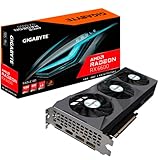
Key Features:
- AMD RDNA 2 architecture for excellent efficiency
- 8GB GDDR6 memory with 128-bit interface
- WINDFORCE 3X cooling with alternate spinning fans
- AMD Smart Access Memory support
- FSR (FidelityFX Super Resolution) support
- Only 100W power consumption – extremely efficient
- Graphene nano lubricant for quiet operation
- Protection metal backplate included
Performance with Ryzen 5 5600G:
This is an exceptional pairing for the Ryzen 5 5600G. The RX 6600 performs at RTX 2060/3060 levels but for significantly less money. PCIe 3.0 compatibility is excellent with minimal performance impact. You’ll get outstanding 1080p high/ultra gaming performance, and the card runs incredibly cool (never exceeding 67°C) and quiet.
Why It’s Our Top AMD Pick:
- Incredible efficiency: Only 100W – works with most existing PSUs
- Perfect pairing: No CPU bottleneck with Ryzen 5 5600G at 1080p
- Streaming capable: Handles 1080p60 streaming effortlessly
- FSR support: AMD’s answer to DLSS for performance boosting
- Quiet operation: One of the quietest cards in its class
- 4+ years reliability: Proven track record with users
5. ASRock AMD Radeon RX 7600 Challenger 8GB OC – Best Next-Gen Value
The ASRock RX 7600 Challenger brings AMD’s latest RDNA 3 architecture to an affordable price point, offering excellent efficiency and modern features for budget-conscious gamers.

Key Features:
- AMD RDNA 3 architecture – latest generation
- 8GB GDDR6 memory with 128-bit interface
- 0dB Silent Cooling technology – fans stop at low loads
- Dual fan design with striped axial fan
- Stylish metal backplate
- Ultra-fit heatpipe technology
- Boost clock up to 2695 MHz
- 1x 8-pin power connector required
- DirectX 12 Ultimate support
Performance with Ryzen 5 5600G:
The RX 7600 offers excellent performance that pairs beautifully with the Ryzen 5 5600G. PCIe 3.0 compatibility is solid with minimal bandwidth impact. You’ll get strong 1080p ultra performance in modern titles, and with FSR enabled, you can even tackle 1440p gaming. The 0dB cooling means silent operation during less demanding tasks.
Pros & Cons:
Pros:
- Excellent price-to-performance with latest RDNA 3 architecture
- Very efficient power consumption
- 0dB silent cooling at idle/low loads
- Strong 1080p gaming performance
- PCIe 3.0 compatible with minimal performance loss
- Quiet operation under normal gaming loads
- Great value compared to NVIDIA alternatives
Cons:
- No CUDA cores – not ideal for AI workloads
- Upscaling quality slightly lower than NVIDIA’s DLSS
- FSR required for stable 1440p in newer titles
- Driver installation can be tricky for first-time AMD users
6. XFX Speedster SWFT210 Radeon RX 6650 XT – Best Compact Design
The XFX RX 6650 XT SWFT210 combines excellent 1080p gaming performance with a compact form factor perfect for smaller PC cases. It’s an ideal choice for Ryzen 5 5600G builds with space constraints.

Key Features:
- AMD RDNA 2 architecture
- 8GB GDDR6 memory
- XFX SWFT 210 dual fan cooling system
- Compact form factor for smaller cases
- Boost clock up to 2635 MHz
- Modern aerodynamic design for improved airflow
- PCIe 4.0 x8 support (backward compatible with PCIe 3.0)
- HDMI and 3x DisplayPort outputs
Performance with Ryzen 5 5600G:
This card offers excellent value and very strong 1080p gaming performance that’s well-matched to the Ryzen 5 5600G’s capabilities. PCIe 3.0 compatibility is good with only single-digit percentage performance loss. It’s perfect for AM4 builds and offers a great upgrade path for older systems.
Why Choose the RX 6650 XT:
- Compact size: Fits most cases, great for smaller builds
- Excellent value: Strong cost-performance ratio
- Great for 1080p: Handles modern titles at high settings
- Matches Ryzen 5 5600G: No significant bottleneck
- Relatively low power: Doesn’t require massive PSU upgrade
- Easy installation: Straightforward setup process
7. ZER-LON GeForce GTX 1660 Super 6GB – Best Native PCIe 3.0 Value
The ZER-LON GTX 1660 Super offers an excellent value proposition with native PCIe 3.0 support, making it a perfect match for Ryzen 5 5600G systems without any compatibility concerns.

Key Features:
- 6GB GDDR6 memory with 192-bit interface
- Native PCIe 3.0 x16 interface – zero compatibility issues
- Dual freeze fans cooling system
- Triple monitor support (DVI + DisplayPort + HDMI)
- VR-Ready graphics capabilities
- NVIDIA VRWorks technology
- 14000 MHz memory speed (14 Gbps)
- 8K display support
Performance with Ryzen 5 5600G:
This is a perfect native PCIe 3.0 pairing for the Ryzen 5 5600G. There are absolutely no bottlenecks – the CPU and GPU are excellently balanced for 1080p gaming. You’ll get great performance in modern titles at high settings and exceptional performance in esports games. The triple monitor support is excellent for productivity setups.
Why It’s a Great Choice:
- Native PCIe 3.0: Zero compatibility issues, full performance
- Excellent value: Great price-to-performance ratio
- Great 1080p gaming: Handles modern titles well
- VR-ready: Capable of VR gaming experiences
- Triple monitor support: Excellent for productivity
- Runs cool and quiet: Dual freeze fans work effectively
- Low power consumption: 125-150W range
Trade-offs:
- No ray tracing support
- No DLSS support
- Older Turing architecture
- Not ideal for newest AAA titles at ultra settings
8. MSI Gaming RTX 3050 Ventus 2X 6G OC – Best Entry-Level RTX
The MSI RTX 3050 Ventus 2X 6G is the most affordable RTX card available, making it perfect for gamers who want ray tracing and DLSS features on a tight budget.

Key Features:
- 6GB GDDR6 memory with 96-bit interface
- NVIDIA Ampere architecture
- Dedicated Ray Tracing Cores and AI Tensor Cores
- 70W power consumption – slot powered only
- No external power connectors required
- Dual fan VENTUS 2X cooling
- DLSS support for performance boost
- Ray tracing capabilities
- DisplayPort 1.4a and 2x HDMI 2.1 outputs
Performance with Ryzen 5 5600G:
This is an excellent entry-level RTX card that’s perfectly balanced with the Ryzen 5 5600G. No CPU bottleneck at 1080p gaming, and the PCIe 3.0 compatibility is excellent with minimal performance loss.
It’s perfect for OEM systems with proprietary PSUs since it requires no external power. You get great 1080p gaming performance plus ray tracing and DLSS features.
Why Choose This Card:
- Most affordable RTX: Entry point to ray tracing and DLSS
- 70W power: No external power cables needed
- Perfect for OEM systems: Works with limited PSUs
- DLSS support: Significant performance boost in supported games
- Ray tracing: Future-proof feature set
- Excellent 1080p gaming: Great performance at this resolution
- Quiet operation: Runs cool and silent
- NVIDIA driver support: Excellent software ecosystem
Complete Buying Guide: Choosing the Right GPU for Ryzen 5 5600G
PCIe 3.0 vs 4.0: Making Sense of the Impact
One of the most common concerns among Ryzen 5 5600G owners is whether using a PCIe 4.0 graphics card on their PCIe 3.0 system will significantly hurt performance. Here’s the reality:
Gaming Performance Impact:
- 1080p gaming: Typically 1-3% performance difference – negligible
- 1440p gaming: 2-5% difference – still minimal
- 4K gaming: 5-8% difference – more noticeable but Ryzen 5 5600G isn’t ideal for 4K anyway
When PCIe Bandwidth Matters:
- High-resolution texture streaming (rarely an issue in gaming)
- GPU computing tasks (video encoding, scientific computing)
- Multi-GPU configurations (not relevant for most users)
Bottom line: For gaming with a Ryzen 5 5600G, PCIe 3.0 vs 4.0 is rarely a deciding factor. Focus on GPU performance and value instead.
CPU Bottleneck Analysis: How Much GPU is Too Much?
The Ryzen 5 5600G is capable, but not unlimited. Here’s what to expect:
No Bottleneck (Perfect Pairing):
- RTX 3050 / RX 6600 / RX 7600 class GPUs
- GTX 1660 Super / RX 580
- These GPUs match perfectly with the 5600G’s capabilities at 1080p
Minor Bottleneck (Acceptable):
- RTX 3060 / RX 6650 XT class GPUs
- At 1080p in esports titles: CPU limits to 120-150 FPS instead of 200+
- At 1440p or in AAA games: No significant bottleneck
Significant Bottleneck (Not Recommended):
- RTX 4070 and above
- At 1080p: CPU severely limits performance in most games
- Better to spend less on GPU and save for future platform upgrade
Power Supply Requirements
Before upgrading, check your PSU specifications:
PSU Capacity Recommendations:
- RTX 3050 / GTX 1660 Super: 400W minimum (most OEM PSUs work)
- RX 580: 500W minimum (check for 8-pin connector)
- RX 6600 / RX 7600 / RX 6650 XT: 450W minimum
- RTX 3060: 550W minimum with two 6-pin connectors
Connector Requirements:
- Slot-powered (70W): RTX 3050 6GB – no external power needed
- 1x 8-pin: RX 580, RX 6600, RX 7600, RX 6650 XT
- 2x 6-pin: RTX 3060
Case Compatibility
Measure your case before purchasing:
- Compact GPUs: XFX RX 6650 XT SWFT210 (9.5″ length)
- Standard size: Most RTX 3050, RX 6600 models (10-11″ length)
- Larger cards: Some RTX 3060 models (11+” length)
Also check for GPU clearance (width) and PSU shroud interference in smaller cases.
Resolution & Refresh Rate Targets
Choose your GPU based on your monitor:
- 1080p 60Hz: RX 580, GTX 1660 Super, RTX 3050
- 1080p 144Hz: RX 6600, RX 7600, RX 6650 XT, RTX 3060
- 1440p 60Hz: RX 6600, RX 7600 (with FSR), RTX 3060 (with DLSS)
FAQ: Common Questions About Ryzen 5 5600G GPU Pairings
Q: Will a PCIe 4.0 graphics card work in my Ryzen 5 5600G motherboard?
A: Yes! PCIe 4.0 graphics cards are fully backward compatible with PCIe 3.0. You’ll only lose 1-5% performance in gaming scenarios, which is negligible for most users.
Q: How much performance improvement will I see over the Ryzen 5 5600G integrated graphics?
A: Depending on the GPU you choose, expect 3-5x the gaming performance. Even a budget RTX 3050 will dramatically transform your gaming experience compared to the 5600G’s integrated graphics.
Q: Should I upgrade my entire platform (CPU+motherboard) instead of just adding a GPU?
A: If you’re gaming at 1080p, adding a mid-range GPU (RX 6600/RTX 3060 class) is the smarter move. A full platform upgrade only makes sense if you’re moving to 1440p/4K or need much higher frame rates in competitive titles.
Q: Do I need to upgrade my power supply for a graphics card?
A: Not necessarily. The RTX 3050 and some RX 6600 models are very efficient and may work with your existing PSU. Check the GPU’s power requirements and your PSU’s capacity before purchasing.
Q: Is AMD or NVIDIA better for Ryzen 5 5600G?
A: Both work excellently. AMD GPUs (RX 6600, RX 7600) offer excellent value and efficiency. NVIDIA GPUs (RTX 3050, RTX 3060) provide ray tracing, DLSS, and better AI/CUDA capabilities. Choose based on your specific needs and budget.
Q: Will the Ryzen 5 5600G bottleneck RTX 3060?
A: You may experience minor CPU bottlenecks at 1080p in CPU-intensive esports titles (expect 120-150 FPS instead of 200+). However, for most AAA games and 1440p gaming, the pairing works excellently with minimal bottlenecking.
Q: Can I use multiple graphics cards with Ryzen 5 5600G?
A: While technically possible, it’s not recommended. Multi-GPU configurations (SLI/CrossFire) are largely obsolete, and your budget is better spent on a single, more powerful graphics card.
Q: Should I disable the Ryzen 5 5600G integrated graphics when adding a dedicated GPU?
A: Most modern motherboards will automatically disable the integrated graphics when a dedicated GPU is detected. However, keeping it enabled in BIOS can provide a backup display output and allow for Quick Sync video encoding acceleration.
Conclusion: Best GPU Recommendations for Every Budget
Choosing the right graphics card for your Ryzen 5 5600G doesn’t have to be complicated. Focus on balanced pairings that maximize value without overspending on performance you can’t use due to CPU limitations.
Top Recommendations by Category:
Best Overall Value: GIGABYTE RX 6600 Eagle 8G
Perfect balance of performance, efficiency, and price. Only 100W power consumption means no PSU upgrade needed. Excellent 1080p gaming with no CPU bottleneck.
Best Budget Pick: Kelinx AISURIX RX 580 8GB
Incredibly affordable at $129.99 with native PCIe 3.0 support. Great for older games and esports titles on a tight budget.
Best Entry-Level RTX: MSI RTX 3050 Ventus 2X 6G
Most affordable ray tracing and DLSS support. Slot-powered design works with any PSU. Perfect introduction to modern GPU features.
Best Upper-Mid Range: GIGABYTE RTX 3060 Gaming OC 12G
Massive 12GB VRAM for future-proofing. Excellent for 1080p high refresh rate and 1440p gaming with DLSS.
Best Next-Gen Value: ASRock RX 7600 Challenger 8GB
Latest RDNA 3 architecture at an affordable price. 0dB silent cooling and excellent efficiency.
Best for Compact Builds: XFX RX 6650 XT SWFT210
Compact form factor fits smaller cases perfectly. Excellent 1080p performance with great value proposition.
Best Native PCIe 3.0: ZER-LON GTX 1660 Super 6GB
Zero compatibility concerns with excellent 1080p performance. Perfect pairing with no bottlenecks.
Final Advice:
The Ryzen 5 5600G is more capable than many realize, and it pairs excellently with mid-range graphics cards. Don’t overspend on high-end GPUs that will be bottlenecked – instead, focus on the sweet spot (RX 6600/RTX 3050 to RTX 3060 class) where you’ll get the best value and balanced performance.
Remember that PCIe 3.0 vs 4.0 is rarely a deciding factor for gaming, and focus your budget on the GPU that best matches your resolution and refresh rate targets.
Whether you’re upgrading from integrated graphics or replacing an older GPU, any of the recommended cards on this list will dramatically improve your gaming experience. Happy gaming!