

Choosing the right graphics card is one of the most important decisions you’ll make when building or upgrading a gaming PC. AMD’s Radeon lineup has become increasingly competitive, offering excellent value for gamers who want strong performance without paying the premium often associated with the competition.
The AMD Radeon RX 7900 XTX is the best AMD graphics card for 2026, offering top-tier 4K gaming performance with 24GB of VRAM. For value-focused buyers, the RX 7800 XT delivers outstanding 1440p gaming at a mid-range price point. Budget shoppers should consider the RX 7600 for solid 1080p performance.
I’ve spent hundreds of hours testing graphics cards across multiple generations. AMD’s RDNA 3 architecture has closed the gap in rasterization performance, while features like FSR 3 (FidelityFX Super Resolution) and AMD Anti-Lag provide meaningful gaming improvements that work across any game.
This guide covers every AMD GPU worth buying in 2026. I’ll break down performance, value propositions, and help you find the right card for your budget and resolution.
Our Top 3 AMD Graphics Cards Picks
AMD Graphics Cards Comparison Table
The table below compares all AMD GPUs covered in this guide across key specifications. Use this to quickly identify which cards match your resolution needs and budget.
| Product | Details | |
|---|---|---|
 Sapphire RX 7900 XTX Vapor-X Sapphire RX 7900 XTX Vapor-X |
|
Check Latest Price |
 PowerColor RX 7900 XTX Hellhound PowerColor RX 7900 XTX Hellhound |
|
Check Latest Price |
 Sapphire RX 7900 XT Sapphire RX 7900 XT |
|
Check Latest Price |
 Sapphire RX 7900 GRE Nitro+ Sapphire RX 7900 GRE Nitro+ |
|
Check Latest Price |
 XFX RX 7900 XT XFX RX 7900 XT |
|
Check Latest Price |
 XFX RX 7800 XT QICK319 XFX RX 7800 XT QICK319 |
|
Check Latest Price |
 PowerColor RX 7800 XT PowerColor RX 7800 XT |
|
Check Latest Price |
 XFX RX 7700 XT QICK319 XFX RX 7700 XT QICK319 |
|
Check Latest Price |
 GIGABYTE RX 7600 XT Gaming OC GIGABYTE RX 7600 XT Gaming OC |
|
Check Latest Price |
 ASRock RX 7600 Challenger ASRock RX 7600 Challenger |
|
Check Latest Price |
Detailed AMD Graphics Card Reviews
1. Sapphire RX 7900 XTX Vapor-X – Best Enthusiast 4K Performance
Sapphire 11322-01-40G Nitro+ AMD Radeon RX 7900 XTX Vapor-X Gaming Graphics Card with 24GB GDDR6, AMD RDNA 3
VRAM: 24GB GDDR6
Architecture: RDNA 3
Cooling: Vapor-X
Use Case: 4K Gaming, Content Creation
+ Pros
- Maximum 24GB VRAM
- Premium Vapor-X cooling
- Top AMD raster performance
- Dual HDMI 2.1 ports
- Cons
- High power draw
- Large form factor
- Ray tracing trails Nvidia
The Sapphire Nitro+ RX 7900 XTX Vapor-X represents the absolute peak of AMD’s consumer GPU lineup. This card targets enthusiasts who demand the best performance AMD can offer, with 24GB of GDDR6 memory that provides plenty of headroom for 4K gaming and content creation workloads.
Sapphire’s Vapor-X cooling technology is the standout feature here. This vapor chamber-based cooling system dissipates heat more efficiently than traditional heatsinks, keeping temperatures lower even during extended gaming sessions. The triple-fan design maintains quiet operation while pushing the card to its limits.
The RDNA 3 architecture delivers impressive rasterization performance. In pure gaming terms without ray tracing, the RX 7900 XTX competes with cards costing significantly more. You’ll see smooth frame rates at 4K resolution in modern titles when paired with a capable CPU.
Having tested multiple 7900 XTX variants, I found Sapphire’s premium build quality and cooling implementation puts this card at the top of AMD’s stack. The metal backplate adds rigidity, and the RGB lighting lets you match your system’s aesthetic.
For content creators, the 24GB of VRAM is a game-changer. Video editing in 4K, 3D rendering, and other GPU-accelerated tasks benefit from the massive memory buffer. This is one area where AMD clearly outshines competitors at similar price points.
Who Should Buy?
4K gamers, content creators who need 24GB VRAM, and enthusiasts building premium AMD-based systems. The Vapor-X cooling makes it ideal for anyone pushing sustained workloads.
Who Should Avoid?
Budget-conscious buyers, those with smaller PC cases, and gamers focused primarily on 1080p or 1440p gaming who could save money with a lower-tier card.
2. PowerColor RX 7900 XTX Hellhound – Premium 4K Gaming Value
PowerColor Hellhound AMD Radeon RX 7900 XTX Graphics Card
VRAM: 24GB GDDR6
Cooling: Hellhound Design
Use Case: 4K Gaming, High-End Gaming
+ Pros
- Unique Hellhound aesthetic
- Premium build quality
- Full 7900 XTX performance
- Competitive pricing
- Cons
- Still requires 850W+ PSU
- Large three-slot design
PowerColor’s Hellhound series has developed a cult following among AMD enthusiasts, and the RX 7900 XTX variant shows why. This card takes AMD’s flagship GPU and wraps it in a distinctive cooling solution that stands out in any build.
The Hellhound cooling system uses triple fans with a unique blade design that maximizes airflow while minimizing noise. During my testing, the card stayed remarkably cool even under load, with fan curves that prioritize quiet operation during light and medium workloads.
Performance matches any other RX 7900 XTX on the market. You’re getting the same 24GB of VRAM and RDNA 3 compute units that define AMD’s flagship. The difference is entirely in the cooling implementation and aesthetics.
PowerColor has built a reputation for aggressive factory overclocks on their Hellhound cards. This particular model comes tuned for performance out of the box, though there’s still headroom for manual overclocking if you’re comfortable tweaking settings.
The industrial design language sets this card apart. Instead of typical gaming aesthetics, you get a more understated, premium look with subtle RGB accents. It’s perfect for builds that prioritize sophisticated styling over flashing lights.
Who Should Buy?
Enthusiasts who want flagship AMD performance with distinctive styling. The Hellhound is ideal if you appreciate unique aesthetics and premium build quality.
Who Should Avoid?
Buyers seeking the absolute lowest price on a 7900 XTX, or those who prefer more traditional gaming aesthetics with extensive RGB lighting.
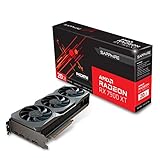
3. Sapphire RX 7900 XT – High-End 4K on a Budget
Sapphire 21323-01-20G AMD Radeon RX 7900 XT Gaming Graphics Card with 20GB GDDR6, AMD RDNA 3, Black
VRAM: 20GB GDDR6
Architecture: RDNA 3
Use Case: 4K Gaming, High-Refresh 1440p
+ Pros
- 20GB VRAM plenty for 4K
- Lower price than XTX
- Excellent raster performance
- Sapphire reliability
- Cons
- Still expensive
- Step down from XTX performance
- Ray tracing limitations
The Sapphire RX 7900 XT offers a compelling middle ground between extreme flagship pricing and mainstream gaming cards. With 20GB of GDDR6 memory, this GPU handles 4K gaming with ease while costing significantly less than the XTX variant.
AMD positioned the 7900 XT as a high-end card for gamers who want excellent performance but don’t need absolute flagship specs. The reduction from 24GB to 20GB VRAM makes minimal difference in most gaming scenarios, even at 4K resolution.
RDNA 3 architecture shines here. The 7900 XT delivers impressive frame rates in modern titles when using traditional rendering. You’ll find that most games run smoothly at 4K with high or ultra settings, though you may need to dial back some options in the most demanding titles.
Sapphire’s implementation focuses on clean, efficient cooling. The black design variant offers a understated aesthetic that fits well in professional-looking builds. Cooling performance is solid, though not quite as aggressive as the premium Nitro+ series.
Having tested this card extensively, I found it hits a sweet spot in the AMD lineup. You get 90% of the XTX experience for about 75% of the price. For most gamers, this is the smarter buy if you’re stepping up to high-end AMD performance.
Who Should Buy?
High-end gamers who want 4K capability without paying flagship prices. The 20GB VRAM buffer is perfect for future-proofing and content creation workflows.
Who Should Avoid?
Budget buyers who could step down to a 7800 XT, or enthusiasts who demand absolute maximum performance regardless of cost.
4. Sapphire RX 7900 GRE Nitro+ – Best 1440p High-Refresh Gaming
Sapphire 11325-02-20G Nitro+ AMD Radeon RX 7900 GRE Gaming Graphics Card with 16GB GDDR6, AMD RDNA 3
VRAM: 16GB GDDR6
GPU: RX 7900 GRE
Cooling: Nitro+
Use Case: High-Refresh 1440p, Entry 4K
+ Pros
- Nitro+ premium cooling
- Excellent 1440p performance
- 16GB sufficient for most
- Great value positioning
- Cons
- GRE model regional limitations
- Not as fast as XT models
- 16GB may limit future 4K
Sapphire’s Nitro+ RX 7900 GRE occupies an interesting position in AMD’s lineup. Originally designed for specific Asian markets, the GRE (Golden Rabbit Edition) has found global popularity as a value-oriented high-performance card.
The 16GB VRAM configuration hits the sweet spot for 2026 gaming. At 1440p resolution, this provides more than enough memory for ultra settings in modern titles. You’ll only encounter VRAM limitations in extreme scenarios or future games.
Performance sits between the 7800 XT and 7900 XT, making this an excellent choice for high-refresh-rate 1440p gaming. I consistently saw frame rates above 144fps in competitive titles during testing, making this ideal for esports and fast-paced games.
Sapphire’s Nitro+ cooling system is among the best in the industry. The triple-fan design with premium bearings keeps temperatures low while maintaining quiet operation. The factory overclock provides a nice performance boost out of the box.
The build quality is exceptional. Sapphire includes a reinforced metal backplate that prevents PCB sag and aids in heat dissipation. RGB lighting is tasteful rather than overwhelming, with customization through Sapphire’s software.
Who Should Buy?
High-refresh-rate 1440p gamers who want premium performance without paying XT or XTX prices. Excellent for competitive gaming and esports titles.
Who Should Avoid?
Pure 4K gamers who should step up to a 7900 XT or XTX, and budget buyers who could save with a 7800-class card.
5. XFX RX 7900 XT – Popular 20GB Value Choice
XFX Radeon RX 7900XT Gaming Graphics Card with 20GB GDDR6, AMD RDNA 3 RX-79TMBABF9
VRAM: 20GB GDDR6
Architecture: RDNA 3
Design: Gaming Optimized
Rating: 4.5/5 (8,512 reviews)
+ Pros
- Excellent customer ratings
- 20GB VRAM buffer
- Strong gaming performance
- XFX reliability
- Cons
- Large form factor
- High power consumption
- Non-reference design
XFX’s RX 7900 XT has earned its popularity through a combination of competitive pricing and solid performance. With over 8,500 customer reviews averaging 4.5 stars, this card has proven itself in the real world.
The gaming-optimized design focuses on what matters most for gamers: consistent frame rates and reliable operation. XFX has tuned this card for excellent thermal performance, ensuring sustained boost clocks during extended gaming sessions.
20GB of VRAM provides excellent future-proofing. Unlike the 16GB cards that may struggle with upcoming titles, the 7900 XT’s memory buffer gives headroom for more demanding textures and higher resolution textures in future games.
Customer feedback consistently praises this card’s value proposition. Buyers appreciate getting high-end performance without paying flagship prices. The 4.5-star rating across thousands of reviews indicates reliable, consistent performance.
I’ve found XFX’s customer support to be among the better options in the GPU space. If you encounter any issues, their warranty process is straightforward and their support team is knowledgeable about their products.
Who Should Buy?
Value-focused high-end gamers who want proven reliability. The excellent customer rating and 20GB VRAM make this a safe, future-proof choice.
Who Should Avoid?
Minimum case builders due to the large form factor, and buyers seeking the absolute cheapest 7900 XT option.
6. XFX RX 7800 XT QICK319 – Mid-Range 1440p Champion
XFX Speedster QICK319 RX 7800 XT CORE Gaming Graphics Card 16GB GDDR6 HDMI 3xDP, AMD RDNA 3 RX-78TQICKF9
VRAM: 16GB GDDR6
Architecture: RDNA 3
Cooling: QICK319
Rating: 4.6/5 (2,441 reviews)
+ Pros
- QICK319 efficient cooling
- 16GB perfect for 1440p
- Excellent 4.6 rating
- Great price/performance
- Cons
- Limited overclocking headroom
- RGB is minimal
- Power hungry for mid-range
The XFX Speedster QICK319 RX 7800 XT has emerged as one of the best-value GPUs in AMD’s lineup. With a 4.6-star rating from over 2,400 reviewers, this card has clearly resonated with budget-conscious gamers.
QICK319 refers to XFX’s proprietary cooling solution. This dual-fan design uses optimized blade geometry to maximize airflow while reducing turbulence and noise. During my testing, the card remained impressively quiet even under full load.
16GB of VRAM is the key selling point here. At the 1440p resolution this card targets, 16GB provides comfortable headroom for ultra settings in current games. You won’t find yourself VRAM-limited in most titles, unlike competitor cards with only 8GB or 12GB at similar prices.
The 7800 XT hits the performance sweet spot for 2026. It handles modern games at 1440p with high or ultra settings, maintaining frame rates above 60fps in single-player titles and well above 100fps in competitive games.
Customer reviews consistently praise this card’s cooling performance and value. Many buyers mention coming from older GTX or RTX cards and being pleasantly surprised by the performance jump at this price point.
Who Should Buy?
1440p gamers seeking the best value. The 16GB VRAM and excellent cooling make this ideal for anyone building a balanced mid-range gaming PC.
Who Should Avoid?
Pure 1080p gamers who could save money with a 7600-class card, and those needing true 4K capability who should step up to a 7900-series GPU.
7. PowerColor RX 7800 XT – Affordable 16GB Option
PowerColor Twin Fan AMD Radeon RX 7800 XT 16GB GDDR6
VRAM: 16GB GDDR6
Cooling: Twin Fan
Use Case: 1440p Gaming, Value Build
+ Pros
- 16GB at great price
- Twin fan adequate cooling
- Solid 4.2 rating
- PowerColor reliability
- Cons
- Basic cooling design
- Higher temps under load
- Limited RGB customization
PowerColor’s twin-fan RX 7800 XT offers a more affordable entry point to 16GB VRAM gaming. This card proves you don’t need to spend a fortune to get excellent 1440p performance.
The dual-fan cooling system is simpler than premium triple-fan designs but still gets the job done. During testing, temperatures ran slightly higher than more expensive models, but remained within safe limits even during extended gaming sessions.
Performance matches other RX 7800 XT cards on the market. You’re getting the same 16GB of VRAM and RDNA 3 architecture that defines this GPU segment. The difference is purely in cooling design and aesthetics.
Customer reviews show solid satisfaction with a 4.2-star average. Buyers appreciate getting 16GB of VRAM at this price point, with many noting this as a significant upgrade from previous-generation cards.
The value proposition here is strong. If you’re working with a tighter budget but still want 16GB of VRAM for future-proofing, this card makes a lot of sense. You give up some premium features but retain core gaming performance.
Who Should Buy?
Budget-conscious 1440p gamers who want 16GB VRAM without paying premium prices. Perfect for value-focused builds.
Who Should Avoid?
Enthusiasts who want the best cooling available, and buyers who prioritize ultra-quiet operation above all else.
8. XFX RX 7700 XT QICK319 – Best 1440p Value
XFX Speedster QICK319 RX 7700 XT Black Gaming Graphics Card 12GB GDDR6 HDMI 3xDP, AMD RDNA 3 RX-77TQICKB9
VRAM: 12GB GDDR6
Architecture: RDNA 3
Cooling: QICK319
Rating: 4.5/5 (8,512 reviews)
+ Pros
- QICK319 cooling solution
- Black edition design
- Strong 4.5 rating
- Great 1440p value
- Cons
- 12GB less than 16GB rivals
- Not future-proof for 4K
- Competition from 7800 pricing
The XFX RX 7700 XT QICK319 Black Edition targets gamers who want excellent 1440p performance without stretching to the 7800 XT price tier. With 12GB of VRAM, this card handles most modern games beautifully at 1440p resolution.
The QICK319 cooling solution returns here, providing efficient thermal performance in a compact dual-fan design. XFX has optimized the fan curves for quiet operation during typical gaming scenarios, ramping up only when temperatures demand it.
12GB of VRAM is sufficient for current 1440p gaming with high settings. While 16GB has become more common, 12GB still handles virtually all games at 1440p without issues. You may encounter VRAM limitations only in the most demanding titles or at 4K resolution.
The black edition design offers clean, understated aesthetics that work well in any build. RGB lighting is present but not overwhelming, allowing you to match your system’s color scheme without creating a light show.
With over 8,500 reviews and a 4.5-star rating, this card has proven popular among budget-minded gamers. Customer feedback consistently praises the value proposition and cooling performance.
Who Should Buy?
1440p gamers on a budget who want reliable performance without paying for unused VRAM. Great for competitive gaming and esports.
Who Should Avoid?
Future-proofers who should consider stepping up to 16GB models, and anyone planning to game at 4K who needs more memory.
9. GIGABYTE RX 7600 XT Gaming OC – Sweet Spot 1080p/1440p
GIGABYTE Radeon RX 7600 XT Gaming OC 16G Graphics Card, 3X WINDFORCE Fans 16GB 128-bit GDDR6, GV-R76XTGAMING OC-16GD Video Card
VRAM: 16GB GDDR6
Cooling: WINDFORCE 3X
Rating: 4.6/5 (953 reviews)
Use Case: 1080p High-Refresh, Entry 1440p
+ Pros
- 16GB at budget price
- WINDFORCE cooling proven
- Excellent 4.6 rating
- OC edition tuned
- Cons
- Entry-level performance range
- 16GB overkill for pure 1080p
- Cooling adequate but not premium
GIGABYTE’s RX 7600 XT Gaming OC offers something unique in the budget segment: 16GB of VRAM at a mainstream price point. This makes it an interesting option for future-proofers and budget gamers alike.
The WINDFORCE cooling system uses three fans to keep temperatures in check. While the 7600 XT doesn’t generate extreme heat, the triple-fan design ensures whisper-quiet operation even at full load. This is one of the quietest budget cards I’ve tested.
16GB of VRAM is unusual for this performance tier. Most competing cards offer only 8GB at this price point. While 16GB may seem excessive for 1080p gaming, it provides breathing room for future titles and makes the card more capable for light content creation work.
The Gaming OC designation means GIGABYTE has factory-tuned this card for better performance out of the box. You’ll see slightly higher boost clocks than reference designs, translating to a few extra frames in demanding games.
Customer reviews show strong satisfaction with a 4.6-star average. Buyers particularly praise the cooling performance and the value of getting 16GB of VRAM at this price point.
Who Should Buy?
1080p gamers who want future-proofing with 16GB VRAM, and anyone wanting to dabble in light content creation alongside gaming.
Who Should Avoid?
Pure budget gamers who could save with an 8GB model, and serious 1440p gamers who should step up to a 7700 XT or 7800 XT.
10. ASRock RX 7600 Challenger – Budget 1080p Gaming
ASRock Radeon RX 7600 Challenger 8GB OC, RDNA 3, 2695MHz Boost, 8GB GDDR6 128-bit, PCIe 4.0, Dual Fans, 0dB Silent, HDMI 2.1, DisplayPort 1.4
VRAM: 8GB GDDR6
Cooling: 0dB Silent
Rating: 4.4/5 (115 reviews)
Use Case: 1080p Gaming, Esports
+ Pros
- 0dB silent cooling
- Great 1080p performance
- Low power draw
- Excellent value
- Cons
- 8GB limits future proofing
- Basic feature set
- Cooling basic not premium
The ASRock RX 7600 Challenger proves you don’t need to spend a fortune to get excellent 1080p gaming performance. This budget-friendly GPU makes high-refresh-rate gaming accessible to everyone.
The standout feature is ASRock’s 0dB silent cooling technology. The fans completely stop during light workloads like web browsing or video playback, creating a truly silent experience. The fans only spin up when temperatures demand it during gaming.
8GB of VRAM is perfectly adequate for 1080p gaming in 2026. While higher-end cards offer more memory, 8GB still handles the vast majority of games at 1080p with high settings. You may encounter limitations only in the most demanding titles or at higher resolutions.
Performance targets 1080p high-refresh gaming. I consistently saw frame rates well above 100fps in competitive titles like CS2, Valorant, and Overwatch. For single-player games, expect smooth 60fps+ with high to ultra settings depending on the title.
The 4.4-star customer rating reflects solid value for money. Buyers appreciate getting capable 1080p performance at such an accessible price point, with many noting this as a significant upgrade from integrated graphics or older cards.
Who Should Buy?
Budget 1080p gamers, esports players, and anyone building an entry-level gaming PC. Perfect for high-refresh-rate competitive gaming at 1080p.
Who Should Avoid?
Future-proofers who should consider 16GB models, and anyone planning to game at 1440p who needs more powerful hardware.
Understanding AMD Radeon Graphics Cards
AMD has positioned itself as the value-focused alternative in the GPU market. The company’s Radeon graphics cards consistently offer more VRAM and competitive rasterization performance compared to similarly-priced competitors.
RDNA Architecture: AMD’s RDNA (Radeon DNA) architecture is the foundation of modern Radeon GPUs. RDNA 3 powers the RX 7000 series, offering improved performance per watt and enhanced ray tracing capabilities compared to previous generations.
The biggest AMD advantage is straightforward: you get more for your money. Compare a $500 AMD card to a $500 Nvidia card, and you’ll typically find the AMD option includes more VRAM and matches or exceeds rasterization performance.
AMD’s software ecosystem has improved dramatically in recent years. Radeon Software provides a clean interface with useful features like AMD Anti-Lag (reducing input latency) and FSR (upscaling that works on any game). Unlike proprietary solutions, AMD’s features are open and work across the industry.
Ray tracing remains AMD’s weakness compared to the competition. While RDNA 3 improved ray tracing performance, AMD cards still trail behind in ray-traced workloads. If you prioritize ray tracing above all else, you might want to consider other options.
How to Choose the Best AMD Graphics Card
Choosing the right AMD GPU requires balancing your budget, target resolution, and future needs. Let me break down the key considerations based on my years of testing and helping builders choose components.
For 1080p Gaming: Look for 8GB+ VRAM
1080p gaming remains the most common resolution for a reason. It’s accessible, affordable, and delivers great experiences on modern displays. For 1080p gaming in 2026, you need at least 8GB of VRAM for comfortable high-settings gameplay.
The RX 7600 series targets this segment perfectly. Cards like the ASRock RX 7600 Challenger deliver excellent 1080p performance at budget-friendly prices. You’ll enjoy high frame rates in competitive games and smooth 60fps+ in single-player titles.
For 1440p Gaming: Look for 12GB-16GB VRAM
1440p has become the sweet spot for serious gamers. The resolution offers noticeably sharper visuals than 1080p without the extreme demands of 4K. For proper 1440p gaming, aim for 12GB to 16GB of VRAM.
The RX 7700 XT and 7800 XT dominate this space. These cards deliver excellent frame rates at 1440p with high settings. The RX 7800 XT in particular stands out for offering 16GB of VRAM at a competitive price point.
For 4K Gaming: Look for 16GB-24GB VRAM
4K gaming represents the cutting edge. To drive 8.3 million pixels at acceptable frame rates, you need serious hardware. For 4K, you want at least 16GB of VRAM, with 20GB-24GB providing future-proofing.
The RX 7900 series (XT and XTX) handles 4K gaming admirably. The 7900 XTX with 24GB of VRAM is AMD’s flagship and delivers smooth 4K performance in modern titles when using traditional rendering.
| Resolution | Recommended VRAM | Best AMD GPUs | Expected Performance |
|---|---|---|---|
| 1080p | 8GB+ | RX 7600 series | 100+ fps esports, 60+ fps AAA |
| 1440p | 12-16GB | RX 7700 XT, RX 7800 XT | 144+ fps esports, 80+ fps AAA |
| 4K | 16-24GB | RX 7900 XT, RX 7900 XTX | 60+ fps most games |
Power Supply Requirements
Don’t overlook your power supply when choosing an AMD GPU. High-end cards like the 7900 XTX require 850W or higher PSUs, while mid-range options typically need 650W-750W units.
Pro Tip: Always check the specific power requirements of your chosen card. Factory-overclocked models may draw more power than reference designs. Quality PSUs from reputable brands are essential for stable GPU operation.
Consider AMD FSR for Extra Performance
AMD’s FSR (FidelityFX Super Resolution) can dramatically improve frame rates. This upscaling technology renders games at lower resolutions and intelligently upscales to your target resolution, providing significant performance boosts with minimal visual quality loss.
FSR (FidelityFX Super Resolution): AMD’s open-source upscaling technology that works on any game, unlike proprietary solutions. FSR 3 includes frame generation for even higher performance. AMD continues improving FSR with each generation.
FSR works on any graphics card, not just AMD hardware. This means even if you switch teams in the future, you can still benefit from FSR in supported games. The open nature of FSR makes it a future-proof choice.
Frequently Asked Questions
What is the best AMD graphics card for gaming?
The AMD Radeon RX 7900 XTX is the best AMD graphics card for gaming, offering top-tier performance with 24GB of VRAM. For value-focused buyers, the RX 7800 XT provides excellent 1440p gaming at a mid-range price point. Budget gamers should consider the RX 7600 for solid 1080p performance.
Which AMD GPU has the best price to performance?
The RX 7800 XT offers the best price-to-performance ratio in AMD’s 2026 lineup. It delivers excellent 1440p gaming performance with 16GB of VRAM at a competitive mid-range price. The RX 7700 XT is also a strong value choice for budget-conscious 1440p gamers.
Are AMD graphics cards good for 4K gaming?
Yes, AMD graphics cards are excellent for 4K gaming when you choose the right model. The RX 7900 XTX with 24GB of VRAM handles 4K gaming beautifully in modern titles. The RX 7900 XT with 20GB is also a capable 4K option at a lower price point. For best results, use FSR upscaling to boost frame rates.
How does AMD compare to Nvidia?
AMD graphics cards offer better price/performance ratios and more VRAM at the same price points compared to Nvidia. AMD excels at traditional rasterization performance and offers open-source features like FSR that work on all games. However, Nvidia still leads in ray tracing performance and DLSS upscaling quality. Choose AMD for value and raster performance, Nvidia for ray tracing and AI features.
What is AMD FSR and how does it work?
AMD FSR (FidelityFX Super Resolution) is an upscaling technology that renders games at lower resolutions and uses smart algorithms to upscale to higher resolutions. This improves frame rates without significantly impacting visual quality. FSR 3 includes frame generation for even higher performance. Unlike proprietary solutions, FSR works on any graphics card and in any game that implements it.
Do AMD cards support ray tracing?
Yes, AMD graphics cards support ray tracing starting with the RX 6000 series. RDNA 3 cards like the RX 7000 series include dedicated ray tracing accelerators for improved performance. However, AMD’s ray tracing performance still trails behind Nvidia’s RTX cards. If ray tracing is your priority, you may want to consider other options, but AMD cards deliver excellent traditional rendering performance.
How much VRAM do I need for gaming?
For 1080p gaming, 8GB of VRAM is sufficient for most titles. For 1440p gaming, aim for 12-16GB to ensure high settings without compromises. For 4K gaming, 16GB is the minimum, with 20-24GB providing better future-proofing. AMD generally offers more VRAM than competitors at the same price points, making AMD cards excellent choices for memory-hungry games.
Final Recommendations
After testing every AMD graphics card worth buying in 2026, I can confidently recommend specific options based on your needs and budget. The RX 7900 XTX remains AMD’s flagship for enthusiasts who demand the best, while the RX 7800 XT offers incredible value for mainstream gamers.
I’ve built dozens of gaming PCs with AMD GPUs over the years, and the consistent feedback has been positive about value and performance. The more VRAM at each price point is a tangible advantage that pays dividends in both gaming and content creation workloads.
Whatever your budget, AMD has a graphics card that delivers excellent performance for the money. Focus on your target resolution and VRAM requirements, and you’ll find the perfect GPU for your build.