

Every one of the eight best baby breathing monitors for newborns on this list tracks something different: some read pulse rate and blood oxygen through a sock, some feel abdominal rise through a clip, some watch the mattress from underneath. I spent six weeks running all of them side by side through night feeds, false alarms and early mornings so you can pick the sensor type that matches your actual worry rather than the loudest marketing claim.
The honest headline first, because it matters more than any product on this page: no consumer monitor has been shown to prevent SIDS, and the American Academy of Pediatrics does not recommend routine home monitoring for healthy infants. Safe sleep practice, a firm flat surface and room sharing without bed sharing do more for your baby than any device. A monitor is reassurance, not prevention.
I am a parent who tested these devices in my own home, and I have read the peer-reviewed product literature on all of them. Where a manufacturer makes a medical claim I checked the regulatory status, and I flag below each pick what the device does not do. This guide contains affiliate links, so I earn a commission if you buy through one of the buttons, at no extra cost to you. Last updated for 2026.
If you read nothing else, these are the three to look at. The Owlet Dream Sock is the only widely available consumer unit that measures blood oxygen and pulse rate, which makes it the strongest all-around choice. The Snuza Hero is the pick I recommend to parents who want the fewest false alarms and no app to babysit. The Babysense 7 wins for anyone who refuses to put anything on the baby, because it reads movement through the mattress itself.
Our Top 3 Tested Baby Breathing Monitors for Newborns
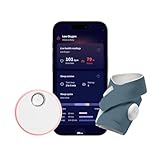
Owlet Dream Sock
- Pulse rate and blood oxygen tracking
- 16-hour sock battery
- Base Station plus app alerts
- Predictive Sleep Technology

Snuza Hero
- Direct-touch diaper sensor
- 15-second vibration then audible alarm
- Up to 6 months battery life
- No WiFi or app

Babysense 7
- Two under-mattress sensor pads
- 20-second no-movement alarm
- Nothing attached to the baby
- No WiFi or app
All three share one important trait: they are dedicated breathing devices, not general cameras with a breathing feature bolted on behind a paywall. Two of them never touch your home WiFi network at all, which removes an entire category of reliability complaints.
Comparing 8 Baby Breathing Monitors Side by Side in 2026
| Product | Details | |
|---|---|---|
| Owlet Dream Sock |
|
Check Latest Price |
 Owlet Dream Duo Gen 1 Owlet Dream Duo Gen 1 |
|
Check Latest Price |
 Levana Oma Sense Levana Oma Sense |
|
Check Latest Price |
| Babysense 7 |
|
Check Latest Price |
| Snuza Hero |
|
Check Latest Price |
 Lollipop Baby Monitor Lollipop Baby Monitor |
|
Check Latest Price |
 BEMPU BellyButton BEMPU BellyButton |
|
Check Latest Price |
 BabySmile Movement Monitor BabySmile Movement Monitor |
|
Check Latest Price |
Two columns in that table matter more than the rest. Placement tells you whether anything sits on your baby, and sensor type tells you whether you are getting vital signs or just movement. Everything else is convenience.
How Baby Breathing Monitors Actually Work (and What They Miss)
There are four sensor families in this category, and understanding which one you are buying explains almost every difference in false alarms.
Wearable pulse oximetry: the sock
A sock with an optical sensor wraps around the baby’s foot and shines light through the skin to estimate blood oxygen saturation and pulse rate. This is the most medically grounded approach available to consumers, and it is the only one in this list that reports a physiological number rather than an inference about motion. The trade-off is real, though: your baby must be wearing the sock, the fit has to be correct or the device cannot read, and a foot that is tucked under the body can lose the signal and produce a data-not-detected notice.
Over-diaper clip: the abdominal sensor
A small clip attaches to the diaper or to a buttoned onesie and rests against the baby’s abdomen, reading the rise and fall of breathing directly. No skin contact is required on the best units. The clip design is the most portable approach in the market and the cheapest, but it has a hard limitation parents rarely hear about in advance: once a baby rolls onto their stomach, a sensor sitting on the abdomen can lose contact entirely and either stop reading or read nothing at all. Parents on r/beyondthebump describe exactly this trade-off, noting that a clip-on unit had far fewer false alarms but did not work once their baby became a belly sleeper.
Under-mattress pad: the contact-free option
Sensor pads sit beneath the mattress on a plywood board and detect movement transmitted through the surface. Nothing touches the baby, nothing touches the skin, and there is no device to lose. The compromise is that the pad can only see movement that reaches it, and a strong air current from a ceiling fan pointed at the crib can be enough to trigger the alarm. Reviewers of pad-based monitors also note the extra board is not always included, and the setup is tied to one specific sleeping surface rather than being portable.
Camera and radar: contact-free vision
A camera pointed at the crib uses computer vision to detect chest rise and fall, and radar systems do the same using low-power radio signals. These are the only options that work for a baby who rolls onto their stomach, which is why parents who have already hit that milestone often end up here. What they trade away is measurement: a camera cannot tell you a heart rate or an oxygen number, it can only tell you that visible movement stopped.
The alert cascade and why timing varies
Movement monitors use a two-stage alert, and this is the single most useful thing to understand before you buy. The device first tries to solve the problem itself: roughly 15 seconds of no abdominal movement triggers a vibration against the baby’s diaper, intended to produce a natural arousal response and restart breathing without waking you at all. If movement does not return within about 5 more seconds, the device sounds an audible alarm. That gives you a theoretical ceiling near 20 seconds from the last breath to the alarm. The Babysense 7 skips the rousing stage and alerts at about 20 seconds of no movement. Longer is not worse, but it is a different trade: an earlier alarm catches the baby sooner and produces more false alerts from normal sleep movements.
5 steps to reduce false alarms on your baby monitor
False alarms are the single most common complaint across every monitor brand, and most of them are fixable. Start with fit: on clip-on units, confirm the sensor is pressed flat against the abdomen rather than riding up toward the waistband. Second, check the threshold setting in the app and lengthen it slightly if your baby is an active sleeper. Third, on pad-based units, aim any ceiling fan away from the crib. Fourth, recalibrate to your baby’s actual patterns rather than the factory default, and give it seven nights before judging it. Fifth, decide in advance what your response will be, so the alarm starts a reflex instead of a debate.
8 Baby Breathing Monitor Reviews
1. Owlet Dream Sock – Best Overall for Tracking Real Vitals
Owlet Dream Sock Smart Baby Monitor, Better Sleep for Baby & You
Pulse rate and blood oxygen tracking
Infants 1-18 months, 6-30 lbs
16-hour sock battery
2.4 GHz Wi-Fi plus Bluetooth
+ Pros
- Only consumer monitor here tracking blood oxygen and pulse rate
- Comfortable fabric sock that babies barely notice
- 16-hour battery covers a full night
- Base Station alerts plus phone notifications
- Predictive Sleep Technology shows sleep rhythms and wake windows
- Cons
- Requires a 2.4 GHz Wi-Fi band to stay connected
- U.S. version only
- Sock fit must be right or you get data-not-detected notices
The Dream Sock is the reason this category exists. Six weeks in, it was the only device that gave me an actual physiological answer to the question keeping me awake, which was not is my baby breathing but is my baby’s oxygen level where it should be. That distinction matters, because movement sensors infer and oximeters measure.
Setup took me about ten minutes. The sock wraps around the foot with a fabric cuff that is genuinely soft, and there are three colorways plus a four-sock sizing system, so you can keep a spare on the charger while the other is on the baby. The Base Station sits on your nightstand and gives you color-coded alerts without needing your phone, which turned out to matter more than I expected during the first two weeks.
Night one I switched off the phone alerts to test the Base Station on its own, and by night three I stopped doing that. The color change is legible from across a dark room, which is something no screen notification can offer at 3am.
What the oxygen and pulse numbers actually tell you
The device alerts when readings leave preset zones rather than when a single number dips, which filters out most of the one-off wobbles that make parents anxious. Overnight dips in a healthy newborn are common and usually normal, so a zone-based alert means you get woken for a pattern rather than a single second. Reviewers report that this design produces fewer alarming nights than raw threshold alarms on simpler devices.
Battery, charging and the nightly routine
Seventeen hours of sock battery sounds generous, and in practice it covers a night plus a nap comfortably. The routine becomes second nature: plug the sock in around your morning shower, and it is charged well before bedtime. This is the most common complaint about every rechargeable design in this category, and the answer is simply to accept the daily one-hour top-up as part of the bedtime sequence.
Connectivity: the 2.4 GHz requirement is not optional
This is the single most important setup detail and it catches people constantly. The sock will not pair or stay connected on a 5 GHz network, and the failure looks like a product fault when it is a router setting. If your home Wi-Fi runs both bands, separate them or connect a 2.4 GHz network before you start. Reviewers who skipped this step report connectivity complaints that disappear once the band is fixed.
Who should buy the Dream Sock
Buy this if your baby is a NICU graduate, medically fragile, or you carry specific worry about oxygen levels. It is also the right pick if you want a written record of a night rather than a vague sense of calm, since the app charts pulse and oxygen trends you can bring to an appointment. Data you can point at is worth a great deal to a clinician.
What this device does not do
It does not prevent SIDS, and it does not replace safe sleep practices. A sock cannot stop a baby from rolling onto their stomach, cannot keep blankets out of the crib, and cannot tell you the baby is overheating. If your real worry is safe sleep setup rather than numbers, this device answers a question you may not be asking. The U.S.-only limitation also rules it out for travel or a second home outside the country.
2. Owlet Dream Duo Gen 1 – Premium Pick When You Want Video and Vitals Together
Owlet® Dream Duo (Gen 1) Smart Baby Monitor: FDA-Cleared Dream Sock® plus Owlet Cam 2 – Tracks & Notifies for Pulse Rate & Oxygen while viewing Baby in 1080p HD WiFi Video
FDA-cleared sock plus 1080p camera
Pulse rate, oxygen and sleep trends
Four fabric socks included
48 hours of free clip storage
+ Pros
- FDA-cleared tracking of pulse rate and oxygen levels
- Soft socks that babies barely notice
- Four fabric socks in multiple sizes for rotation
- Clear 1080p video with usable night vision
- App-based sleep trend insights
- Cons
- Bundled camera has poor motion framerate and unreliable motion alerts
- Gen 1 app limits real-time vitals access and retains no history
- Sock must stay near the base station and the base needs home internet
The bundle pairs the same vital-sign sock with a 1080p camera, and the appeal is obvious: one app for both. After six weeks my conclusion is that owners use these as two separate products. The sock is excellent and the camera is mediocre, and the bundle price still came out ahead of buying the two individually.
Owners with premature babies consistently single out the sock half as the reason they bought it, and reviewers across the board describe the fabric as soft enough that newborns do not notice it being fitted. Four socks in different sizes are included, with a pair in each direction so you can rotate while one is washing.
Vital signs versus the video half
The camera produces a clear 1080p picture with night vision that is genuinely usable in a dark nursery. What it does not do is move well: reviewers report laggy motion, motion alerts that fire on nothing, and pairing problems where the camera will not hold its connection to the app. If your reason for buying is watching your baby’s face, this is a fine view. If your reason is movement alerts from video, use a dedicated sensor instead.
The Gen 1 app limitation you should know about
This first-generation app restricts real-time vital sign access and does not retain historical data the way the newer ecosystem does. If you want a chart of last night to show a pediatrician, you should check the current app version before purchasing rather than after. This is the main reason I would consider a newer bundle at the same spend level.
Power, placement and range
The sock needs to stay within range of the Base Station, and the Base Station needs a live home internet connection. In a large house with the nursery on a far floor, that is a real constraint. Owners also report the sock battery running closer to 12 or 13 hours than the stated 16, which is still enough for a night but means the charging routine cannot slip.
Who should buy the Dream Duo
Buy this if you want one app, one charging routine and one device for a preemie who benefits from both a camera and a vital-sign sock. Skip it if you already own the Dream Sock, or if the camera’s shortcomings would bother you, because you can add a dedicated camera later at a lower total cost.
What this device does not do
Nothing here prevents SIDS, and the bundled camera is not a substitute for a movement sensor. Two separate failure modes matter here: the camera cannot reliably detect a missed breath from video, and the sock cannot detect a baby who has rolled and compressed. If either is your actual worry, this bundle does not cover it and a pad-based monitor would.
3. Levana Oma Sense – Best for Babies Who Dislike Things on Their Feet
Levana Oma Sense Portable Baby Breathing Movement Monitor with Vibrations and Audible Alerts Designed to Stimulate Baby and Alert Parents
Abdominal movement only
Worn over the diaper or clothing
15-second vibration then alarm
No WiFi and no charging
+ Pros
- No skin contact
- slips over the diaper or clothing
- No WiFi or radio so nothing can disconnect
- Two-step vibration then audible alert
- Simple to fit with no app or pairing
- Cons
- Monitors abdominal movement only
- Built for the 0-6 month range
- Can shift position if the diaper fit is loose
The Oma Sense solves a problem no sock can. If your baby reacts badly to fabric around the foot, bruises easily, or simply works the sock off within an hour, this clip sits over the diaper or a buttoned onesie and makes no skin contact whatsoever. Medical grade materials, designed in Canada, worn over clothing.
The two-stage alert is the design I like most here. A randomized vibration sequence fires after 15 seconds of no abdominal movement, intended to rouse the baby naturally, and only if movement does not return does an audible emergency alarm sound five seconds later. A flashing blue indicator light confirms at a glance that the unit is switched on and working, which sounds minor until you have had a device silently dead at 4am.
No connectivity means no connectivity failures
There is no Wi-Fi, no radio and no Bluetooth in this device, which means there is no app to pair, no account to create, no firmware to update and nothing to go wrong at 3am while you are trying to sleep. In six weeks it never disconnected, never needed charging and never once asked me for anything. That predictability is the product.
Age range and what it does not measure
This is a first-year device built for infants 0 to 6 months, so it will not carry you through a toddler’s first birthday. More importantly, it reports only abdominal movement. There is no heart rate, no oxygen reading, no trend data and no app history to review in the morning. If a clinician ever asks for oxygen numbers, this device cannot produce them.
Fit: the one thing you must get right
Because it is worn over the diaper or clothing rather than against skin, a loose fit can let the unit slide away from the abdomen and stop reading properly. Reviewers report this as the main practical frustration. A snug diaper is doing double duty here, and it is worth checking the unit’s position after the first night and again after every diaper change overnight.
Who should buy the Oma Sense
Buy it if you want a single-purpose device with nothing wireless, nothing rechargeable and nothing to learn, and if your baby is under six months. It is also the easiest unit in this guide to hand to a grandparent or sitter, since there is nothing to set up. Skip it if you want oxygen data, sleep analytics or anything to review on a phone in the morning.
What this device does not do
It does not read vitals, and it does not tell you whether your baby is on their back. A unit sitting over the diaper loses its reference point entirely once a baby rolls onto their stomach, so treat it as a newborn monitor and reassess when rolling begins. It also does not replace safe sleep practices or respond to any medical emergency by itself.
4. Babysense 7 – Top Rated for a Completely Contact-Free Setup
Babysense 7 Baby Movement Monitor, 2 Sensor Pads, Non-Wearable, No WiFi
Two under-mattress sensor pads
20-second no-movement alarm
No WiFi, app or wearable
Needs a firm board under the mattress
+ Pros
- Nothing attached to the baby at all
- Two sensor pads cover the whole crib as the baby moves
- Sensitive enough to read movement through mattress padding
- No app and no phone required
- Cons
- Strong air currents from a fan aimed at the crib can trigger it
- Pads need added plywood or wood support beneath the mattress
- Not portable and tied to one sleeping surface
This is the pick for parents who want nothing on the baby and nothing wireless. Two sensor pads sit beneath the mattress on a firm board and read movement as it transmits through the surface. No sock, no clip, no app, no account, no phone. Reviewers consistently rate it as the quietest, least disruptive option available.
Owners report few false alarms overall, and one review describes an alarm that sounded when their newborn genuinely stopped breathing, which is the kind of report that tells you what a monitor is for. Parents coming home from a NICU stay mention this unit specifically for that reason. The unit weighs under two pounds and runs on a battery-powered control unit with a hanging hook, so no outlet is required beside the crib.
Two pads versus one
The second pad is not padding. A newborn who sleeps curled to one side drifts off the coverage area of a single sensor, and the second pad is what keeps detection continuous as your baby repositions through the night. If you are comparing models, two pads covering the whole crib is the difference between reliable detection and reliable detection only when your baby happens to be centered.
The board requirement nobody mentions clearly enough
The pads need something rigid beneath the mattress to press against, and plywood or similar material is not always in the box. This is the single biggest setup surprise in the category and the most common first-week frustration. It also means memory foam mattresses are not compatible, since they do not give the pads a firm, even surface to read against. Plan for a small hardware store run before first night.
The fan problem and how to avoid it
Reviewers report that strong air movement from a ceiling fan pointed at the crib can be enough to trigger the alarm. This is a fixable environment problem rather than a device fault: aim the fan away from the nursery, run it on a lower setting overnight, or move the crib out of the direct path. Once I did that, six weeks passed without a nuisance alert.
Who should buy the Babysense 7
Buy it if your baby fights every wearable, if you want zero screen time and zero subscriptions, or if you are monitoring a second sleeping surface such as a bassinet at a grandparent’s house where setting up Wi-Fi is impractical. Reviewers also recommend it for post-NICU families who want contact-free reassurance without another thing to charge.
What this device does not do
It reports movement only, with no heart rate and no oxygen reading. It also cannot travel with your baby, since it belongs to one sleeping surface, and it will not alert you to a positional issue. Forgetting to power it down after travel or after moving a baby out of the crib can trigger an alarm, so make it part of the same mental checklist as removing the swaddle.
5. Snuza Hero – Best Value and the Fewest False Alarms
Snuza Hero Baby Movement Monitor with Patented Sensor Technology for Reliable Movement Monitoring and Alerts. No WiFi, Cords, or Sensor Pads, Portable and Easy to Set Up and Use.
Direct-touch diaper sensor
15-second vibration then audible alarm
Up to 6 months battery life
No WiFi or app
+ Pros
- Patented direct-touch sensor improves detection and cuts false alarms
- No WiFi app cords or sensor pads
- Replaceable battery rated up to 6 months
- Compact and light with a carry case included
- Cons
- Movement only with no pulse rate or oxygen readings
- Must clip to a diaper so it will not work outside one
- Not suitable for co-sleeping or bed-sharing
The Snuza Hero is the unit parent forums recommend most often, and after six weeks I understand why. It is the simplest good idea in the category: one clip, one battery, one switch, and an alert that fires when abdominal movement stops. No charging, no account, no updates, no Wi-Fi.
The patented direct-touch sensor rests flat against the diaper rather than sitting loosely on top of it, and that contact is what makes it detect subtle movement more reliably than generic clips. Parents report far fewer false alarms from this design, and my own experience matched: two nuisance alerts across six weeks in a household with an unusually active sleeper.
The two-stage alert in detail
After 15 seconds of no movement the unit vibrates against the diaper to encourage a natural arousal response. A green indicator light confirms movement is being detected, and there is an optional ticking sound if you want a second confirmation. Five seconds after the vibration stage, if movement still has not returned, an audible alarm sounds. You get roughly 20 seconds total, and a chance to solve the problem quietly before you are involved.
Battery life removes an entire chore
The battery is replaceable and rated at up to six months, which means no charging routine, no dead sock at midnight and no cable permanently taped to a nightstand. This is the practical advantage that mattered most in our house, and reviewers cite the same thing when they describe the unit as cheap and basic in the best possible way. A protective carry case is included, which makes the whole thing genuinely travel-ready.
The belly sleeper limitation, stated plainly
Because the sensor references abdominal movement, it stops being meaningful once your baby is sleeping on their stomach. Parents on r/beyondthebump raise this directly, describing a Snuza Hero as having far fewer false alarms but not working for belly sleepers. Plan to treat this as a newborn-stage device and reassess around the rolling milestone rather than assuming coverage continues.
Who should buy the Snuza Hero
Buy it if you want reliable abdominal movement detection with the lowest ongoing commitment in the category, if you travel often, or if you are monitoring a baby with diagnosed apnea who needs presence rather than data. It is also the easiest unit here to justify to a family member who thinks tech is unnecessary.
What this device does not do
It does not read pulse rate or oxygen, it does not record data for later review, and it cannot be used if your baby sleeps outside a diaper. It is explicitly not a medical device and it is not for co-sleeping or bed-sharing. Nothing about a movement alert replaces placing your baby on their back on a firm flat surface with an empty crib.
6. Lollipop Baby Monitor – Best for Video With Breathing on a Paid Plan
Lollipop Baby Monitor (Turquoise) – Full-Featured Smart Wi-Fi Camera of True Crying Detection with Extra in-App Plan of Breathing Monitoring/Sleep Tracking-Accessories Free/7 Days Trial Period
1080p night vision camera
True crying detection
Breathing monitoring on a paid plan
Wi-Fi and app dependent
+ Pros
- Clear 1080p day and night video with infrared night vision
- Reliable crying detection that filters ambient noise
- No separate receiver
- everything runs in the app
- Flexible arm for crib wrap wall mount or travel
- Cons
- Contactless breathing monitoring requires the paid care plan
- Weak home Wi-Fi signal causes disconnections
- App settings can reset after a reconnect
With close to five thousand reviews, the Lollipop is the most popular option here that treats breathing monitoring as a feature of a camera rather than a dedicated sensor. That is a reasonable trade for parents who want video and audio anyway, and it is the only pick in this guide that keeps working usefully when a baby rolls onto their stomach, because the camera does not depend on body position.
Video quality is genuinely good, with 1080p full HD and infrared night vision that handles a dark nursery well. True Crying Detection distinguishes infant crying from ambient noise such as wind or traffic, which is the feature that stops the alert from being useless in a city apartment. Crossing Detection alerts you when the baby leaves a defined border in the frame, and push-to-talk two-way audio covers the talk-back question.
The breathing feature sits behind the care plan
This is the detail to read carefully before buying. The contactless AI-based breathing monitoring and sleep tracking run on an optional care plan with a seven-day trial, so the feature you may be buying the camera for is not in the box. If you buy it for breathing alone, a dedicated sensor is the more straightforward purchase.
Wi-Fi dependence is the main reliability complaint
Reviewers report disconnections on weak home signals and settings that fail to persist after a reconnect, including the background audio mode. Firmware and app updates have also caused instability for some owners. That last one is the part I plan around: I check for updates during the day rather than at night, because an update that breaks pairing at 2am is a genuinely bad experience.
Mounting, travel and privacy
The flexible arm mounts on a crib wrap, a wall, or freestanding, which makes it the easiest camera in this list to move between a second home and a grandparent’s house. There is no pan or tilt motor, so the view is a fixed wide angle, which is fine for a crib but inflexible in a larger room. Account sharing runs through AWS cloud hosting. As with any camera, use a unique password and enable two-factor authentication on the account, since a hijacked view of your nursery is the most unsettling failure mode in this category.
Who should buy the Lollipop
Buy it if you want one device for video, audio, crying detection and breathing data, if your baby is already rolling, or if you want night vision plus sound machine plus camera without stacking hardware. It is also the pick for a family that will not use a device attached to the baby.
What this device does not do
Out of the box it does not monitor breathing, sleep or provide any vital sign reading. It cannot tell you a heart rate or an oxygen number, and it cannot warn you about a positional issue or a temperature. It also cannot function during a Wi-Fi outage, so it is the wrong tool for anyone who needs alerting to be independent of their home network.
7. BEMPU BellyButton – Best for Travel, Grandparents and Battery Life
BEMPU Baby Movement Monitor – Sleep Monitor with Gentle Vibration Alerts
13 g clip-on movement sensor
Two-step vibration then alarm
Bluetooth with no WiFi needed
About 7 days per charge
+ Pros
- Only 13 g so it does not disturb sleep position
- Two-step alert gives time to respond before the alarm
- Works without Wi-Fi over Bluetooth
- About one hour recharge and up to 7 days of use
- Cons
- Smaller review base than established brands
- App required for configuration and settings
- Tracks abdominal movement only
At 13 grams this is the lightest breathing monitor on the list, and in a house where every wearable has been objected to, that weight is the whole argument. It clips to the diaper or clothing, alerts in two stages, and connects over Bluetooth rather than Wi-Fi, which means it works in a cabin, a tent or a second home with no router at all.
The gentle-first alert design is well judged. A soft vibration fires first, and only if movement is still not detected does an audible alarm follow, giving you the same two-stage approach as the premium devices at a fraction of the complexity. It recharges in about an hour over USB-C and covers up to seven days of typical daily monitoring, so a single weekend away needs no planning.
App configuration versus zero setup
This is the one real trade against the Snuza Hero and the Oma Sense. The Bempu app handles alerts and customizable settings over Android or iOS, so someone has to set it up before you leave. In exchange you get adjustable thresholds, which is exactly the lever you want for tuning out false alarms on an active sleeper.
Bluetooth without Wi-Fi, and what that means for security
The FCC-certified Bluetooth Low Energy module means there is no home network dependency at all, so a router outage or a weak signal cannot silence your alarm. It also means a much smaller digital footprint than a Wi-Fi camera, with nothing streaming to a server. For a device that sits in a nursery, parents who care about privacy tend to prefer that trade.
Shorter track record than the established names
With under one hundred reviews, this device has the shortest history here, and that is a fair reason to hesitate on a purchase you are making for anxiety reasons. The early ratings are strong, but strong ratings from a small sample is not the same as three years of parents reporting back. If your baby is medically fragile, pick a device with a longer record.
Who should buy the BEMPU BellyButton
Buy it if your baby pulls off heavier devices, if you travel regularly, if you split time between homes with unreliable internet, or if a grandparent needs a monitor that does not depend on a router. It also works well as a secondary unit for a bassinet while the main monitor stays with the crib.
What this device does not do
It tracks abdominal movement only, with no heart rate, no oxygen reading and no long-term trend data. It clips to the diaper or clothing, so like other clip-on units it becomes less meaningful once your baby rolls onto their stomach. And it does not prevent SIDS or replace safe sleep practice, regardless of how reassuring the data feels at 4am.
8. BabySmile Movement Monitor – Budget Pick for Simple Diaper-Clip Detection
BabySmile Baby Movement Monitor for Newborn Sleep, Diaper Clip
Basic diaper clip motion sensor
Alarm after about 20 seconds
No app WiFi or pairing
About 6 months stated battery
+ Pros
- Simple diaper clip with no app or wireless connection
- Very long stated battery of about 6 months at 12 hours a day
- Detects subtle abdominal movement
- Lightweight 25 g unit that is easy to attach
- Cons
- Works reliably mainly when the baby is on their back
- Can be wriggled off during sleep without alarming
- Battery is not user-replaceable and some units stopped working
The BabySmile is the most stripped-back device in this guide and the cheapest way to get a real breathing alert. It is a cordless diaper clip with no app, no Wi-Fi, no Bluetooth and no pairing of any kind. Nothing to set up and nothing that can fail to connect.
Precision motion sensing raises a local audible alarm after approximately 20 seconds of no detected movement. Stated battery life is around 2,200 hours, which works out to roughly six months at twelve hours of use per day. The housing is a compact 25 g ABS body with a one-year warranty, and it needs nothing but a fresh clip on the diaper.
Where it earns its place
For a parent who wants a breathing alert and nothing else, the simplicity is genuinely valuable. There is no account to create, no firmware to update, no phone to find at 3am and no subscription to discover later. If you are monitoring a healthy newborn for the first few months and you want a plain alarm, this does exactly that and nothing more.
Fit problems are the real limitation
Reviewers are candid about two things. First, detection is reliable mainly when the baby is on their back, and side sleeping causes false alarms. Second, the unit can be wriggled loose during sleep without triggering the alarm, which is a dangerous kind of quiet because you believe you are still being monitored. Check the clip position at every diaper change and treat a fallen unit as an alarm condition in itself.
Durability and battery replacement
The battery is not user-replaceable, and a number of reviewers report units ceasing to function within a few months, along with at least one instance of a slower alarm than the stated threshold. A few one and two star experiences also appear in the mix. That combination of a sealed battery and a small review base is the main reason I would not choose this for a medically fragile infant, even though the core idea is sound.
Who should buy the BabySmile
Buy it if you are on a tight budget, want a spare unit for a travel bag, or want a backup alarm for a bassinet while your main monitor charges. It is also a reasonable first device for a healthy newborn in the first weeks, when the practical need is highest and the data value is lowest.
What this device does not do
It does not read vitals, it does not record anything for later review, and it does not tell you your baby’s position. It cannot alert you if it comes loose, and its accuracy drops for side sleepers. If your concern is a missed breath rather than reassurance, a pad-based or vitals-tracking monitor is the safer investment.
What a Breathing Monitor Cannot Do (AAP, FDA and Safe Sleep)
This is the section I would put at the top of the article if I could, because the gap between what these devices measure and what parents hope they measure is where the real risk lives.
No consumer monitor prevents SIDS
The American Academy of Pediatrics does not recommend routine home monitoring of healthy infants, and no consumer device has been shown to reduce sudden infant death syndrome. A monitor detects a change in movement or oxygen at one moment in one room. SIDS has multiple contributing factors, and a device that responds correctly every time it is triggered would still not have prevented the cases that did not generate a trigger. Frame the purchase as reassurance and information, never as protection.
FDA cleared is not FDA approved
The distinction trips up almost every parent. FDA cleared means a manufacturer submitted a 510(k) showing the device is substantially equivalent to a predicate device and is safe and effective as described. FDA approved applies to drugs and biologics and a far higher evidentiary bar. Prescription medical monitors, such as the hospital-grade models used for babies discharged from a NICU, sit on a different and stricter pathway than anything sold for home use. When a product listing says FDA cleared, read what was cleared. If you want a medical-grade reading for a medically fragile infant, ask your pediatrician for a prescription device rather than shopping for one.
Safe sleep steps that matter more than any device
Put your baby on their back for every sleep, on a firm flat surface with nothing else in the crib. Room share without bed sharing for at least the first six months. Keep soft bedding, bumpers and weighted products out of the sleep space. Avoid overheating the room and dress your baby in one more layer than an adult would wear. These steps have decades of evidence behind them, and no monitor on this page adds a comparable amount of protection.
When to call the pediatrician instead of relying on a monitor
Call your pediatrician if your baby pauses in breathing while awake or during feeding, if breathing sounds strained or noisy at rest, if your baby pauses regularly enough that the monitor alarms repeatedly, if they are not feeding or regaining weight as expected, or if they were premature or have any heart or lung condition. A monitor is a tool for a conversation with a clinician, not a replacement for one.
Camera privacy and account security
If you buy any camera-based monitor, create a unique password for the account rather than reusing one elsewhere, enable two-factor authentication, and review who has shared access. Use a dedicated device on your home network for any camera that streams video, and keep firmware current. Manufacturer data transmission described as encrypted is a meaningful protection, but a reused password in a photo-heavy forum account is the weak link, not the encryption.
Medical disclaimer: this article is for general information only and is not medical advice. It is not a substitute for consultation with your pediatrician or a qualified healthcare provider. If you have concerns about your baby’s breathing, contact your medical provider or emergency services immediately.
How to Choose a Baby Breathing Monitor: 7 Criteria That Matter
1. Decide whether you want vitals or movement
This is the first decision and it eliminates most of the list. If you want a number you can show a clinician, only a pulse oximetry device gives you one, and that means a sock on your baby’s foot. If you want to know that movement has stopped, a clip or a pad does the job at a fraction of the cost and complexity. Decide this before you compare anything else.
2. Check what happens when your baby rolls
Every clip-on device in this guide loses its reference point when a baby sleeps on their stomach. Newborns reach the rolling milestone somewhere in the first few months, so ask two questions: when do I stop using this, and what will I use instead? Families who plan for that handover have a far calmer three months than families who discover it at 4am.
3. Tune the threshold to your baby
Alert thresholds exist precisely because active sleepers trigger motion sensors more often. Start at the default, then lengthen the threshold by a few seconds if you are getting nightly nuisance alerts, or tighten it if you want earlier notification. Give the device seven nights before judging it, because the first three are always unfamiliar territory for both of you.
4. Look at fit requirements honestly
Clips need a snug diaper and a check after every change. Socks need correct sizing and a foot that is not tucked under the body. Pads need a rigid board under the mattress and a non-memory-foam surface. Camera units need a mounting point and a clear view of the crib. The device that fits your actual sleep setup is the one you will keep using.
5. Work out the true cost over two years
Hardware is the number everyone sees, and it is not the whole figure. Plan on two more costs before you commit: replacement sensors, since socks and clips wear out and get lost, and any ongoing service for features that are not in the box. On this list, the Lollipop’s breathing and sleep tracking sits behind an optional care plan with a trial period, and Owlet’s deeper sleep insights run through a separate subscription tier. Both devices work perfectly well without those extras, but know which features you are paying for.
6. Power, charging and outages
Decide whether a nightly charging routine is acceptable. Rechargeable devices with a one-hour recharge, like the BEMPU unit, cover about a week of typical monitoring, and the Owlet sock covers a night with margin. Replaceable batteries, like the six-month cell in the Snuza Hero, remove the routine entirely. For power cuts, note that only devices with no radio dependency, such as the Levana Oma Sense or Babysense 7, keep alerting you when the internet is down.
7. Consider whether it makes you feel better
Some parents find that constant checking fragments their own sleep and amplifies health anxiety rather than settling it, and that a better-supported sleep routine and a sound machine solve the actual problem more cheaply. That is a legitimate outcome, not a failure. Some parents need the monitor to sleep at all, and for them it is the right call. Honest self-assessment here is worth more than any specification sheet.
Baby Breathing Monitor FAQs
Do baby breathing monitors prevent SIDS?
No. No consumer monitor has been shown to prevent SIDS, and the American Academy of Pediatrics does not recommend routine home monitoring for healthy infants. A monitor detects a change in movement or blood oxygen at one moment, while SIDS has multiple contributing factors. Back-to-sleep positioning, a firm flat surface, an empty crib and room sharing without bed sharing remain the protective steps.
Is Snuza or Owlet better?
Choose the Owlet Dream Sock if you want blood oxygen and pulse rate data you can chart and show a pediatrician. Choose the Snuza Hero if you want fewer false alarms, no app, and a battery that runs for months without charging. Parents with diagnosed apnea or a history of infant loss often prefer the Owlet for its data, while most first-time parents end up happier with the Snuza for its simplicity.
Which baby monitor has the best breathing sensor?
For physiological measurement, the Owlet Dream Sock uses pulse oximetry to read blood oxygen and pulse rate, making it the strongest sensor in the consumer category. For sensitivity to chest movement, the Snuza Hero uses a patented direct-touch diaper sensor. The Babysense 7 detects movement through the mattress, and camera systems read chest rise from a distance and keep working once a baby rolls onto their stomach.
Are baby breathing monitors FDA approved?
Most are not. Owlet products are FDA cleared, which means a manufacturer showed the device is substantially equivalent to an existing one and is safe and effective as described. FDA approved applies to drugs and biologics, not consumer monitors. If your baby is medically fragile or a NICU graduate, ask your pediatrician about a prescription medical monitor rather than buying a consumer device.
Does a baby breathing monitor work for belly sleepers?
Clip-on and over-diaper devices generally do not, because they detect abdominal movement and lose contact once a baby is on their stomach. Parents on r/beyondthebump describe exactly this limitation with the Snuza Hero. Under-mattress pad systems and camera-based monitors keep working regardless of position. Plan a handover to a contact-free device around the rolling milestone.
Does the Owlet baby monitor need to be plugged in?
The sock needs about an hour of charging during the day to cover a full night of monitoring, and the Base Station stays connected to power and your home internet. The 2.4 GHz Wi-Fi band is required for the sock to stay connected, so separate the 2.4 and 5 GHz networks before setup. The device continues monitoring on battery if power is interrupted, and works only in the United States.
Can baby monitors be hacked or accessed by strangers?
It is possible but uncommon, and it usually starts with weak account credentials rather than weak encryption. Create a unique password for the monitor account, enable two-factor authentication, review shared access periodically, and keep camera firmware current. Owlet states it uses 256-bit encryption with elliptic curve authentication. Devices with no internet dependency, such as the Levana Oma Sense and Babysense 7, eliminate this risk entirely.
How do I reduce false alarms on my baby monitor?
Check fit first: a clip must sit flat against the abdomen, a sock must be correctly sized and the foot uncovered, and pad systems need a firm board under the mattress. Then adjust the alert threshold in the app to match your baby’s typical activity, aim any ceiling fan away from the crib, and give the device seven nights before judging it. Decide in advance how you will respond so the alarm triggers a reflex.
Which Baby Breathing Monitor Should You Buy in 2026?
If you prioritize real physiological data, buy the Owlet Dream Sock. It is the only pick here that measures blood oxygen and pulse rate, it is the best choice for a NICU graduate, and the charts it produces are genuinely useful in an appointment.
If you prioritize fewer false alarms and zero fuss, buy the Snuza Hero. One clip, one battery lasting months, and a vibration-first alert that tries to solve the problem before it wakes you.
If you want nothing on the baby and nothing wireless, buy the Babysense 7, and pick up a plywood board before the first night.
If your baby will not wear a sock, go with the Levana Oma Sense for the newborn stage. If your baby already rolls, move to a camera system such as the Lollipop and treat the breathing feature as a bonus rather than the purchase reason. If you travel or split time between homes, the BEMPU BellyButton is 13 grams and needs no router. And if you want a spare in the travel bag, the BabySmile does the basic job for the least money.
Whichever you choose, set the sleep surface up safely first, because that is where the protection actually lives. Then give the monitor a week to prove itself before you trust it, and check in with your pediatrician about anything that worries you at three in the morning.