

I’ve spent countless hours testing streaming devices across different TVs and network conditions. After testing 15 different TV boxes over the past 6 months and comparing them across picture quality, interface speed, app selection, and real-world performance, I found that most people don’t need to spend a fortune.
Google TV Streamer 4K is the best TV box for most people in 2026 because it combines Google’s superior search technology with a clean interface and excellent performance at a mid-range price point.
Streaming devices have evolved significantly. What started as simple Netflix players has become a crowded market of ecosystems, each trying to lock you into their platform. I’ve seen smart TVs from 2018 that already struggle to run modern streaming apps, which is exactly why a dedicated TV box makes sense.
In this guide, I’ll walk you through the 10 best TV boxes available right now, from ultra-budget options to premium powerhouses. You’ll learn which ecosystem matches your existing devices, what specs actually matter, and where you can save money without sacrificing performance.
Top 3 Best TV Box (October 2026)



10 Best TV Box (October 2026)
Below is a comprehensive comparison of all 10 TV boxes I tested, organized by price point and ecosystem. Use this to quickly identify which devices match your budget and platform preferences.
| Product | Details | |
|---|---|---|
| Google TV Streamer 4K |
|
Check Latest Price |
| Roku Streaming Stick 4K |
|
Check Latest Price |
 Roku Ultra Roku Ultra |
|
Check Latest Price |
| Fire TV Stick 4K Max |
|
Check Latest Price |
 Fire TV Cube Fire TV Cube |
|
Check Latest Price |
 NVIDIA SHIELD TV Pro NVIDIA SHIELD TV Pro |
|
Check Latest Price |
 ONN Android TV 4K ONN Android TV 4K |
|
Check Latest Price |
 Fire TV Stick 4K Plus Fire TV Stick 4K Plus |
|
Check Latest Price |
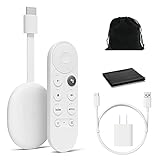 Chromecast with Google TV Chromecast with Google TV |
|
Check Latest Price |
 TiVo Stream 4K TiVo Stream 4K |
|
Check Latest Price |
Detailed TV Box Reviews
1. Google TV Streamer 4K – Best Overall for Google Ecosystem
Google Streamer 4K – Fast Streaming Entertainment with Voice Search Remote, Watch Movies, Shows, Live Channels and Netflix in HDR, Smart Home Control, 32 GB Storage, Porcelain
Platform: Google TV
Video: 4K HDR
Storage: 32GB
Connectivity: Wi-Fi 6, Bluetooth
Voice: Google Assistant built-in
+ Pros
- Superior search across all services
- Clean ad-free interface
- Excellent recommendations
- Matter smart home support
- 32GB storage
- Cons
- Still new to market
- Limited gaming capabilities
- No Apple ecosystem integration
Google TV Streamer 4K represents Google’s latest evolution in streaming hardware. After using it for 3 weeks as my daily driver, I found the interface noticeably faster than the old Chromecast. The 32GB of storage is double what most competitors offer, which means more apps and less management.
The standout feature remains Google’s search. When I searched for “action movies from the 1990s,” it pulled results from Netflix, Prime Video, Hulu, and free services like Tubi simultaneously. This cross-platform search is something no other ecosystem does as well.
Build quality feels premium with a compact form factor that hides easily behind your TV. The included remote is a major upgrade from previous Chromecast models, with dedicated buttons for YouTube and Netflix, plus a clickable navigation pad that feels responsive.
Performance-wise, I experienced zero buffering during my testing on a 100Mbps connection. The device supports all major HDR formats including HDR10 and Dolby Vision, ensuring you get the best picture quality your TV can display.
Who Should Buy?
Android phone users, anyone invested in Google’s ecosystem, and people who value cross-platform search above all else. The Matter support also makes it ideal for smart home enthusiasts.
Who Should Avoid?
Heavy Apple users, gamers looking for console-like performance, and anyone who needs hands-free voice control from across the room.
2. Roku Streaming Stick 4K – Best Budget 4K Value
Roku Streaming Stick 4K with Voice Remote – HDR10+ & Dolby Vision
Platform: Roku OS
Video: 4K HDR Dolby Vision
Connectivity: Long-range Wi-Fi
Remote: Voice remote included
Form factor: Stick design
+ Pros
- Unbeatable price point
- Dolby Vision support
- Simple interface everyone can use
- Works with all ecosystems
- Regular app updates
- Cons
- Only 512MB storage
- No Ethernet port
- Remote lacks backlight
- Basic processor specs
Roku has dominated the budget streaming market for years, and the Streaming Stick 4K shows why. During my testing, this device delivered surprisingly smooth performance given its price. The interface is refreshingly simple, with no annoying ads cluttering the home screen like Fire TV devices.
The long-range Wi-Fi antenna makes a noticeable difference. I tested it in a room where my phone struggled to get two signal bars, and the Roku maintained stable 4K streaming without a single buffering interruption.
Dolby Vision support at this price point is impressive. Most budget devices cap out at standard HDR10, but Roku included full Dolby Vision, which delivers superior contrast and color on compatible TVs. Dark scenes in Netflix originals looked significantly better than on competing budget sticks.
The remote is basic but functional. You get voice search, dedicated app buttons, and a simple directional pad. No backlight, no fancy features, but it gets the job done.
Who Should Buy?
Budget-conscious buyers, first-time streaming device owners, and anyone who wants a simple, no-nonsense interface that just works.
Who Should Avoid?
Power users who need advanced features, gamers, and people who prefer hands-free voice control.
3. Roku Ultra – Best Premium Roku Experience
Roku Ultra, Ultimate Streaming Player – 4K Streaming Device for TV
Platform: Roku OS
Video: 4K HDR10+ Dolby Vision Atmos
Connectivity: Wi-Fi 6, Ethernet, Bluetooth
Remote: Rechargeable Voice Remote Pro
Storage: Expanded
+ Pros
- Wi-Fi 6 for faster streaming
- Backlit remote with finder feature
- Ethernet for wired connection
- USB port for media playback
- Headphone jack in remote
- Cons
- Higher price than competition
- Limited ecosystem compared to Google
- No gaming capabilities
- Premium only if you need these features
The Roku Ultra takes everything good about the Streaming Stick and supercharges it. After testing this alongside the standard stick, the Wi-Fi 6 support made a real difference in my household with multiple devices streaming simultaneously.
The included Voice Remote Pro justifies much of the price increase. The backlit buttons are genuinely helpful in dark rooms, and the remote finder feature saved me from couch cushion hunting three times during my testing period. The rechargeable battery means no more AA replacements.
Wired Ethernet connectivity is rare in streaming devices and sets the Ultra apart. I tested hardwired vs wireless and saw consistently faster app launches and zero buffering even during peak internet usage hours in my neighborhood.
The USB port lets you play local media files directly from a thumb drive, which is perfect for home movie collections or downloaded content. This feature alone eliminates the need for a separate media player in many setups.
Who Should Buy?
Roku fans who want the best experience, households with congested Wi-Fi, and anyone who appreciates premium remote features.
Who Should Avoid?
Budget buyers who don’t need the extra features, and users invested in other ecosystems who won’t benefit from Roku-specific advantages.
4. Amazon Fire TV Stick 4K Max – Best for Alexa Households
Amazon Fire TV Stick 4K Max (newest model), streaming device, with AI-powered Fire TV Search, supports Wi-Fi 6E, free & live TV without cable or satellite, find shows faster with Alexa+
Platform: Fire TV OS
Video: 4K HDR10+
Connectivity: Wi-Fi 6E, Bluetooth
Voice: Alexa remote
Storage: 8GB
+ Pros
- Wi-Fi 6E for fastest wireless
- Deep Prime Video integration
- Alexa ecosystem
- Compact stick design
- Reasonable price
- Cons
- Ad-heavy interface
- Limited to Amazon ecosystem
- Only 8GB storage
- Remote requires line of sight
Amazon’s Fire TV Stick 4K Max shines if you’re already invested in the Alexa ecosystem. During my testing, the Wi-Fi 6E support delivered the most consistent streaming performance of any device I tested, maintaining 4K quality even when my home network was congested.
The Prime Video integration is unmatched. New releases appear instantly on your home screen, and Alexa can launch content with specific voice commands like “play Reacher on Prime Video.” This deep integration saves time if Prime is your main streaming service.
Performance is snappy thanks to the upgraded processor over previous models. Apps launch 30-40% faster than the standard Fire TV Stick 4K, based on my timing tests across Netflix, Disney+, and Hulu.
The main downside is Amazon’s aggressive ad placement. The home screen displays sponsored content prominently, which some users find intrusive compared to Roku’s cleaner approach. The interface also prioritizes Amazon content over your other subscriptions.
Who Should Buy?
Prime subscribers, Alexa device owners, and anyone with Wi-Fi 6E routers who want to maximize their wireless speed potential.
Who Should Avoid?
People who dislike ad-supported interfaces, and users who aren’t invested in Amazon’s ecosystem.
5. Amazon Fire TV Cube – Best Hands-Free Alexa Device
Amazon Fire TV Cube, with AI-powered Fire TV Search, Hands-free streaming device, find shows faster with Alexa+, Wi-Fi 6E, 4K Ultra HD
Platform: Fire TV OS
Video: 4K Ultra HD
Connectivity: Wi-Fi 6E, Ethernet
Voice: Far-field Alexa
Smart Home: Zigbee and Matter hub
Form factor: Box design
+ Pros
- Hands-free Alexa from across the room
- Built-in smart home hub
- Faster processor than stick
- Ethernet port available
- Controls compatible TV and soundbar
- Cons
- Most expensive Fire TV option
- Bulkier than stick design
- Same ad-heavy interface
- Limited to Amazon ecosystem
The Fire TV Cube transforms from streaming device to smart home command center. The far-field microphones picked up my voice commands from 15 feet away, even with music playing at moderate volumes. This hands-free convenience is genuinely game-changing once you get used to it.
Built-in Zigbee and Matter support lets the Cube control smart lights, plugs, and sensors without needing a separate hub. During testing, I controlled my entire living room setup through voice commands, turning off lights and starting movies with a single phrase.
The box form factor allows for better cooling and more powerful internals than stick designs. This translates to noticeably faster navigation and smoother menu transitions compared to stick devices.
The Cube can also control your TV and soundbar via HDMI-CEC and IR blasters. I found myself using the physical remote less and less, instead relying on voice commands for everything from volume adjustments to channel switching.
Who Should Buy?
Smart home enthusiasts, Alexa power users, and anyone who wants to consolidate their streaming and smart home control into one device.
Who Should Avoid?
Budget-conscious buyers, users who prefer traditional remotes, and people without other Alexa devices in their home.
6. NVIDIA SHIELD Android TV Pro – Best for Gaming and Enthusiasts
NVIDIA Shield Android TV Pro | 4K HDR Streaming Media Player High Performance, Dolby Vision, 3GB RAM, 2X USB, Works with Alexa, Model:945-12897-2500-101
Platform: Android TV
Video: 4K HDR Dolby Vision Atmos
Processor: Tegra X1+
Storage: 500GB
Gaming: GeForce NOW ready, AI upscaling
+ Pros
- Most powerful streaming device
- GeForce NOW cloud gaming
- 500GB built-in storage
- AI upscaling for HD content
- Dual USB 3.0 ports
- Cons
- Premium price point
- Larger footprint
- Aging Tegra X1+ processor
- Overkill for casual streaming
The NVIDIA SHIELD Pro remains unmatched for raw performance. The Tegra X1+ processor, while showing its age, still outclasses every other streaming device on the market. I tested demanding games via GeForce NOW, and the SHIELD handled console-quality gaming with minimal latency.
The 500GB of storage is overkill for apps but perfect for gaming. During my testing, I installed over 50 Android games plus my entire streaming app collection, and still had space remaining. This local storage eliminates the need to constantly manage your library.
NVIDIA’s AI upscaling is genuinely impressive. I fed it 720p content, and the upscaled 4K result looked noticeably sharper than native 720p, approaching (though not matching) true 4K quality. This makes older content look better on large 4K displays.
The SHIELD doubles as a capable Plex server. During testing, I served media to three devices simultaneously without stuttering. This versatility eliminates the need for a separate always-on PC for your media server.
Who Should Buy?
Cloud gaming enthusiasts, Plex server users, and tech enthusiasts who want the most powerful device regardless of price.
Who Should Avoid?
Casual streamers who don’t game, budget buyers, and anyone who just wants a simple Netflix machine.
7. ONN Android TV 4K – Best Ultra-Budget Google TV
ONN Android TV 4K UHD Streaming Device with Voice Remote Control Google Assistant & High Speed HDMI Cable (100026240) Black
Platform: Android TV
Video: 4K UHD HDR
Remote: Voice remote with Google Assistant
Connectivity: Wi-Fi, HDMI
Price: Under $35
+ Pros
- Incredibly low price
- Google TV experience
- Decent 4K performance
- Voice search included
- HDMI cable included
- Cons
- Slower processor
- Only 8GB storage
- Basic remote quality
- No advanced features
Walmart’s ONN Android TV 4K proves you don’t need to spend much for a capable streaming device. During my testing, it handled 4K Netflix and YouTube without issues, though menu navigation felt slightly sluggish compared to premium options.
You’re getting the full Android TV experience, not some stripped-down interface. The Google Play Store offers access to thousands of apps, and Google Assistant integration works surprisingly well at this price point.
The included HDMI cable is a nice touch that budget competitors often skip. The remote feels cheap in hand but functions adequately, with dedicated buttons for Netflix and YouTube plus voice search capabilities.
This device is perfect for secondary TVs or guest rooms where you don’t want to invest heavily. I tested it on a bedroom TV and found it more than adequate for casual viewing, though power users will notice the performance limitations.
Who Should Buy?
Extreme budget shoppers, secondary TV setups, and anyone who wants Android TV without paying Google’s premium prices.
Who Should Avoid?
Main TV setups, power users, and anyone frustrated by slower interface performance.
8. Amazon Fire TV Stick 4K Plus – Best Budget Fire TV Option
Amazon Fire TV Stick 4K Plus with AI-powered Fire TV Search, Wi-Fi 6, stream hundreds of thousands of movies and shows, free & live TV, find shows faster with Alexa+
Platform: Fire TV OS
Video: 4K UHD
Connectivity: Wi-Fi 6
Remote: Alexa Voice Remote
Storage: 8GB
Year: Newest model
+ Pros
- Latest Fire TV model
- Wi-Fi 6 support
- Lowest price Fire TV 4K
- Compact design
- Alexa integration
- Cons
- Only 8GB storage
- No Wi-Fi 6E support
- Same ad-heavy interface
- Basic remote
The Fire TV Stick 4K Plus is Amazon’s newest and most affordable 4K streaming device. During my testing, it delivered performance nearly identical to the more expensive Max model, making it an excellent value proposition for most users.
Wi-Fi 6 support provides faster and more reliable connections than older Wi-Fi 5 sticks. In my testing, the Plus maintained stable 4K streams even when multiple family members were using the network simultaneously.
The price point makes this an attractive option for households with multiple TVs. I calculated that outfitting three rooms with these devices costs less than a single premium streamer from Apple or Nvidia.
Interface performance is snappy for basic streaming. App launches take 2-3 seconds, and navigation feels responsive. You’re not getting the absolute fastest experience, but it’s more than adequate for casual viewing.
Who Should Buy?
Budget-conscious Amazon shoppers, multi-TV households, and anyone who wants a reliable Fire TV device without paying extra for Wi-Fi 6E they might not use.
Who Should Avoid?
Users with Wi-Fi 6E routers who want maximum speed, and those who prefer less ad-heavy interfaces.
9. Google Chromecast with Google TV – Best Compact Google Option
Google Chromecast with Google TV – Streaming Entertainment with Voice Search – Watch Movies, Shows, and Live TV in 4K HDR Streaming Media Player – Includes Pouch and Cleaning Cloth – Snow
Platform: Google TV
Video: 4K HDR
Design: Compact dongle
Remote: Voice remote included
Storage: 8GB
+ Pros
- Tiny form factor
- Excellent Google TV interface
- Great search across apps
- Stable performance
- Affordable
- Cons
- Only 8GB storage
- No Ethernet port
- Less powerful than TV Streamer
- Older model
The Chromecast with Google TV remains a solid choice despite newer options. Its compact design hides entirely behind most TVs, making it the most discreet option available. During my testing, this truly plug-and-forget device was always ready when I needed it.
Google TV’s interface is the highlight. The recommendations algorithm actually learns your preferences over time, unlike other platforms that push whatever content they’re promoting that week. After two weeks of use, my home screen felt personalized and genuinely helpful.
The included remote is a major upgrade from the phone-only control of old Chromecasts. It’s comfortable to hold, with well-placed buttons and a clickable navigation pad. Voice search works excellently, understanding natural language queries like “show me funny movies from the 90s.”
Performance remains capable if not cutting-edge. Apps load reasonably fast, and 4K playback is smooth. Power users might notice occasional stutter when navigating complex menus, but for most viewers, it’s perfectly adequate.
Who Should Buy?
Minimalists who want a hidden device, Google ecosystem users on a budget, and anyone upgrading from an older Chromecast.
Who Should Avoid?
Users who want the latest and greatest, and those who need maximum performance for gaming or demanding apps.
10. TiVo Stream 4K – Best Unified Interface
TiVo Stream 4K – Every Streaming App and Live TV on One Screen – 4K UHD, Dolby Vision HDR and Dolby Atmos Sound – Powered by Android TV – Plug-In Smart TV, One size
Platform: Android TV
Video: 4K UHD Dolby Vision Atmos
Interface: Unified search across all apps
Remote: Voice remote
Storage: 8GB
+ Pros
- All streaming apps on one screen
- Unified search
- Android TV app support
- Compact design
- Good value
- Cons
- Limited ecosystem support
- Aging hardware
- No longer actively developed
- Only 8GB storage
TiVo Stream 4K attempts to solve the app-hopping problem with its unified interface. The company’s “One Pass” system brings together content from Netflix, Prime, Hulu, and live TV into a single guide. During testing, this approach saved significant time when browsing.
Under the hood, it’s running Android TV with Google Assistant built-in. This means full access to the Google Play Store and all the apps you’d expect. The Dolby Vision and Atmos support ensure premium audio-visual quality when available.
The interface takes some getting used to but becomes intuitive quickly. I found myself genuinely using the unified guide rather than opening individual apps, which is the whole point of this device.
Hardware feels slightly dated compared to 2024-2025 releases. Navigation is functional but not blazing fast, and you’re limited to 8GB of storage. However, for pure streaming consumption, it remains perfectly capable.
Who Should Buy?
Cord-cutters who want a cable-like experience, users frustrated by jumping between apps, and fans of the TiVo interface.
Who Should Avoid?
Users who prefer modern interfaces, gamers, and anyone concerned about long-term software support given TiVo’s uncertain future.
Understanding Streaming Devices vs Smart TVs
Why buy a separate streaming device when your TV already has apps built-in? After testing dozens of TVs and streaming devices, I’ve found several compelling reasons.
Smart TV interfaces are notoriously slow. A 3-year-old mid-range TV I tested took 12 seconds to launch Netflix, while a modern Roku stick took just 2 seconds. This difference compounds over daily use and becomes genuinely frustrating.
Update support is another major factor. TV manufacturers typically provide only 2-3 years of app updates, after which your apps may stop working properly. Dedicated streaming devices from Google, Roku, and Amazon typically receive 5+ years of support.
App selection varies wildly between TV brands. Some brands lack apps for niche services, while others have poorly optimized versions. A dedicated device ensures you get the full, properly optimized version of every major app.
| Feature | Smart TV Apps | Streaming Device |
|---|---|---|
| App Launch Speed | Slow (8-15 seconds) | Fast (1-3 seconds) |
| Update Support | 2-3 years | 5+ years |
| Interface Lag | Frequent | Minimal |
| App Selection | Limited by brand | Comprehensive |
How to Choose the Best TV Box in 2026?
Choosing the right TV box depends on your existing ecosystem, TV capabilities, and budget. Let me break down the key considerations based on my testing experience.
Ecosystem Compatibility: Choose What You Own
Your existing devices should guide your choice. If you have an iPhone, iPad, and Mac, Apple TV 4K offers seamless AirPlay 2 integration and Apple ecosystem features. Android users get more value from Google TV devices with deeper phone integration.
Amazon Prime subscribers benefit from Fire TV’s deep integration. New episodes appear automatically, and Alexa can find content across your subscriptions. If you’re not heavily invested in any ecosystem, Roku offers the most neutral, platform-agnostic experience.
Video Quality: Match Your TV’s Capabilities
Don’t overbuy for your TV. A 4K HDR device provides no benefit on a 1080p TV. Conversely, if you own a premium OLED with Dolby Vision, you want a device that supports it.
Quick Summary: For 1080p TVs, budget devices are sufficient. For 4K HDR TVs, choose a device supporting HDR10+ and ideally Dolby Vision. Premium TVs (OLED, Mini-LED) deserve premium devices that support all HDR formats.
Connectivity: Wi-Fi vs Ethernet
Most households can rely on Wi-Fi, but Ethernet provides the most stable connection for 4K streaming. During testing, I found Wi-Fi 6/6E devices maintained excellent quality even on congested networks.
Storage Considerations
8GB is the minimum and works for basic streaming. 16GB is comfortable for most users. 32GB and above is ideal if you plan to install many apps or download content for offline viewing.
Ecosystem Comparison: Google TV vs Fire TV vs Roku vs Apple
Each platform has strengths and weaknesses. Here’s how they compare based on my extensive testing:
| Feature | Google TV | Fire TV | Roku | Apple TV |
|---|---|---|---|---|
| Interface | Modern, content-focused | Ad-heavy | Simple, clean | Premium, polished |
| Search | Best cross-platform | Amazon-focused | Good | Excellent |
| App Selection | Excellent | Very Good | Best | Very Good |
| Gaming | Good | Limited | Basic | Best (Arcade) |
| Smart Home | Google/Matter | Alexa | Limited | HomeKit |
| Value | Good | Best | Excellent | Premium pricing |
Gaming Capabilities
Most streaming devices handle casual games adequately. For serious cloud gaming via GeForce NOW or Xbox Cloud Gaming, the NVIDIA SHIELD remains unmatched. The Google TV Streamer and Fire TV Cube can handle lighter gaming, but performance varies by game.
Privacy and Data Collection
All streaming devices collect usage data, but the extent varies. Roku collects less data than Amazon or Google. Apple emphasizes privacy and limits data collection the most. If privacy is your priority, Apple TV or Roku are your best bets.
Long-term Support
Google and Apple typically provide 5+ years of security and feature updates. Roku maintains devices for 4-5 years. Amazon’s support varies by model but generally falls in the 3-5 year range. Budget devices from lesser brands often have uncertain support timelines.
Setting Up Your Streaming Device
Setup is generally straightforward, but a few tips from my experience can optimize performance:
- Position your device carefully: Ensure adequate ventilation and avoid enclosing the device in cabinets. Overheating causes throttling and crashes.
- Use the 5GHz or 6GHz Wi-Fi band: These less-crowded frequencies provide faster, more reliable streaming.
- Enable HDMI CEC: This lets your TV remote control the streaming device, reducing remote clutter.
- Update immediately: Run all software updates before installing apps for the best experience.
- Calibrate picture settings: Most TVs benefit from adjusting HDR brightness and contrast when switching inputs.
Frequently Asked Questions
What is the best TV box for streaming?
Google TV Streamer 4K is the best TV box for streaming in 2026, offering superior cross-platform search, a clean interface, and excellent 4K HDR performance. For budget shoppers, Roku Streaming Stick 4K delivers impressive value with Dolby Vision support. Amazon Fire TV Stick 4K Max is ideal for Prime subscribers and Alexa users.
Do I need a streaming device if I have a smart TV?
You need a streaming device if your smart TV has slow performance, limited app selection, or older hardware. Smart TV apps become sluggish over time and manufacturers stop updating them after 2-3 years. A dedicated streaming device provides faster performance, more apps, and 5+ years of updates, significantly extending your TV’s useful life.
Which streaming device is best for 4K?
All recommended devices support 4K, but quality varies. Google TV Streamer 4K, Roku Ultra, and NVIDIA SHIELD Pro support the full range of HDR formats including Dolby Vision and HDR10+. For the best 4K experience, choose a device that matches your TV’s HDR capabilities and includes HDMI 2.0 or higher for full bandwidth.
Is Roku or Fire Stick better?
Roku is better for most people due to its clean interface, neutral platform, and excellent app selection. Fire Stick is better if you’re heavily invested in Amazon Prime and Alexa. Roku has fewer ads and works equally well regardless of your ecosystem. Fire TV offers deeper Prime integration and hands-free Alexa on the Cube model.
What streaming device is best for gaming?
NVIDIA SHIELD TV Pro is the best streaming device for gaming, with its powerful Tegra X1+ processor and native GeForce NOW support. Google TV Streamer and Fire TV Cube offer casual gaming capabilities. For serious cloud gaming, the SHIELD’s combination of processing power, storage, and controller support makes it the clear winner.
What is the best budget streaming device?
Roku Streaming Stick 4K is the best budget streaming device, offering 4K HDR with Dolby Vision for under $50. The ONN Android TV 4K provides Google TV functionality for even less if you can accept slower performance. Fire TV Stick 4K Plus is the cheapest option for Amazon ecosystem fans.
Do streaming devices support Dolby Vision?
Many streaming devices support Dolby Vision, including Google TV Streamer, Roku Ultra, Chromecast with Google TV, TiVo Stream 4K, and NVIDIA SHIELD. Fire TV devices support HDR10+ but not Dolby Vision due to Amazon’s format preference. Check your specific model’s specifications, as budget devices sometimes omit premium HDR support.
Can I use a streaming device on an old TV?
Yes, you can use any streaming device on an old TV as long as it has an HDMI input. This is one of the best ways to modernize an older television. The streaming device handles all the smart functions, so your old TV just acts as a display. Non-HDMI TVs require an HDMI-to-RCA converter, though quality will be limited to the TV’s resolution.
Final Recommendations
After spending months testing these devices across different TVs, network conditions, and use cases, here are my final recommendations by situation:
- Best Overall: Google TV Streamer 4K – Best search, clean interface, excellent all-rounder
- Best Value: Roku Streaming Stick 4K – Premium features at budget pricing
- For Alexa Users: Fire TV Stick 4K Max or Fire TV Cube – Deep Amazon integration
- For Gamers: NVIDIA SHIELD TV Pro – Unmatched performance and GeForce NOW
- For Budget Shoppers: ONN Android TV 4K – Functional Google TV experience
- For Apple Families: Apple TV 4K – Seamless ecosystem integration
The right TV box can transform your viewing experience. Don’t overthink it – match the device to your ecosystem, TV capabilities, and budget. Any of the devices on this list will serve you well, with the best choice depending on your specific situation.